TikTok moves fast—but not every “viral TikTok” trend is worth your time. The good news: a handful of current formats consistently deliver real value (better storytelling, stronger engagement, and easier production), whether you’re a creator, a brand, or just someone who loves making tiktok videos that feel fresh instead of forced.
This guide breaks down 10 Viral Trends on TikTok That Are Actually Worth the Hype Right Now, plus the practical “how” behind them: smarter hooks, TikTok video editing tips, tiktok hashtags choices, and what to do when your upload looks crunchy (yes, we’ll cover why TikTok upload blurry fix). You’ll also get a creator-ready checklist for the TikTok algorithm ranking factors, analytics, privacy, music usage, and even CapCut vs TikTok editor.
The “Worth the Hype” Standard (What Makes a TikTok Go Viral—Sustainably)
Before the trends, here’s the filter: trends are “worth it” when they boost results and can be repeated without burning you out.
In general, what makes a TikTok go viral comes down to:
- Retention: people watch longer than average (and rewatch).
- Immediate clarity: the viewer understands the point within seconds.
- Strong engagement: saves, shares, comments, profile taps.
- Consistency: repeatable format with small variations.
Those align with the most commonly discussed TikTok algorithm ranking factors creators can actually influence: watch time, completion rate, rewatches, engagement, relevance (caption/audio/hashtags), and session behavior (how your video affects what someone does next).
1) The “Micro-Tutorial” That Solves One Pain in Under 30 Seconds
Micro-tutorials are thriving because they’re instantly useful and easy to binge. They also make great “series” content.
Best for: coaches, educators, creators, small businesses, service providers.
How to make TikTok clips in this style:
- Start with the outcome: “Here’s how to fix X in 15 seconds.”
- Show 2–4 steps on screen (don’t exceed).
- End with a “save this” CTA and a part-2 teaser.
TikTok video editing tips:
- Add punch-in zooms on key steps.
- Use quick on-screen labels (3–6 words).
- Keep transitions simple; clarity beats complexity.
Best TikTok video length for this trend:
- 12–25 seconds is a sweet spot for completion.
- If it truly needs longer, aim for 35–45 seconds and tighten pacing.
2) “Photo Mode Storytime” (Carousel + Voiceover = High Retention)
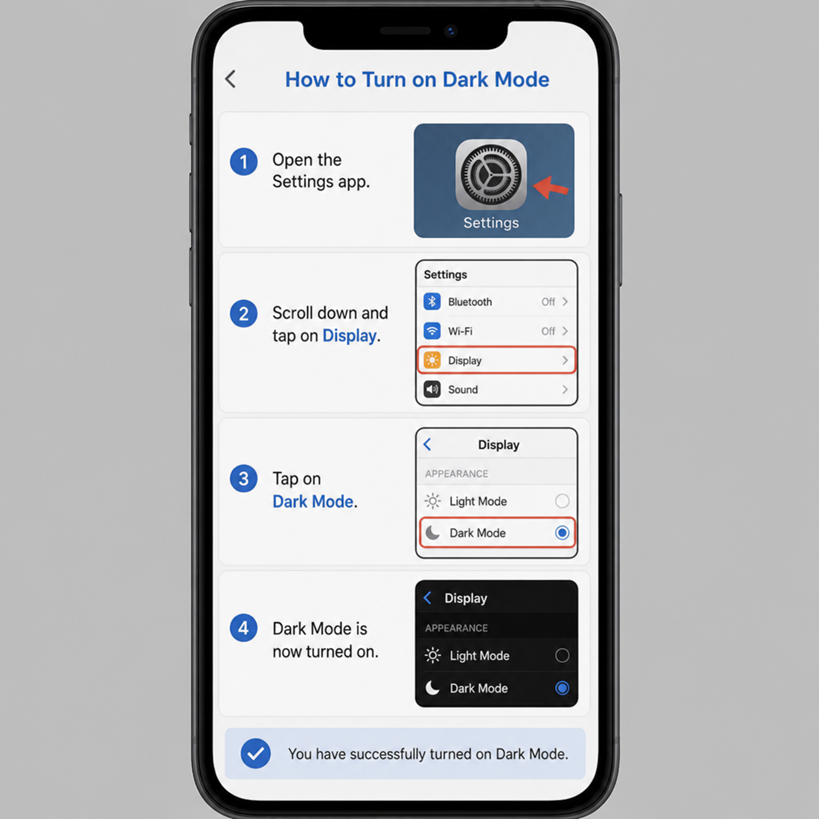
Photo posts and carousel storytelling can outperform video when the story is compelling—because swiping creates a micro-commitment and encourages completion.
Best for: personal brands, travel, behind-the-scenes, product journeys.
Make it work:
- Slide 1: a curiosity hook (“I didn’t expect this to happen…”).
- Slides 2–6: reveal the story in short chunks.
- Final slide: “Want the full breakdown? Comment ‘PART 2’.”
Caption + hashtags:
- Keep captions search-friendly (“how I planned my first pop-up shop”).
- Use a light tiktok hashtags strategy 2026 approach: 3–7 hashtags max (more in the strategy section below).
3) “Duet/Reply With Proof” (Myth-Busting With Receipts)
People love a confident claim—but they trust evidence. Replying to a comment with a quick demonstration, screenshot, or side-by-side test is one of the most reliable engagement loops.
Best for: tech, fitness, finance (careful), beauty, marketing, food science, creators addressing FAQs.
Framework:
- Show the comment for 1 second.
- Say: “Let’s test it.”
- Demonstrate in real time (or show data).
- Conclude: “Here’s what actually happened.”
Why it works as viral tiktok content:
- It triggers debate (comments).
- It earns shares (“you need to see this”).
- It boosts saves (reference value).
4) “Day-in-the-Life…But With a Twist” (A Hooked Routine)
Classic day-in-the-life videos can feel bland—unless the first line makes it specific.
Twists that work:
- “Day in the life of a ___ during the busiest week of the year”
- “Day in the life after I quit my 9–5”
- “Day in the life of a ___ on $30/day”
- “Day in the life: building this from scratch”
TikTok influencers often win here by repeating a recognizable format:
- Same opening line
- Same text style
- Same music vibe
- New daily twist
Production tip: batch film your routine and add voiceover later so it feels intentional, not random.
5) “Before/After” With a Clear Transformation (Not Just Aesthetic)
Transformation content is evergreen, but the best versions show process, not just the reveal.
Examples:
- Editing a photo/video from raw to final
- Room makeover with budget breakdown
- Skill progress (30 days of speaking practice)
- Business metrics (from 0 to first 100 customers)
TikTok analytics metrics explained for this trend:
- Track average watch time and completion rate to see if your “before” hook is strong enough.
- Track shares and saves—transformations get saved when the process is teachable.
Make it stronger:
- Put the “after” peek in the first 1–2 seconds.
- Use captions that explain the “how,” not just the “wow.”
6) “Mini Vlog + On-Screen Subtitles” (Quiet-Friendly, Scroll-Stopping)
A huge chunk of TikTok is watched without sound—so subtitles are not optional if you want consistent performance.
If you’re wondering how to add captions on TikTok, you have three solid routes:
- TikTok auto-captions (fast, but always proofread)
- Manual text overlays (best for emphasis)
- Captions made in an editor (great control for style)
How to add captions on TikTok (best practice):
- Use one to two lines max per screen.
- Highlight only key phrases (avoid full paragraphs).
- Keep captions in the “safe zone” (avoid covering UI).
This trend pairs well with relatable tiktok memes—subtle, not spammy—like “POV: you thought it would take 10 minutes.”
7) “CapCut Template Remix” (Fast Iteration Without Losing Quality)
Templates can be a shortcut—but only if your visuals are strong and your hook is clear. Many creators ask CapCut vs TikTok editor—here’s the practical answer:
CapCut vs TikTok editor (quick comparison):
- CapCut: better for templates, effects, keyframes, advanced captions, cleaner exports.
- TikTok editor: better for speed, in-app native feel, quick trims, posting workflow.
When templates are worth it:
- You’re highlighting a portfolio (photos/video snippets).
- You’re recapping a trip/event.
- You’re showcasing a product line in motion.
Don’t: rely on template-only content. Add a voiceover, text hook, or a “why this matters” caption to avoid looking generic.
8) “Hot Take / Unpopular Opinion” (But Make It Constructive)
Hot takes get views; constructive hot takes get followers.
The best structure:
- Hook: “Unpopular opinion: ____”
- Reason: “Here’s why…”
- Proof: quick example/story
- Balanced close: “If you prefer the other way, that’s fine—but try this.”
This works particularly well for niches with strong opinions: skincare, fitness, productivity, creator tools, education.
Safety tip: avoid attacking individuals; criticize ideas, not people. This keeps comments productive and protects your brand.
9) “Creator Collabs” (Stitches, Co-Hosted Lives, Shared Challenges)
Collaboration remains one of the most underrated growth levers, because it gives you:
- Fresh content angles
- Borrowed trust
- New audiences without paid ads
This is where tiktok influencers can help smaller creators and smaller creators can help each other via niche swaps.
Try:
- “I tested your method” stitch
- “We swapped routines for a week”
- “Two experts answer one question”
Tie it into tiktok challenges by turning a collab into a repeatable prompt your audience can copy.
10) “Comment-to-Content Series” (Build a Community Feedback Loop)
If you want sustainable growth, stop guessing and start answering real questions your viewers ask.
How it works:
- End each video with one specific question.
- Pin a high-quality comment.
- Reply to that comment with a new video.
- Repeat as a weekly series.
This trend is “worth the hype” because it compounds:
- More comments → more ideas → more relevant posts → better reach
It also boosts the “community” signals that often correlate with stronger distribution.
How to Apply These Trends to Your Own TikTok Videos (Without Copy-Pasting)
Vertical Video Specs for TikTok (So Your Content Looks Crisp)
Use the right vertical video specs for TikTok to avoid quality loss:
- Aspect ratio: 9:16 (full screen)
- Resolution: 1080 × 1920 recommended
- Frame rate: 30 fps (or 60 fps if your footage benefits and is consistent)
- Bitrate: keep it high on export when possible (platform will compress)
Pro tip: avoid uploading a video that has already been heavily compressed (e.g., downloaded from another app and re-uploaded multiple times).
Why TikTok Upload Blurry Fix (Common Causes + Quick Fixes)
If you’re searching why TikTok upload blurry fix, these are the most common culprits:
- Exported at low resolution (720p or less)
- Over-compression from templates or screen recordings
- Poor lighting/noisy footage (compression looks worse)
- Uploading on weak connection
- “Data Saver” or low-quality upload settings enabled
Quick fixes:
- Export at 1080 × 1920 and avoid extra compression steps.
- Upload on strong Wi‑Fi.
- Turn off Data Saver and enable high-quality uploads if available.
- Add a touch of sharpening in edit (lightly—don’t overdo).
- Improve lighting (clean footage stays crisp after compression).
TikTok Hashtags Strategy 2026 (Practical, Not Spammy)
A modern TikTok hashtags strategy 2026 should support clarity and search—not act like a lottery ticket.
Use 3–7 tiktok hashtags per post, mixing:
- Niche hashtags: #DIYHomeOffice, #MealPrepTips, etc.
- Intent/search hashtags: #HowTo, #Tutorial, #BeginnerTips
- Format hashtags: #Storytime, #BeforeAndAfter
- Brand/community tag: your custom tag (optional)
Avoid:
- Copy-pasting the same 20 tags on every post
- Only using ultra-broad tags (#fyp, #viral) with no niche context
Best Time to Post on TikTok (A Simple Way to Find Yours)
There isn’t one universal best time to post on TikTok—it depends on your audience time zone and habits.
Use this method:
- Post consistently for 14 days.
- Test 3 time windows (e.g., morning, lunch, evening).
- Compare:
- views in first hour
- average watch time
- shares/saves
- Double down on the window that wins twice.
Once you have data, your posting time becomes a repeatable advantage—not a guess.
TikTok Analytics Metrics Explained (What to Watch Per Trend)
Here are the most useful TikTok analytics metrics explained in plain terms:
- Average watch time: your pacing and hook quality.
- Completion rate: whether the story resolves cleanly.
- Rewatches: strong sign your video is dense or satisfying.
- Shares: “this is worth sending to someone.”
- Saves: “I want this later” (tutorials thrive here).
- Traffic source: helps you see if search is working.
- Profile visits/follows: whether your niche promise is clear.
Match metrics to trend:
- Micro-tutorial → saves + completion
- Storytime → watch time + completion
- Myth-bust → shares + comments
- Transformation → rewatches + saves
TikTok Copyright Music Rules (Keep Your Posts Safe)
TikTok copyright music rules can affect what audio you can use, especially for brands and monetized accounts. In general:
- Using trending sounds doesn’t automatically grant commercial rights.
- Business accounts often have access to different licensed libraries than personal accounts.
- Re-uploads and cross-posts can trigger claims more easily.
Safer workflow:
- Use TikTok’s licensed/commercial music options when applicable.
- Keep original voiceover as the “main” audio layer when possible.
- If a sound is critical, test it on a draft and confirm it stays available.
If you’re building a business presence, consider developing recognizable original audio (voice + format) so your brand isn’t dependent on any single song.
TikTok Privacy Settings for Creators (A Quick Safety Checklist)
Your content can grow while you stay in control. Review these TikTok privacy settings for creators:
- Filter keywords in comments
- Limit DMs (or require follow-back)
- Control who can duet/stitch
- Hide liked videos if desired
- Decide whether your account appears in suggestions
- Manage location and personal info visibility in your bio/content
This is especially important if you’re scaling quickly from a single viral post.
Putting It All Together: A Weekly Posting Plan Using These Trends
If you want a simple cadence:
- Mon: Micro-tutorial (trend #1)
- Tue: Comment reply / myth-bust (trend #3)
- Wed: Mini vlog with captions (trend #6)
- Thu: Before/after transformation (trend #5)
- Fri: Hot take (constructive) (trend #8)
- Weekend: Collab or photo storytime (trend #2 or #9)
- Daily: collect comments for trend #10
This mix keeps your feed varied while still “format familiar.”
Quick Takeaway: The Trends That Win Now (And Why)
The best tiktok videos in 2026 aren’t just loud—they’re clear, tight, and built for retention. If you focus on micro-tutorials, proof-based replies, captioned mini vlogs, transformations with process, and community-driven comment series, you’ll be using trends that are actually worth the hype—not just copying whatever’s on your For You page.
If you only do three things this week:
- Tighten your first 2 seconds (outcome + curiosity).
- Add clean captions (and keep them in the safe zone).
- Track watch time + saves, then repeat your top format.
That’s how you turn “viral TikTok” moments into consistent growth—without chasing every wave of tiktok memes and tiktok challenges that burns out by Friday.