AI initiatives move fast, but enterprise storage often carries the heaviest hidden friction. Before teams can train models, run inference, index documents, or connect generative AI tools to internal knowledge, they need data storage systems that can deliver performance, availability, governance, and security without forcing every team into a workaround. This landing page is built for IT, infrastructure, data, and security leaders who want a practical path from storage bottlenecks to AI-ready enterprise data management.
Is your storage ready for AI workloads?
Your storage is ready for AI only if it can move large, diverse, and frequently changing datasets to the right compute environment without slowing down teams or weakening controls. Many enterprise environments were designed for traditional applications, backup windows, file shares, and predictable growth. AI changes that pattern: data scientists need rapid access to historical data, application teams need low-latency responses, security teams need auditability, and finance teams need cost visibility across cloud storage services, network storage solutions, and on-premises platforms.
The right enterprise data storage solutions do more than add capacity. They help you classify data, reduce duplication, protect sensitive information, support hybrid workflows, and keep performance consistent when demand spikes. If your AI roadmap depends on moving data manually, copying datasets into disconnected platforms, or relaxing security rules to keep projects moving, your storage layer is already shaping what your AI program can and cannot do.
The bottlenecks that slow enterprise AI adoption
AI exposes storage weaknesses that may have been tolerable in ordinary business operations. A nightly report can survive a delay. A model training pipeline, retrieval system, or real-time analytics workflow may not. When storage becomes the constraint, teams lose time waiting for data, troubleshooting access, and duplicating information into separate environments just to keep experiments moving.
Common storage bottlenecks include:
- Fragmented data locations: Critical files, databases, archives, logs, and object stores sit across departments, clouds, and legacy systems, making it hard to find and prepare trustworthy data.
- Inconsistent performance: Some workloads need high throughput, while others require low latency. When enterprise storage solutions are not matched to workload patterns, AI pipelines slow or fail unpredictably.
- Limited network capacity: Network storage solutions can become a chokepoint when large datasets move repeatedly between storage, compute, cloud platforms, and analytics tools.
- Manual data movement: Teams often copy data into separate workspaces because direct access is difficult. This increases cost, creates version confusion, and complicates governance.
- Security and compliance gaps: AI projects can expand data access faster than controls are updated, creating risk around permissions, retention, encryption, and audit trails.
- Cloud cost sprawl: Cloud storage services are powerful, but uncontrolled data growth, repeated transfers, and poorly tiered storage can make costs harder to forecast.
- Weak metadata and classification: Without clear context around ownership, sensitivity, freshness, and lineage, teams spend more time finding data than using it.
These issues rarely appear as one dramatic failure. More often, they show up as slow onboarding, stalled pilots, duplicate platforms, unexpected invoices, and security reviews that happen too late in the process.
Build an AI-ready storage foundation
An AI-ready storage foundation connects performance, governance, security, and cost control into one operating model. It does not require replacing every system at once. It does require understanding which workloads need speed, which data needs tighter protection, which platforms should remain on premises, and where cloud storage services can add flexibility.
A practical modernization plan often starts with the data path. Where does information originate? How is it cleaned, labeled, stored, protected, accessed, archived, and reused? Mapping that path reveals where data storage systems are helping the business and where they are forcing expensive detours.
A strong foundation should support:
- Workload-aligned storage: Match storage tiers to AI use cases, from high-performance training datasets to lower-cost archives and retained source data.
- Hybrid data access: Enable teams to work across on-premises infrastructure, cloud storage services, and network storage solutions without unnecessary copying.
- Secure data storage by design: Apply permissions, encryption, retention, and monitoring before AI tools are connected to sensitive enterprise data.
- Unified visibility: Give IT and data teams a clearer view of capacity, performance, access patterns, cost drivers, and data movement.
- Governed collaboration: Help data scientists, application teams, analysts, and compliance stakeholders work from approved datasets with defined ownership.
- Scalable protection: Keep backup, recovery, immutability, and resilience aligned with the business value and sensitivity of the data.
The goal is not storage for its own sake. The goal is to give AI teams dependable access to approved data while giving the enterprise confidence that security, cost, and compliance are not being traded away for speed.
A storage readiness review turns uncertainty into priorities
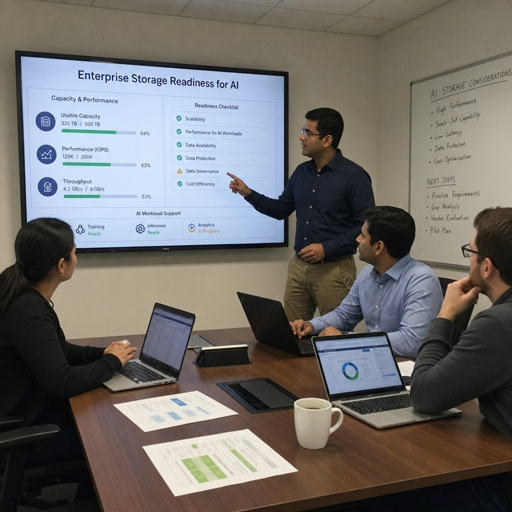
A storage readiness review gives enterprise teams a focused way to understand what is blocking AI progress and what should be fixed first. Instead of starting with a product list, the review starts with the workloads, data flows, security requirements, and operating constraints that already exist inside the business. That makes the outcome more useful than a generic infrastructure recommendation.
A well-scoped review can identify where current enterprise data storage solutions are sufficient, where configuration changes may help, and where new investment may be needed. It can also separate urgent blockers from nice-to-have improvements, which is essential when AI demand is rising faster than infrastructure budgets.
A typical review may cover:
- AI workload discovery Identify the workflows that need storage support, such as model development, analytics, document retrieval, application integration, log processing, or high-volume file access.
- Data location mapping Document where relevant data lives today, including file systems, databases, object stores, cloud repositories, backup environments, and departmental silos.
- Performance and access assessment Review throughput, latency, concurrency, data movement, and user access patterns to pinpoint where storage or network design may slow AI workloads.
- Security and governance review Examine permissions, encryption, retention, auditability, data classification, and recovery requirements so secure data storage remains central to the AI roadmap.
- Cost and capacity analysis Evaluate growth trends, tiering opportunities, duplicate datasets, cloud transfer patterns, and storage policies that influence long-term cost.
- Modernization roadmap Prioritize practical next steps across architecture, tooling, policy, migration, and operational ownership.
The result is a clearer plan for enterprise data management: what to keep, what to optimize, what to connect, and what to modernize before AI workloads scale.
Make data easier to use without making it harder to control
AI programs often create tension between speed and control. Data teams want fast access. Security teams want least-privilege permissions, traceability, and reduced exposure. Infrastructure teams want systems that are reliable, supportable, and cost-aware. A storage strategy that ignores any one of these priorities will eventually slow the business down.
Modern enterprise storage solutions should help teams use data with confidence. That means sensitive datasets are identified before they are connected to AI platforms. Access is granted through clear policies instead of one-off exceptions. Backup and recovery plans account for the importance of training data, model inputs, application data, and source repositories. Cloud storage services are governed with the same discipline as on-premises systems, so the organization does not lose visibility as projects scale.
This is especially important for teams building retrieval-augmented generation, internal copilots, analytics platforms, and AI-enabled applications. These workloads depend on accurate, accessible, and appropriately protected data. If the storage layer cannot support those requirements, even a strong AI tool can produce limited value because the information behind it is incomplete, stale, inaccessible, or risky to use.
Align storage choices with real AI use cases
Not every AI project needs the same architecture. A document search assistant, an image analysis pipeline, a forecasting model, and a real-time fraud detection workflow can place very different demands on data storage systems. The most effective storage plans begin with use cases rather than assumptions.
For example, a team building an internal knowledge assistant may need secure access to file shares, document repositories, metadata, and permission-aware indexes. In that case, the storage challenge is not only capacity; it is governance, freshness, and access control. A team training models on large media datasets may care more about throughput, parallel access, lifecycle policies, and cost-efficient tiers. A business intelligence team using AI-enhanced analytics may need dependable integration between structured databases, cloud storage services, and reporting tools.
Use case alignment helps you avoid two common mistakes: overbuilding expensive performance where it is not needed, and underbuilding critical storage paths that support business-facing AI applications. It also gives stakeholders a shared language for tradeoffs. Instead of debating storage in abstract terms, teams can discuss the data, users, risks, and outcomes attached to each workload.
Useful planning questions include:
- Which AI workloads are experimental, and which are moving toward production?
- What datasets are most valuable, sensitive, or difficult to access?
- Where are duplicate copies being created, and why?
- Which workflows require low latency, high throughput, or both?
- What retention, backup, and recovery expectations apply to AI-related data?
- How will storage costs be tracked as teams scale from pilots to ongoing operations?
- Which data owners must approve access before AI tools are deployed?
These answers shape better architecture decisions and reduce the risk of buying capacity that does not solve the real problem.
Move from reactive fixes to a scalable storage roadmap
Many enterprises begin AI storage modernization after a pain point becomes visible. A pilot slows down. A cloud bill rises. A security review blocks deployment. A data science team creates another unmanaged copy of sensitive data. Reactive fixes may solve the immediate issue, but they rarely create a repeatable model for the next workload.
A scalable roadmap connects near-term improvements with long-term architecture. Near-term work might include identifying duplicate datasets, tuning access policies, improving monitoring, or shifting less active data to more appropriate storage tiers. Longer-term work may involve modernizing network storage solutions, improving hybrid cloud integration, standardizing metadata practices, or implementing stronger enterprise data management processes.
A practical roadmap should define:
- The current state: Systems, datasets, access paths, ownership, pain points, and cost patterns.
- The desired operating model: How teams should request, access, protect, move, and retire data.
- Priority workloads: AI projects that justify immediate storage attention because they are strategic, high-risk, or close to production.
- Policy requirements: Security, compliance, retention, encryption, audit, and recovery expectations.
- Architecture decisions: Where to use on-premises storage, cloud storage services, network storage solutions, or hybrid models.
- Success indicators: Practical signs that storage is improving, such as fewer manual copies, faster access approvals, better cost visibility, and more predictable workload performance.
This approach turns storage from a background utility into an active enabler of AI delivery.
Get a clear next step for AI-ready enterprise storage
If your AI plans are growing faster than your storage strategy, now is the time to assess the foundation. The right next step is not always a major migration or a new platform. It may be a targeted review, a governance reset, a performance assessment, or a roadmap that helps every team understand what must change before AI scales.
Use this page as your starting point to evaluate enterprise data storage solutions against the realities of AI workloads. Look closely at where data lives, how it moves, who can access it, how it is protected, and what it costs to keep multiple copies alive. Then turn those findings into a prioritized plan that supports innovation without sacrificing control.
Request a storage readiness consultation to identify the bottlenecks most likely to affect your AI roadmap and define practical next steps for secure, scalable, and cost-aware enterprise storage solutions.