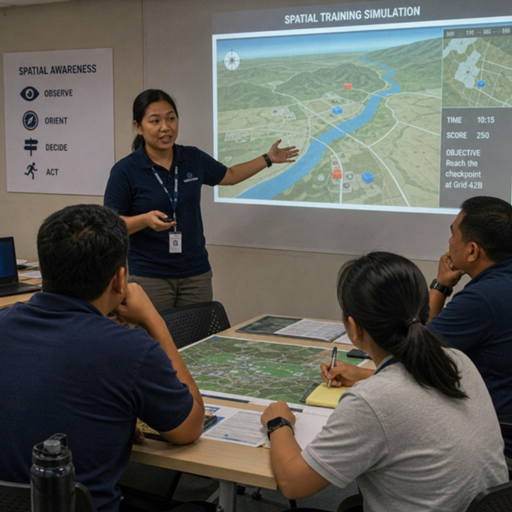
The immersive enterprise metaverse brings people, data, applications, and shared 3D environments together so teams can work beyond the limits of flat screens and fragmented tools. Spatial workspaces use immersive technology to make virtual collaboration feel more present, contextual, and interactive, whether employees are reviewing a prototype, training for a complex task, or planning across locations. For organizations building the next digital workplace, the value is not novelty; it is the ability to create immersive experiences that support clearer communication, faster understanding, and more connected work.
What is an immersive enterprise metaverse?
An immersive enterprise metaverse is a business-focused network of virtual spaces where employees, partners, customers, or trainees can meet, collaborate, visualize information, and interact with digital assets in real time. Unlike consumer-facing virtual worlds built primarily for entertainment, a virtual enterprise environment is designed around work: meetings, training, simulation, design reviews, onboarding, customer engagement, and operational planning.
At its simplest, it is a more spatial version of the digital workplace. Instead of joining another video call, a team might enter a branded virtual office, stand around a 3D model, annotate a process map, or rehearse a field scenario. Instead of reading through a static manual, a new employee might walk through an interactive environment that demonstrates how equipment, systems, or service workflows function.
The term can sound expansive, but the practical idea is straightforward: immersive enterprise metaverse environments help people understand and act on information by placing it in context. Spatial workspaces give teams a shared sense of place, scale, and sequence. That makes them especially useful when work is visual, technical, collaborative, or difficult to explain through documents alone.
Spatial workspaces turn digital work into shared context
Traditional collaboration tools are excellent for messages, documents, calendars, and video meetings. They are less effective when teams need to understand space, movement, hierarchy, or complex relationships between objects. Spatial workspaces help close that gap by letting people interact with content in a shared environment rather than simply looking at it on separate screens.
For example, a product team can gather around a life-size digital prototype and discuss design changes as if the object were in the room. A facilities team can explore a virtual layout before changes are made in the physical world. A training team can create immersive experiences that show employees what to do, where to look, and how to respond in a realistic scenario.
This matters because many business problems are not purely informational. They are experiential. People need to see the workflow, feel the sequence, understand the environment, and practice decisions. Immersive technology can make those moments easier to teach, easier to remember, and easier to repeat across distributed teams.
The core building blocks
Most enterprise metaverse solutions combine several elements, even if the final experience feels simple to the user:
- A virtual environment: This may be a digital office, training room, product showroom, simulated worksite, command center, or custom 3D space.
- Identity and presence: Users may appear as avatars, live video panels, name tags, or role-based participants depending on the experience.
- Shared content: Teams can bring in documents, dashboards, 3D models, media, spatial annotations, and business data.
- Interaction tools: Voice, gestures, pointers, whiteboards, object manipulation, screen sharing, and guided pathways help people work together.
- Device access: Some environments run on headsets, while others support desktop, mobile, or browser-based access for broader participation.
- Governance and security: Enterprise use requires access controls, data handling rules, compliance alignment, and clear ownership of virtual spaces.
The best implementations do not treat these components as isolated features. They design them around the work to be done. A training simulation, for instance, needs different interaction patterns than an executive briefing room or a virtual product showroom.
Why does immersive technology matter for the digital workplace?
Immersive technology matters because the digital workplace has become broader, more distributed, and more dependent on clear shared understanding. When people are not in the same physical space, organizations need better ways to create alignment, transfer knowledge, and build trust. Spatial workspaces add a layer of presence and context that standard collaboration tools often cannot provide.
This does not mean every meeting should become a 3D experience. In fact, one of the most important principles is restraint. Email, chat, and video are still the right tools for many tasks. Immersive experiences are most valuable when they solve a specific collaboration problem: showing scale, practicing behavior, exploring a system, creating engagement, or bringing people together around complex information.
The promise of an immersive enterprise metaverse is not to replace the digital workplace. It is to extend it. A mature approach connects spatial workspaces with existing systems so employees can move naturally between communication, documentation, data, and experience.
Practical benefits for enterprise teams
Organizations typically explore metaverse solutions because they want to improve how people learn, collaborate, and make decisions. The most useful benefits include:
- Better understanding of complex information Spatial environments help teams see relationships that are hard to describe in slides. A manufacturing process, building layout, service journey, or product architecture can become easier to understand when people can move through it.
- More engaging virtual collaboration Presence changes the tone of remote work. When participants can gather in a shared room, point to the same object, and interact with the same materials, virtual collaboration can feel less passive and more active.
- Consistent training experiences Immersive training can help organizations deliver repeatable scenarios across locations. Employees can practice procedures, customer conversations, safety routines, or decision-making steps without relying only on classroom instruction.
- Faster review cycles for visual work Teams working with physical spaces, products, or systems can evaluate ideas earlier. A spatial workspace can reveal design, usability, or workflow issues before they become more expensive to change.
- Stronger connection across distributed teams Virtual enterprise environments can support onboarding, culture-building, workshops, and events by giving people a sense of shared place, not just another link to click.
- New ways to engage customers and stakeholders Product demonstrations, executive briefings, sales enablement, and service walkthroughs can become more memorable when stakeholders experience the subject rather than simply hear about it.
The most valuable use cases begin with real work
The strongest enterprise metaverse programs do not start with a platform demo. They start with a workflow that needs improvement. The question is not “How do we use the metaverse?” but “Where would immersive experiences help people understand, decide, train, or collaborate more effectively?”
A spatial workspace should have a purpose that can be explained in one sentence. If that purpose is vague, adoption will be difficult. If it is concrete, the experience can be designed around the people, content, and outcomes that matter.
Training and simulation
Training is one of the clearest applications for immersive technology because it benefits from repetition, realism, and active participation. Employees can practice tasks in a guided virtual environment before performing them in the physical world. This is useful when training involves equipment, movement, safety awareness, customer interaction, or multi-step procedures.
A virtual training scenario can also support different learning speeds. Some employees may need to repeat a sequence. Others may need feedback on decision points. Trainers can observe, guide, and refine the experience over time based on where learners hesitate or make mistakes.
The best training experiences are not just visually impressive. They are instructionally clear. They define what the learner should know, what actions they should take, and how success will be recognized.
Design, prototyping, and product review
For design and engineering teams, spatial workspaces can make abstract decisions concrete. A 3D prototype can be reviewed at scale. Different stakeholders can gather around the same model, comment on the same details, and explore alternatives in context.
This is valuable because design conversations often suffer when each person imagines the object differently. A shared immersive environment reduces ambiguity. Teams can discuss form, flow, ergonomics, layout, or customer experience while looking at the same digital object.
Spatial review also helps non-technical stakeholders participate. People who may struggle to interpret technical drawings can still understand a virtual product or environment when they can move around it and see how it behaves.
Remote and hybrid collaboration
Many organizations have accepted hybrid work, but not every team has solved hybrid collaboration. Video meetings can keep people connected, yet they often flatten participation. Immersive enterprise metaverse environments can provide more dynamic formats for workshops, planning sessions, innovation labs, and cross-functional reviews.
A well-designed virtual collaboration space gives people places to gather, break into smaller groups, leave visual notes, return to shared materials, and build on ideas over time. It can make a remote workshop feel more like a working session and less like a sequence of presentations.
That said, spatial collaboration should be used selectively. A daily status update rarely needs a 3D room. A strategy workshop, design sprint, or complex planning session may benefit from one.
Customer demonstrations and virtual showrooms
Immersive experiences can help customers understand products, services, or environments that are difficult to communicate through brochures or slides. A virtual showroom can let stakeholders explore configurations, compare options, or visualize how a solution fits into their own context.
For business development teams, this can create a more consultative experience. Instead of simply presenting features, they can guide the customer through a scenario. The customer can ask questions while interacting with the environment, which often leads to more specific and productive conversations.
The experience must still serve the buyer’s needs. A polished virtual space is not enough if it does not answer real questions, reduce uncertainty, or help the customer make a better decision.
Operations, planning, and digital twins
Some spatial workspaces are connected to digital representations of physical environments, systems, or assets. These experiences may help teams plan changes, monitor conditions, rehearse responses, or understand dependencies. In many cases, the value comes from combining visual context with operational information.
For example, a team could use a virtual model of a facility to discuss maintenance planning, space utilization, or workflow changes. Leaders could explore scenarios before committing resources. Field teams could use spatial information to prepare for work in a specific environment.
The practical requirement is accuracy. If the virtual environment is used for planning, people must understand what is current, what is approximate, and what is only illustrative.
Immersive experiences need intentional design
An immersive enterprise metaverse succeeds when it is designed around human behavior, not just technical capability. Users should know where they are, what they can do, why they are there, and what should happen next. If the environment is confusing, slow, or overly decorative, people will return to simpler tools.
Strong immersive design balances presence with clarity. The space should feel engaging, but it should not distract from the task. Movement should be intuitive. Controls should be easy to learn. Content should be organized in a way that supports the flow of work.
Design principles that improve adoption
Use these principles when planning spatial workspaces:
- Start with the user journey. Map what participants need to do before, during, and after the experience.
- Design for the least experienced user. If someone is new to immersive technology, they still need to participate confidently.
- Keep navigation simple. Avoid unnecessary rooms, decorative complexity, or hidden controls.
- Use spatial layout to create meaning. Place related content together, separate stages clearly, and use scale intentionally.
- Make collaboration visible. Participants should see who is present, what others are pointing at, and what has changed.
- Support multiple access levels. Not every user will have the same device, bandwidth, comfort level, or physical environment.
- Include facilitation. Many immersive meetings and workshops work best when someone guides the flow and helps participants use the space.
- Plan for follow-through. Notes, decisions, recordings, outputs, or next steps should connect back to the broader digital workplace.
These principles are simple, but they prevent many common failures. Enterprise users do not adopt tools because they are futuristic. They adopt them because they make work easier, clearer, or more effective.
How do teams choose the right metaverse solutions?
Teams should choose metaverse solutions by matching platform capabilities to business use cases, user needs, security requirements, and integration expectations. The right solution is not necessarily the most visually advanced one; it is the one that supports the work, fits the organization’s environment, and can be adopted without creating unnecessary friction.
A useful selection process begins with a defined scenario. For example, “We need to train service employees on a multi-step procedure,” or “We need customers to explore a complex product configuration remotely.” From there, teams can evaluate which capabilities are essential and which are optional.
Evaluation criteria for enterprise buyers
When comparing options, consider the following:
- Use-case fit Does the platform support the specific type of experience you need, such as training, collaboration, visualization, events, or customer engagement?
- Ease of access Can users join through the devices they already have, or does the experience require specialized hardware? If headsets are required, how will they be deployed and supported?
- Content flexibility Can the environment use your existing 3D models, documents, brand assets, media, and business data? How difficult is it to update content?
- Collaboration features Does the solution support voice, presence, annotation, shared objects, breakout areas, facilitation tools, and persistent workspaces?
- Security and governance Can access be controlled by role or group? How are data, recordings, user identities, and shared assets managed?
- Integration with the digital workplace Does the solution connect with existing identity systems, calendars, learning platforms, file storage, analytics, or collaboration tools where appropriate?
- Scalability and performance Can the environment support the expected number of users and complexity of content? Does it perform reliably across locations and networks?
- Administrative control Can teams manage users, spaces, permissions, templates, and content without relying on technical specialists for every change?
- Measurement and feedback Can the organization understand usage, completion, engagement, or outcomes in a way that supports improvement?
- Long-term maintainability Who will update the experience, manage assets, support users, and decide when the environment should evolve?
The goal is to avoid buying a platform before defining the operating model. Immersive technology becomes more valuable when it is treated as a capability, not a one-time experiment.
Implementation should begin small and scale with evidence
A successful immersive enterprise metaverse program usually starts with a focused pilot. The pilot should be meaningful enough to prove value, but contained enough to manage risk. It should involve real users, real content, and a real workflow rather than a purely promotional demonstration.
The pilot stage is where teams learn what users understand quickly, where they struggle, what content needs refinement, and how the experience fits into daily work. It is also where organizations discover operational requirements, such as device management, facilitation, support, accessibility, and governance.
A practical rollout path
A staged approach helps organizations move from exploration to adoption:
- Define the business problem Identify a workflow where spatial context could improve understanding, training, collaboration, or decision-making.
- Select a narrow use case Choose one audience, one environment, and one measurable objective. Avoid trying to build the full virtual enterprise at once.
- Map the experience Outline what users do before they enter, what happens inside the workspace, and what outputs are needed afterward.
- Create the minimum useful environment Build only what is needed to support the goal. Add complexity later if users need it.
- Test with real participants Observe how people navigate, collaborate, ask questions, and complete tasks. Capture friction honestly.
- Refine the content and facilitation model Improve instructions, navigation, timing, assets, and support materials based on feedback.
- Connect to existing systems Link the experience to learning records, collaboration channels, documentation, or workflow tools where useful.
- Scale by repeatable templates Once a format works, turn it into a reusable workspace, training pattern, or event model.
- Establish governance Define ownership, access rules, content update cycles, data handling, and support responsibilities.
- Measure and improve over time Treat the immersive environment as a living part of the digital workplace, not a finished artifact.
This approach keeps ambition grounded. It allows teams to demonstrate value while learning what the organization actually needs from immersive experiences.
Governance, security, and accessibility cannot be afterthoughts
Enterprise adoption depends on trust. If an immersive environment handles sensitive information, hosts internal meetings, trains employees, or represents the brand to customers, it needs governance from the beginning. The more connected the environment becomes, the more important these controls are.
Security questions should be addressed early. Who can enter a workspace? What content can be uploaded? Can sessions be recorded? Where is data stored? How are external guests managed? These questions are not barriers to innovation; they are what make innovation usable in an enterprise setting.
Accessibility also deserves careful attention. Immersive technology can create powerful new experiences, but it can also exclude people if design choices are too narrow. Not every user can or wants to wear a headset. Some may need keyboard navigation, captions, screen-based access, comfort settings, or alternative ways to participate.
Governance checklist
Before scaling a spatial workspace, teams should clarify:
- Who owns the environment and approves changes.
- Which users, partners, or customers can access each space.
- What information is allowed inside the environment.
- How identity, authentication, and permissions are handled.
- Whether sessions can be recorded, exported, or analyzed.
- How content is reviewed, updated, archived, or removed.
- What support is available before and during immersive sessions.
- How accessibility and device alternatives are provided.
- What standards apply to brand representation and user conduct.
- How feedback, incidents, and improvement requests are managed.
These decisions help prevent the immersive enterprise metaverse from becoming a collection of disconnected experiments. They also give business teams confidence that spatial workspaces can be used responsibly.
Measurement connects immersive work to business value
Immersive experiences should be evaluated by how well they support the intended outcome. Visual appeal matters, but it is not the same as impact. A beautiful virtual environment that does not improve understanding, participation, training, or decision-making is unlikely to earn lasting support.
Measurement should be planned before the experience is launched. The right metrics depend on the use case. A training simulation may focus on completion, confidence, assessment results, or observed performance. A collaboration workspace may focus on participation, decision quality, time to alignment, or stakeholder feedback. A customer showroom may focus on engagement, qualified conversations, or progression to the next step.
Useful signals to track
Teams can combine quantitative and qualitative signals, such as:
- Participation and return usage.
- Completion of guided activities.
- Time spent in key areas or scenarios.
- Questions asked during the experience.
- Feedback from participants and facilitators.
- Quality of decisions, outputs, or next steps.
- Reduction in confusion around a process or product.
- Content areas that need revision.
- Technical issues that affect participation.
- Evidence that the experience fits naturally into the broader workflow.
The point is not to over-measure every interaction. The point is to learn whether immersive technology is helping people do something better than existing tools alone.
Common mistakes to avoid
The most common mistake is leading with spectacle instead of usefulness. A virtual space can impress people once, but work tools must prove their value repeatedly. If the environment is difficult to enter, hard to navigate, or disconnected from real tasks, users will not make it part of their routine.
Another mistake is assuming immersion automatically creates engagement. Engagement comes from relevance, clarity, interaction, and good facilitation. A passive presentation in a 3D room is still passive. The experience should give participants a reason to explore, contribute, practice, or decide.
Organizations should also avoid building too broadly too soon. A large virtual campus may sound appealing, but a focused training room, design review space, or customer demonstration can create clearer value. Start with a use case that has a defined audience and a visible outcome.
Red flags in early planning
Watch for warning signs such as:
- The project goal is described mainly as “being in the metaverse.”
- No one can explain why a spatial workspace is better than a video call or web page.
- The experience depends on hardware the target audience cannot easily access.
- Content updates require too much technical effort.
- Security, privacy, and accessibility are postponed until after launch.
- Success is measured only by attendance or visual reactions.
- The environment has many features but no clear user journey.
- There is no owner responsible for maintenance after the first event.
These issues can be corrected, but they are easier to address before development begins.
The future of virtual enterprise work is blended
The future digital workplace will likely be a blend of familiar tools and more immersive spaces. Employees will still use documents, chat, dashboards, and video. But when work calls for shared context, simulation, presence, or spatial understanding, immersive enterprise metaverse environments can become a practical extension of the workplace.
The organizations that benefit most will be the ones that treat immersive technology as part of a larger collaboration strategy. They will connect it to learning, design, operations, sales, and employee experience. They will also make thoughtful choices about when not to use it.
That balance is important. The goal is not to make every interaction immersive. The goal is to give people the right environment for the task. Sometimes that is a quick message. Sometimes it is a spreadsheet. Sometimes it is a spatial workspace where people can step inside an idea and work on it together.
Building a more immersive digital workplace
An immersive enterprise metaverse can make digital work more human, visual, and interactive when it is designed with purpose. Spatial workspaces help teams move beyond flat communication and into shared environments where they can learn, explore, plan, and collaborate with greater context.
For leaders evaluating metaverse solutions, the best next step is to choose one meaningful workflow and design a focused experience around it. Start with the people, the task, and the outcome. Then use immersive technology to support what the work actually requires.
When approached this way, immersive experiences become more than an emerging trend. They become a practical layer of the virtual enterprise: a way to bring distributed teams together, make complex information easier to understand, and build a digital workplace that feels less fragmented and more connected.