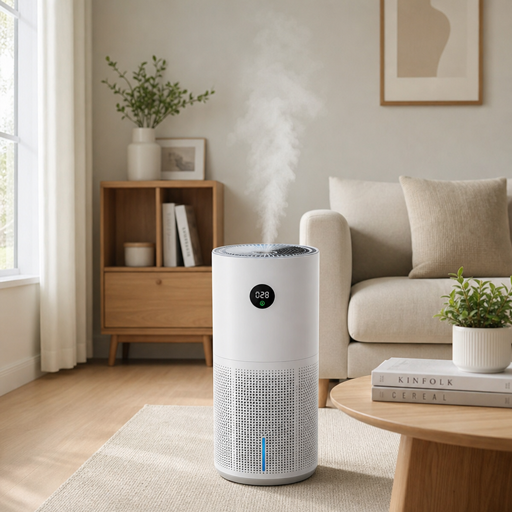
Smart air quality purifiers with integrated humidification combine two everyday comfort goals in one device: cleaner indoor air and better moisture balance. For homes where dry air, dust, pollen, pet dander, odors, or stale rooms are recurring issues, these hybrid air quality devices can simplify the routine by filtering airborne particles while helping the room feel less dry. The best approach is not just choosing a feature-packed unit, but understanding which functions actually support healthier, more comfortable indoor air quality.
What should a smart purifier-humidifier actually do?
A smart purifier-humidifier should clean the air, add moisture when needed, monitor conditions, and make those actions easy to control. At a practical level, that means it should use reliable air purification technology, include sensors or air quality monitors, offer clear humidity controls, and provide app or voice-enabled convenience without making maintenance harder. The goal is a balanced room environment, not just another connected appliance.
Here are the features, buying considerations, and everyday habits that matter most when comparing smart air purifiers with integrated humidification.
1. Dual-function design saves space and simplifies routines
The biggest appeal of a purifier-humidifier combination is convenience. Instead of running separate home air purifiers and standalone humidifiers, one device can manage two common indoor comfort concerns from the same footprint. This is especially useful in bedrooms, apartments, nurseries, home offices, and shared living spaces where floor space is limited.
A dual-function unit also reduces the mental load of managing indoor air quality. You do not have to check one machine for filter life, another for water level, and another for room conditions. When the system is designed well, you can see air quality, humidity, mode, fan speed, and maintenance alerts from one control panel or app.
That said, “two-in-one” should not mean compromising on either function. A strong model should have enough airflow to circulate the room and enough humidification capacity to maintain a comfortable moisture range. If one side of the machine is weak, the convenience benefit quickly fades.
When reviewing a device, look for:
- A clear recommended room size
- Separate settings for purification and humidification
- Easy access to both the filter and water tank
- Automatic shutoff when the tank is empty
- Visible air quality and humidity readings
- Maintenance alerts that are specific, not vague
The best smart air quality purifiers are useful because they make healthy routines easier to keep. A compact design is helpful, but only if the device can still perform reliably in the room where you plan to use it.
2. Air quality sensors help the device respond automatically
Smart air purifiers are most valuable when they can react to changing room conditions. Built-in sensors can detect changes in airborne particles and adjust fan speed automatically, so the device does not rely only on fixed schedules. This matters because indoor air can shift throughout the day as people cook, clean, open windows, burn candles, bring in outdoor pollen, or move pet hair through the room.
Air quality monitors are also useful for awareness. A display or app reading can help you see how daily habits affect the air in your home. For example, you may notice that air quality drops after frying food, vacuuming, using certain sprays, or letting outdoor air in during high-pollen conditions.
Not every sensor package is equal, so it is worth checking what the device actually measures. Some air quality devices focus on particle levels, while others may include additional readings such as humidity or temperature. For a purifier-humidifier, humidity sensing is particularly important because the machine needs to know when to add moisture and when to stop.
A practical sensor setup should offer:
- Real-time air quality feedback
- Humidity readings
- Auto mode based on air conditions
- Clear color indicators or simple numeric displays
- App history or trend views, if available
The main benefit is not simply having more data. The benefit is having information you can act on, with automation that responds before the room feels uncomfortable.
3. Humidity control should be precise, not constant
Integrated humidification works best when the device aims for balance. Too little humidity can make a room feel dry and uncomfortable, especially during colder months or in heavily air-conditioned spaces. Too much humidity can make a room feel damp and may create conditions that are not ideal for comfort or cleanliness.
That is why precise humidity control matters. A smart unit should let you set a target humidity level or choose an automatic mode that maintains a comfortable range. It should not simply release moisture continuously until the tank is empty.
Good humidity management also protects the rest of the device. Because a purifier-humidifier combines water handling with air movement and filtration, the system should be designed to keep moisture controlled and directed appropriately. Clear instructions for cleaning, refilling, and replacing any humidification components are essential.
Before choosing a model, ask:
- Can I set a target humidity level?
- Does the device stop humidifying when the target is reached?
- Is the water tank easy to remove, fill, and clean?
- Are there washable or replaceable humidification parts?
- Does the app show current humidity?
- Can purification run without humidification?
The last point is important. You may want purification all year, but humidification only during dry periods. Flexible controls prevent the device from solving one problem while creating another.
4. Filtration quality is the core of cleaner indoor air
Smart features can make a purifier easier to use, but the filter is still the heart of the machine. When comparing home air purifiers, pay close attention to the type of filtration used and what the filter is meant to capture. Many devices use layered filtration, often including a pre-filter for larger debris, a particle filter for fine airborne matter, and an activated carbon layer for certain odors.
The pre-filter is especially useful in homes with pets, fabric furniture, rugs, or high dust levels. It helps capture larger particles before they reach the main filter, which may support better long-term performance. If the pre-filter is washable or easy to vacuum, maintenance becomes simpler.
A particle filter is the main line of defense against small airborne particles such as dust, pollen, and some dander. Activated carbon can help reduce common household odors from cooking, pets, smoke residue, or musty air, depending on the amount and quality of carbon used.
For a purifier-humidifier, filtration also needs to work well alongside moisture control. Air should move efficiently through the filter without the humidification system making the filter damp or difficult to maintain.
Useful filtration features include:
- A removable pre-filter for lint, hair, and larger dust
- A high-quality particle filter suited to the room size
- Activated carbon for odor support
- Filter-life tracking based on use
- Easy replacement access
- Clear instructions for what can and cannot be washed
A device can look sleek and offer advanced app controls, but if filtration is weak, it will not deliver the main benefit people expect from smart air quality purifiers.
5. Room size matching determines real-world performance
One of the most common mistakes when buying air quality devices is choosing a unit that is too small for the room. A purifier-humidifier needs enough airflow to circulate air through the filter and enough humidification output to affect the space. If the room is too large, the machine may run constantly without making a meaningful difference.
Room size guidance is usually provided by the manufacturer, but the way you use the space matters too. A bedroom with closed doors may be easier to manage than an open-plan living area connected to a kitchen and hallway. High ceilings, frequent door opening, large windows, and strong drafts can also affect performance.
For best results, match the device to the actual area where it will operate most often. If you plan to move it between rooms, size it for the largest room where you expect consistent use. A slightly stronger unit running at a lower fan speed may be more comfortable than an undersized unit running loudly at full power.
A quick room-fit checklist:
- Measure or estimate the square footage of the room.
- Consider ceiling height, open doorways, and connected spaces.
- Check the purifier’s recommended room coverage.
- Confirm the humidification capacity is also suitable.
- Think about noise needs for sleep, work, or media rooms.
- Leave enough clearance around the air intake and outlet.
Placement matters as much as sizing. Even capable smart air purifiers will underperform if they are wedged behind furniture, blocked by curtains, or placed where airflow cannot circulate.
6. Smart controls make clean air easier to maintain
Smart controls are not just a luxury feature. They help people use the device more consistently, which is often the difference between owning an air purifier and actually benefiting from it. App controls, schedules, air quality alerts, and remote adjustments make it easier to manage indoor air quality around real life.
For example, you might schedule the purifier to run before bedtime, increase fan speed during cooking, or lower noise while working from home. If the app includes air quality monitors or humidity history, you can also see patterns and adjust habits accordingly.
Voice control can be helpful when the device is in a bedroom or living room and you do not want to open an app. However, the basics still matter more than novelty. Controls should be simple, stable, and easy for everyone in the household to understand.
Helpful smart features include:
- App-based power, mode, fan, and humidity control
- Air quality and humidity notifications
- Scheduling by time of day
- Auto mode for sensor-based adjustments
- Child lock or control lock
- Voice assistant compatibility, if desired
- Filter and cleaning reminders
The best smart air quality purifiers do not require constant attention. They quietly automate routine decisions while still giving you manual control when conditions change.
7. Cleaning access affects long-term satisfaction
A purifier-humidifier can only perform well if it is maintained. Because these devices include water tanks and filters, cleaning access should be treated as a major buying factor rather than an afterthought. A beautiful device that is frustrating to clean may not stay in regular use.
Water tanks should be easy to remove, carry, fill, empty, and dry. Openings should be large enough to clean without special tools whenever possible. If the humidification system includes a wick, pad, disc, tray, or other component, the replacement or cleaning process should be clearly explained.
Filter access should also be straightforward. If replacing the filter requires turning the device upside down, removing several panels, or guessing which part locks where, maintenance becomes less likely to happen on time. Simple design supports better air purification technology because the system stays clean and unobstructed.
Look for maintenance-friendly details such as:
- Wide tank openings
- Detachable water components
- Smooth surfaces that are easy to wipe
- Clear filter replacement steps
- Washable pre-filter access
- App reminders for filter and water-system care
- Parts that dry fully between uses
Ongoing care is part of owning any device that moves air and water. Choosing a model that respects your time makes that care much easier.
8. Separate operating modes add year-round flexibility
The best hybrid units allow purification and humidification to operate independently. This is important because indoor air quality needs change throughout the year. You may want air purification daily, especially if dust, pollen, pet dander, or odors are ongoing concerns, but you may only need humidification during dry seasons.
Separate modes also help in climates where humidity varies sharply. On a rainy or humid day, you may want the purifier running without adding more moisture. During winter heating season, you may want both functions working together. In a bedroom, you may prefer a quiet sleep mode that still monitors air quality without over-humidifying the space.
Flexible mode options can include:
- Purification only
- Humidification only, if supported
- Combined purification and humidification
- Auto air quality mode
- Auto humidity mode
- Sleep mode
- Turbo or high-speed mode
- Quiet manual fan settings
This level of control helps the device feel useful beyond one season. It also prevents the common problem of using a humidifier when the room does not need moisture simply because it is built into the same machine.
9. Noise levels matter in bedrooms and workspaces
Airflow creates sound, and sound tolerance depends on the room. A higher fan speed may be acceptable in a kitchen after cooking, but not beside a bed at 2 a.m. If you plan to use a purifier-humidifier in a bedroom, nursery, office, or meditation space, noise should be one of your main evaluation points.
Smart air purifiers often include sleep modes or quiet modes that dim lights and reduce fan speed. This can be helpful, but make sure the quieter mode still supports your needs. A very low fan speed may be comfortable, but it may also circulate less air. The best balance depends on whether you need gentle maintenance or stronger purification after a trigger event.
Consider how sound interacts with automation. If auto mode frequently jumps from low to high speed at night, it may disturb sleep. Some devices allow you to limit fan speed during certain hours or create schedules that prioritize quiet operation.
For noise-sensitive rooms, prioritize:
- A dedicated sleep mode
- Dimmable or turn-off display lights
- Multiple fan speeds
- Smooth speed transitions
- App scheduling for quiet hours
- A size appropriate for the room, so it does not constantly run at maximum
Comfort is more than air readings. If a device is too loud to use regularly, it will not support better indoor air quality in daily life.
10. Water quality and refill habits shape the humidification experience
Humidification adds another layer of responsibility because the device uses water. The quality of the water, the frequency of refilling, and the design of the tank all affect how pleasant the machine is to live with. A small tank may be fine for occasional use, while daily humidification in a dry room may require a larger, easier-to-carry tank.
Some users may also need to think about mineral buildup, especially in areas with hard water. Depending on the device design, manufacturers may recommend certain water types, cleaning routines, or replacement parts. Following those instructions helps protect the machine and keeps humidification working as intended.
A practical refill routine should feel simple:
- Check the app or tank indicator before the room feels dry.
- Refill with the water type recommended by the manufacturer.
- Avoid overfilling past the marked line.
- Empty stale water if the device has been sitting unused.
- Let parts dry during longer breaks from humidification.
- Clean on the schedule recommended for the model.
Integrated humidification is convenient only when the water system is easy to manage. If refilling feels messy or cleaning is unclear, the feature may go unused.
11. Airflow direction influences comfort and coverage
Air purification depends on circulation. A device needs to pull room air in, pass it through filtration, and send cleaner air back into the space. If the air outlet blows directly at your face, desk, bed, or plants, it may feel uncomfortable. If the intake is blocked, performance may drop.
The best placement usually allows air to move freely around the unit. Corners can work in some rooms, but a cramped corner behind furniture is rarely ideal. Keep the device away from curtains, bedding, walls, and objects that could restrict airflow.
Humidification also benefits from thoughtful placement. Moist air should disperse into the room rather than collect on nearby surfaces. Avoid placing the unit where mist or humidified airflow could concentrate against wood furniture, electronics, paper, or fabric.
Placement tips include:
- Keep clearance around intakes and outlets.
- Place the unit in the room where you spend the most time.
- Avoid blocking sensors with furniture or walls.
- Keep it away from direct heat sources.
- Do not aim humidified airflow at delicate surfaces.
- Close doors when you want stronger room-specific performance.
A well-placed midrange device can often feel more effective than a poorly placed premium one. Air needs a path to move.
12. Display design should make data understandable
Air quality data is only helpful if it is easy to interpret. Many air quality devices use color-coded indicators, numeric readings, app graphs, or icons to show current conditions. A clear display helps you quickly understand whether the room is stable, improving, or needs attention.
For most households, simplicity is better than overwhelming detail. You should be able to glance at the device and know whether the air quality is good, whether humidity is in the desired range, and whether the filter or tank needs attention. More detailed app data can be useful, but the device itself should still communicate the basics.
A useful display may show:
- Current air quality status
- Current humidity level
- Target humidity setting
- Fan speed or operating mode
- Filter status
- Water level or empty-tank alert
- Wi-Fi or app connection status
If the purifier will sit in a bedroom, make sure the display can dim or turn off. Bright screens and status lights can become annoying at night, even when the device is otherwise quiet.
13. Maintenance alerts prevent performance drift
Filters slowly load with captured particles. Water components need cleaning. Tanks need refilling. Without reminders, it is easy for performance to decline gradually while the device still appears to be running.
Smart alerts help prevent that drift. A good system should tell you when to replace the filter, clean the humidification parts, refill the tank, or address a blocked intake. The more specific the alert, the more useful it is.
Be cautious with devices that rely only on a simple timer for every reminder. Usage-based alerts may be more helpful because filter life can vary depending on fan speed, air quality, dust levels, and how often the device runs. Even with smart tracking, you should still visually inspect filters and water components as part of routine care.
A simple maintenance rhythm can include:
- Check the water tank daily during heavy humidification use.
- Rinse or clean water-contact parts as instructed.
- Vacuum or wash the pre-filter if the model allows it.
- Replace the main filter when indicated.
- Wipe exterior vents and sensors gently.
- Review app alerts instead of dismissing them automatically.
Maintenance is not a drawback; it is how the device keeps doing its job. Smart reminders make the process less dependent on memory.
14. App privacy and connectivity deserve attention
Because smart air purifiers connect to apps, Wi-Fi networks, and sometimes voice assistants, privacy and reliability should be part of the decision. You do not need to become a cybersecurity expert, but you should understand what the app requires and whether the device remains useful without constant connectivity.
A strong app experience should make setup simple, provide useful controls, and avoid unnecessary friction. It should also offer account settings, firmware updates, and clear explanations of permissions. If multiple household members need access, shared control should be easy to manage.
Before connecting any smart home product, review:
- What permissions the app requests
- Whether remote control is optional
- Whether the device works manually if Wi-Fi is down
- How firmware updates are handled
- Whether multiple users can control the unit
- Whether voice assistant integration is necessary for your use
Connectivity should support convenience, not create dependency. A smart purifier-humidifier should still perform its core functions from the device controls.
15. Energy use depends on automation and fan habits
Purifier-humidifier units may run for long periods, so energy use matters. Actual consumption depends on the model, fan speed, humidification method, room conditions, and how often the device operates. While exact energy details should come from the product information, your daily habits can also influence efficiency.
Auto modes may help by increasing fan speed only when needed and reducing output when conditions stabilize. Schedules can prevent unnecessary operation in rooms that are empty for much of the day. Correct sizing also helps, because an undersized unit may run at high speed more often.
Ways to support efficient use include:
- Use auto mode when sensors are reliable.
- Close doors in the target room during operation.
- Keep filters clean so airflow is not restricted.
- Avoid over-humidifying beyond the target level.
- Use schedules for predictable routines.
- Choose a unit sized appropriately for the space.
Energy efficiency is not just about the label on the box. It is also about giving the device a realistic job and maintaining it well.
16. Odor control requires the right expectations
Many people look to air purification technology for odor reduction, especially in homes with cooking smells, pets, smoke residue, trash areas, or musty rooms. Activated carbon or similar odor-focused filtration can help, but expectations should be realistic. A purifier can reduce certain airborne odor compounds, but it cannot replace cleaning, ventilation, moisture control, or removing the source of the odor.
For example, a purifier may help after cooking, but it will not clean grease from surfaces. It may reduce pet odors in the air, but it will not replace washing bedding, cleaning litter areas, or grooming pets. It may improve a stale room, but persistent damp smells should prompt a closer look at moisture sources.
Use odor control as part of a larger strategy:
- Remove or clean the source of the smell.
- Use the purifier in the room where the odor starts.
- Run a higher fan speed during and shortly after odor-producing activities.
- Replace carbon filters as recommended.
- Manage humidity to avoid damp, stale air.
- Ventilate when outdoor conditions are suitable.
Odor performance depends heavily on filter design and maintenance. If odor reduction is a major priority, do not choose a device based on particle filtration alone.
17. Allergy-season support works best with prevention habits
Smart air purifiers can be helpful during pollen season, especially when paired with simple household habits. The device can filter airborne particles inside the room, while your routine can reduce how much outdoor material enters in the first place. This combination is often more effective than relying on a purifier alone.
Place the purifier-humidifier in the bedroom if nighttime comfort is the priority. Keep windows closed during high-pollen periods if that works for your home, and change clothes or rinse hair after long outdoor exposure when pollen is a concern. Vacuuming with appropriate equipment and washing bedding can also reduce particle buildup.
A practical allergy-season routine:
- Run the purifier before bedtime.
- Keep bedroom doors closed when possible.
- Avoid placing worn outdoor clothing on the bed.
- Clean floors and soft surfaces regularly.
- Monitor humidity so the room does not become too dry or too damp.
- Use app trends to identify when indoor air worsens.
The device supports the room environment, but habits control the load placed on it. Cleaner inputs make cleaner indoor air easier to maintain.
18. Pet households benefit from pre-filtration and steady airflow
Homes with pets often deal with hair, dander, dust, and odor all at once. A purifier-humidifier can help manage airborne particles and comfort, but pet households should pay special attention to pre-filter access. Hair and larger debris can collect quickly, and a clogged intake reduces performance.
Steady airflow is also useful. Instead of waiting until the room feels dusty or smells stale, running the device on an automatic or low continuous setting may help maintain more stable air. During grooming, litter cleaning, or vacuuming, a temporary higher speed can help capture particles stirred into the air.
Pet-friendly features to prioritize:
- Easy-to-clean pre-filter
- Strong intake design that resists quick clogging
- Odor-support filtration
- Quiet low-speed operation for daily use
- App reminders for more frequent maintenance
- Stable base and pet-safe placement options
Placement is especially important with curious animals. Keep cords managed, avoid locations where the unit can be knocked over, and make sure pets cannot access the water tank.
19. Bedroom use calls for comfort-first features
Bedrooms are one of the most common places to use home air purifiers because people spend many hours there. A purifier-humidifier can support a more comfortable sleep environment by filtering airborne particles and balancing dry air. However, bedroom use requires careful attention to noise, light, controls, and placement.
A good bedroom device should run quietly at night, offer a dim or dark display, and maintain humidity without frequent refills. It should also be easy to check in the morning, so you can refill the tank or review air quality changes without disrupting your routine.
For bedroom comfort, look for:
- Sleep mode with low noise
- Display dimming or lights-off setting
- Automatic humidity target
- Gentle airflow direction
- Reliable tank capacity for overnight use
- App control from bed
- Filter alerts that do not beep loudly at night
The right bedroom setup should fade into the background. You should notice the comfort more than the machine.
20. Open-plan living spaces need stronger planning
Open-plan spaces are harder to manage than enclosed rooms. Air moves into connected areas, cooking particles travel farther, and humidity may disperse unevenly. A single purifier-humidifier can still help, but expectations should match the layout.
If your living room connects to a kitchen, dining area, hallway, or staircase, room coverage becomes more complicated. You may need a larger device, more strategic placement, or more than one unit for consistent results. In some homes, a purifier near the main activity area and another in the bedroom may be more practical than expecting one device to serve the entire home.
For open-plan use:
- Choose a unit rated for the realistic connected area.
- Place it near common particle sources without blocking airflow.
- Use higher fan speeds during cooking or gatherings.
- Avoid over-humidifying one corner of the room.
- Monitor humidity in the broader space, not just beside the unit.
- Consider separate devices for distant zones.
Smart controls can be especially helpful in open areas because conditions change quickly. App alerts and auto mode help the device respond when activity increases.
How do you choose between smart air quality purifiers?
Choose by matching the device to your room, routine, and main air concerns rather than focusing only on smart features. Start with room size, filtration quality, humidity control, maintenance access, and noise level, then compare app controls and extra features after the essentials are covered. A good device should fit naturally into how you live, because consistent use is what improves day-to-day indoor air quality.
Use this buying checklist to narrow your options:
- Primary room: Decide where the unit will be used most often.
- Main concern: Identify whether dust, pollen, pets, odors, dry air, or general comfort matters most.
- Room coverage: Match both purification and humidification capacity to the space.
- Filter setup: Look for particle filtration, pre-filtration, and odor support if needed.
- Humidity control: Choose a model with target humidity or automatic shutoff.
- Cleaning routine: Check whether the tank, tray, filter, and pre-filter are easy to access.
- Noise comfort: Prioritize quiet operation for bedrooms and work areas.
- Smart features: Confirm the app, schedules, alerts, and controls are actually useful.
- Manual backup: Make sure basic functions work without the app.
- Long-term upkeep: Consider replacement filters, water-system parts, and cleaning time.
The right choice is rarely the one with the longest feature list. It is the one that solves your most common indoor air problems with the least daily friction.
Simple habits make the device work better
Even the best smart air purifiers perform better when the home environment supports them. Air cleaning is not a one-time action; it is an ongoing system of filtration, source control, cleaning, ventilation, and moisture balance. The device can do a lot, but it should not be expected to overcome avoidable indoor pollution sources by itself.
Make the most of your purifier-humidifier with these habits:
- Run it consistently in the right room. Intermittent use can help during specific events, but regular operation is better for maintaining stable conditions.
- Keep doors and windows managed. Outdoor air can be helpful or harmful depending on local conditions, pollen, smoke, humidity, and temperature.
- Control sources first. Clean dust, manage pet areas, reduce unnecessary sprays, and address damp smells at the source.
- Maintain filters and water parts. A dirty filter or neglected tank undermines performance.
- Use auto mode thoughtfully. Let sensors respond, but override settings when cooking, cleaning, or sleeping requires a different mode.
- Watch humidity trends. Comfort improves when moisture stays balanced rather than swinging between too dry and too damp.
- Give the device clear airflow. Do not hide it behind furniture and expect strong circulation.
These habits are simple, but they help turn air quality devices from passive appliances into active parts of a healthier home routine.
Common mistakes to avoid
A purifier-humidifier is easy to use, but a few mistakes can reduce its value. Avoiding these issues helps protect performance and keeps the device easier to live with over time.
Watch out for:
- Buying for the wrong room size. An undersized unit may run constantly and still feel ineffective.
- Ignoring humidity limits. More moisture is not always better; target control matters.
- Skipping filter changes. A loaded filter restricts airflow and reduces cleaning performance.
- Forgetting the water tank. Stale water and neglected parts can create maintenance problems.
- Blocking sensors or vents. Poor placement can confuse readings and weaken airflow.
- Expecting odor removal without source control. Filters help, but cleaning and ventilation still matter.
- Choosing smart features over core performance. App controls cannot make up for weak filtration or poor humidification design.
- Using one device for every room. Air cleaning is most effective in the space where the device is running.
These mistakes are common because hybrid devices promise convenience. The solution is to treat the unit as a system that needs the right size, placement, settings, and care.
A smart purifier-humidifier is best for balanced comfort
Smart air quality purifiers with integrated humidification are ideal for people who want a cleaner, more comfortable room environment without managing multiple appliances. They are especially useful in bedrooms, home offices, pet areas, and living spaces where airborne particles and dry air are both concerns. When chosen well, they combine air purification technology, humidity control, and connected convenience in a way that supports daily routines.
Focus first on essentials: filtration, room fit, humidity accuracy, easy cleaning, quiet operation, and useful air quality monitors. Then consider app controls, voice features, schedules, and design details. A smart purifier-humidifier should not demand constant attention; it should make better indoor air quality easier to maintain every day.