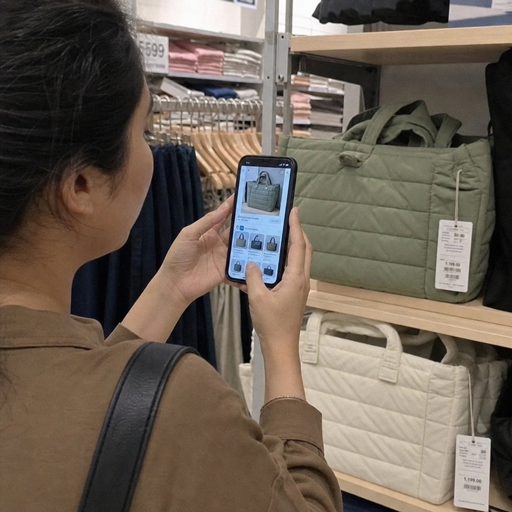
Shoppers do not always know the right words for what they want. AI visual search helps retail apps turn photos, screenshots, and camera inputs into relevant product results, creating a faster and more intuitive path from inspiration to purchase. For retailers, it is both a customer experience feature and a data-rich retail AI solution that can improve discovery, merchandising, and personalization when it is designed well.
What is AI visual search in retail?
AI visual search in retail is a shopping experience that lets a customer search with an image instead of a text query. A user can upload a photo, take a picture, scan an item in-store, or use a screenshot from social media, and the app identifies visual features such as color, shape, pattern, style, material cues, logo placement, and product category to return similar or matching products.
At its simplest, visual product search answers a shopper’s unspoken question: “Where can I find something like this?” Instead of forcing the customer to describe a dress as “satin midi slip dress in sage green” or a lamp as “arched brass floor lamp with globe shade,” the app can interpret the image and surface relevant options. That shift matters because many purchase journeys begin with inspiration, not vocabulary.
Visual search technology combines computer vision, machine learning, product data, and search ranking. The image recognition retail layer detects what appears in the image. The product catalog layer connects detected attributes to available inventory. The ranking layer decides which items should appear first based on visual similarity, product availability, user intent, and business rules.
The role of visual search in the modern shopping journey
Retail discovery has become more visual. Shoppers see products in social posts, short videos, online lookbooks, ads, streets, homes, stores, and saved screenshots. Traditional search works well when the customer has a clear product name, brand, SKU, or category in mind. It becomes weaker when the customer only has a visual reference.
AI visual search closes that gap. It allows a retailer’s app to meet customers at the moment of inspiration and convert vague interest into browsable results. This is especially useful in categories where appearance drives the decision, including fashion, beauty, home décor, furniture, accessories, footwear, jewelry, and consumer electronics.
The feature also supports omnichannel behavior. A shopper might photograph a product in a physical store to check sizes, colors, reviews, or online availability. Another customer might upload an image from their camera roll while commuting and save similar items for later. A store associate could use the same capability to help a shopper locate alternatives when an item is out of stock.
In each case, visual search is not just a novelty. It reduces the effort required to move from “I like this” to “Here are products I can buy.” That reduction in effort is one of the most practical reasons visual search remains an important topic among retail technology trends.
How visual search technology works
Visual search feels simple to the customer, but several systems work together behind the scenes. The goal is not merely to recognize an object. The goal is to recognize the product intent behind the image and connect that intent to a retailer’s catalog in a useful way.
Image input and preprocessing
The journey starts when a customer submits an image. The app may accept a live camera photo, uploaded file, screenshot, barcode-adjacent scan, or cropped image. Preprocessing prepares that image for analysis by adjusting size, removing noise, detecting boundaries, and identifying the primary object.
This step is important because real customer images are messy. A photo may include poor lighting, multiple objects, reflections, folded fabric, a person wearing the item, or a product partially hidden behind something else. Good preprocessing helps the system focus on the most relevant visual information.
Some retail apps also allow customers to crop or tap the item they mean to search for. This small design choice can significantly improve intent clarity. If a screenshot includes a model wearing shoes, jeans, a jacket, and a bag, the app should not assume which product the shopper wants.
Feature extraction and recognition
Once the image is prepared, the AI system extracts visual features. These may include color families, silhouettes, patterns, textures, shapes, proportions, object type, and category signals. In fashion, the system might recognize a floral print, sleeve length, neckline, hemline, and fit. In furniture, it might identify a sectional sofa, rounded arms, fabric upholstery, and a neutral color palette.
Modern visual search technology often uses deep learning models trained to represent images as mathematical embeddings. In plain language, the model converts an image into a format that can be compared with other images. Similar items should sit closer together in that representation space.
This approach helps the app return products that are visually similar even when text descriptions differ. One merchant may call a product “cream,” another “ivory,” and another “warm white.” A visual model can help bridge that inconsistency by comparing the images themselves.
Catalog matching and ranking
After the image is understood, the system searches the product catalog for similar or relevant items. This requires a well-structured catalog with clean images, descriptive metadata, category hierarchy, availability status, and product attributes. Even the best image recognition retail model will struggle if the catalog is incomplete, outdated, or inconsistent.
Ranking determines which results appear first. A strong ranking system may consider:
- Visual similarity to the uploaded image
- Product category confidence
- In-stock status and size availability
- Price range or customer preferences
- Location, shipping options, or store availability
- Product popularity or conversion signals
- Brand rules, margin priorities, or merchandising campaigns
- Personalization based on browsing or purchase behavior
The best experiences balance similarity with usefulness. If an item looks similar but is unavailable, irrelevant in size, or outside the shopper’s likely price range, it may not deserve top placement. Visual search should feel helpful, not merely technically impressive.
Feedback and continuous learning
Visual search systems improve when they learn from customer behavior. Clicks, saves, add-to-cart actions, purchases, refinements, and ignored results all provide feedback. If many shoppers upload similar images and consistently choose a certain product type, the system can adjust future rankings.
Retailers should also monitor failed searches. If customers frequently search for products the retailer does not carry, that information can inform buying, merchandising, content planning, or private-label development. In this way, ai visual search in retail can become a source of demand intelligence, not just a search feature.
Why does visual product search matter for retailers?
Visual product search matters because it removes friction from discovery, especially when customers cannot easily describe what they want. It helps retailers capture intent earlier, guide shoppers toward relevant inventory, and create a more natural AI shopping experience across mobile and omnichannel journeys.
The commercial value comes from solving real customer problems. A shopper may want the same style in a different color, a lower-priced alternative, a matching accessory, or a product that resembles something seen offline. Text search can handle some of those needs, but visual search often handles them with less effort.
It also supports stronger engagement. Customers who use a camera or upload an image are actively expressing interest. That image can reveal preferences that text does not capture well, such as aesthetic taste, fit inspiration, color harmony, room style, or trend affinity. When used responsibly, those signals can improve recommendations and personalization.
For retailers, the benefits commonly fall into several areas:
- Faster product discovery Customers can move from inspiration to results without guessing keywords. This is especially valuable on mobile, where typing long descriptive queries can be inconvenient.
- Higher relevance in visual categories Products with strong style, shape, color, and design components are often easier to search visually than verbally. Fashion, home, beauty, and décor are natural fits.
- Better use of product imagery Retailers already invest heavily in product photography. Visual search turns those assets into searchable data, extending their usefulness beyond product detail pages.
- Reduced dead-end searches If a customer searches textually for an imprecise phrase, the app may return poor results. Visual search offers another route when language fails.
- Richer behavioral insight Uploaded images can reveal emerging demand, style preferences, and unmet catalog opportunities. Aggregated patterns can help teams understand what shoppers are trying to find.
- Stronger omnichannel service In-store staff and customers can use images to find alternatives, check online inventory, or locate complementary products.
The key is to treat visual search as a practical service layer. It should help customers make progress, not distract them with a technology showcase.
Customer use cases that make visual search valuable
The most successful retail AI solutions are grounded in specific shopper behaviors. Visual search works best when it is placed where customers already feel uncertainty, inspiration, or comparison intent.
Searching from inspiration images
A customer sees an outfit, room design, handbag, sneaker, lipstick shade, or kitchen fixture online and wants something similar. They may not know the brand, product name, or exact category. By uploading the image, they can browse items that match the general look.
This use case is powerful because it connects external inspiration to the retailer’s own catalog. Instead of losing the shopper to open-ended web search, the retailer can keep the experience inside its app and guide the customer toward purchasable options.
Finding alternatives when an item is unavailable
Out-of-stock products are a common source of frustration. Visual search can soften that dead end by showing similar products with available sizes, colors, or delivery options. This is more helpful than a generic “you may also like” carousel because the recommendations are anchored in the product the customer already wanted.
For fashion, this might mean similar silhouettes or prints. For home décor, it might mean matching shape, color, finish, or scale. For electronics accessories, it might mean compatible-looking styles or form factors, while still requiring accurate compatibility filters.
Matching and completing a look
Visual search can help shoppers build coordinated purchases. A customer may photograph a sofa and look for pillows, rugs, or lamps that match the room’s style. Another may upload a dress and search for shoes or accessories that complement it.
This moves the feature beyond “find the same item” into assisted styling or guided discovery. It can increase customer confidence by making coordination easier, particularly for shoppers who know what they like when they see it but struggle to assemble a full look.
Supporting in-store discovery
In physical retail, customers often encounter products without full digital context. They may want reviews, available variants, online sizes, care instructions, or similar items. Visual search in a retail app can connect the shelf, rack, or showroom floor to digital product information.
This can also help associates. If a shopper shows a reference image, an associate can search visually and locate nearby products or online alternatives. The result is a more responsive service experience without requiring the associate to manually translate the image into search terms.
Core features of a strong AI shopping experience
Visual search is most effective when it is part of a broader AI shopping experience rather than a standalone button. Customers need clear entry points, useful results, and easy ways to refine what the system returns.
Clear and visible search entry points
If customers do not notice the feature, they will not use it. Retail apps often place visual search inside the search bar, camera icon, product detail pages, or inspiration sections. The icon should be familiar, but the surrounding copy should make the benefit clear.
Simple prompts work well. Examples include “Search with a photo,” “Find similar styles,” or “Upload an image to shop the look.” The wording should tell customers what will happen next, especially if they are new to image-based search.
Cropping and object selection
Many images contain more than one item. Giving customers the ability to crop, tap, or select an object helps the system understand intent. It also makes the customer feel in control when the first automatic detection is not precise.
This is particularly important for fashion and home images. A full-room photo may include furniture, lighting, art, rugs, and décor. A full-outfit photo may include multiple garments and accessories. Object selection turns a broad image into a focused query.
Filters that combine visual and textual intent
Visual search should not replace filters. It should work with them. After uploading an image, customers may still want to filter by size, color, price, brand, material, rating, availability, delivery speed, or store location.
This combination is where visual search becomes commercially useful. The image captures style intent, while filters capture practical buying constraints. Together, they help the customer reach products they can actually buy.
Similar, exact, and complementary results
Not every visual search has the same intent. Sometimes the shopper wants the exact product. Sometimes they want a similar item. Sometimes they want something that coordinates with the image. A strong retail app can separate or label these result types.
For example:
- Exact or near-match results for known products and branded items
- Similar style results for inspiration-based searches
- Complementary products for styling, bundling, or room coordination
- Available alternatives for out-of-stock or discontinued items
Clear labels reduce confusion. If the app cannot find an exact match, it should not pretend that it did. Showing “similar items” sets the right expectation and preserves trust.
Personalization with boundaries
Personalization can improve visual search by prioritizing sizes, preferred brands, favorite colors, price ranges, or categories the customer often browses. However, personalization should not narrow the results so much that discovery disappears. A shopper using visual search may be exploring a new style, not repeating past behavior.
A balanced approach can blend personal relevance with visual similarity. Retailers should also give users control through filters, saved preferences, and clear privacy settings. Trust is part of the experience.
Implementation considerations for retail teams
Launching visual search technology requires more than adding an AI model to an app. Retail teams need to align product data, user experience, merchandising rules, analytics, and operational processes. The feature touches multiple departments, including ecommerce, product, engineering, data science, merchandising, creative, and store operations.
Catalog quality comes first
A visual search system is only as useful as the catalog it searches. Product images should be consistent enough for comparison while still representing the item honestly. Metadata should be structured, accurate, and maintained across categories.
Important catalog foundations include:
- High-quality product images from useful angles
- Clear category and subcategory labels
- Accurate color, size, material, and style attributes
- Up-to-date inventory and availability data
- Variant relationships for colors, sizes, and bundles
- Product descriptions that support both search and customer decision-making
Poor data creates poor results. If products are miscategorized, images are missing, or variants are disconnected, visual search can return confusing recommendations even when the AI model performs well.
User experience must explain the feature
Customers should understand what visual search can and cannot do. If the app accepts inspiration images, say so. If it works best with one item at a time, guide the user to crop the image. If results are similar rather than exact, label them accurately.
Helpful onboarding does not need to be long. A few microcopy cues can prevent disappointment and improve results. For example, a fashion app might say, “For best results, crop to one item.” A home app might say, “Tap the lamp, chair, or rug you want to search.”
Merchandising rules should support relevance
Retailers often need to apply business logic to search results. This may include prioritizing in-stock products, promoting seasonal collections, excluding restricted items, or respecting brand agreements. These rules should enhance the experience rather than overpower the customer’s visual intent.
If merchandising rules push visually irrelevant products to the top, customers will lose confidence quickly. The system should maintain a visible connection between the uploaded image and the results shown. Business priorities work best when they are layered onto relevance, not substituted for it.
Performance needs to feel immediate
Visual search is often used in moments of curiosity. Slow processing can interrupt that momentum. Retail teams should optimize image upload, model inference, catalog retrieval, and result rendering so the experience feels responsive.
If processing takes a few seconds, the interface should show progress and set expectations. Avoid blank screens. Use loading states, helpful prompts, or quick previews to reassure the shopper that the app is working.
Privacy and consent must be clear
Visual search can involve personal photos, screenshots, rooms, faces, locations, or background details. Retailers should clearly explain how uploaded images are used, stored, and protected. If images are used to improve models or personalize experiences, customers should be informed in plain language.
Privacy is not just a compliance concern. It affects adoption. Customers are more likely to use image-based features when they understand the value exchange and feel that the retailer handles their data responsibly.
How should retailers measure success?
Retailers should measure visual search by whether it helps customers find and buy relevant products, not by whether the feature exists. Useful metrics connect search behavior to discovery quality, engagement, conversion, and customer satisfaction.
A practical measurement plan includes both feature-level and journey-level indicators. Feature-level metrics show whether customers use visual search and how well it performs. Journey-level metrics show whether it improves outcomes compared with traditional browsing or text search.
Consider tracking:
- Feature adoption: how often customers tap the camera icon, upload images, or use visual search during sessions
- Search completion: how many image searches return usable results instead of errors or empty states
- Result engagement: clicks, product views, saves, zooms, and filter use after visual searches
- Refinement behavior: whether customers crop, filter, sort, or repeat searches to improve results
- Add-to-cart and conversion: whether visual search sessions lead to purchases or saved intent
- Alternative purchase rate: whether shoppers buy similar items after viewing unavailable products
- Customer satisfaction: ratings, feedback prompts, support comments, and qualitative usability testing
- Operational insight: recurring image searches for products, styles, or colors not currently carried
Measurement should also include result quality reviews. Human evaluation remains useful, especially during launch. Merchandisers, category experts, and user researchers can review sample searches to identify obvious mismatches that pure metrics may not explain.
Over time, retailers can segment performance by category. Visual search may perform extremely well in dresses, sneakers, sofas, or lighting, while being less useful in categories where specifications matter more than appearance. This insight helps teams decide where to improve, expand, or limit the feature.
Common challenges and how to avoid them
AI visual search can disappoint when teams underestimate the complexity of real shopping behavior. The technology may work in a controlled demo but struggle with customer images, inconsistent catalogs, or unclear expectations. Planning for these issues early makes the feature more reliable.
Ambiguous images
A single image may contain many searchable objects. The system may detect the wrong item or return mixed results. Cropping tools, object selection, and clear prompts can reduce ambiguity.
Retailers should also design graceful recovery paths. If the result is wrong, the customer should be able to adjust the crop, choose a different detected object, or switch to text search without starting over.
Weak product data
Visual similarity alone is not enough. Customers still need accurate sizes, prices, variants, descriptions, and availability. If the catalog data is weak, the experience may create interest but fail at the decision stage.
A good implementation plan should include catalog cleanup before launch. This may feel less exciting than model selection, but it is often the difference between a useful shopping tool and a frustrating experiment.
Overpromising exact matches
Many visual searches are inspiration searches, not exact-match searches. If an app suggests that it can always identify and sell the exact product in any image, customers may feel misled. This is especially risky when images come from other brands, older collections, or unknown sources.
Use honest language. “Find similar products” is often better than “Find this exact item” unless the system truly supports exact recognition for the relevant catalog.
Bias and narrow recommendations
AI models can reflect limitations in training data, imagery, and catalog representation. In retail, this can affect how well the system performs across body types, skin tones, lighting conditions, home styles, cultural fashion cues, or product categories.
Retailers should test visual search with diverse images and real customer scenarios. Evaluation should include not only technical accuracy but also whether results feel inclusive, useful, and commercially appropriate.
Lack of cross-team ownership
Visual search sits between search, merchandising, design, data, and engineering. If no team owns the end-to-end outcome, quality can drift. Establishing clear ownership helps ensure the feature is monitored, improved, and aligned with business goals.
A useful governance checklist includes:
- Who reviews result quality by category?
- Who updates rules when inventory or campaigns change?
- Who monitors privacy, consent, and data retention practices?
- Who responds to customer feedback about poor results?
- Who decides when the feature expands to new categories?
- Who measures impact on conversion, engagement, and satisfaction?
Best practices for designing visual search in retail apps
A strong visual search experience feels natural, transparent, and easy to refine. It should help customers express visual intent quickly while giving them enough control to reach practical buying options.
Use these best practices as a planning framework:
- Start with high-fit categories Launch where visual attributes matter most and catalog quality is strong. Fashion, footwear, beauty, home décor, furniture, and accessories are often better starting points than highly technical categories.
- Make the camera entry point obvious Place image search where customers already search or browse. A hidden feature will not generate enough usage to learn from.
- Guide customers before they upload Short prompts can improve image quality. Encourage users to focus on one item, use good lighting, or crop the image when needed.
- Show editable results Let customers refine by category, color, size, price, brand, and availability. Visual similarity should start the journey, not trap the shopper in a fixed result set.
- Label result types clearly Separate exact matches, similar items, alternatives, and complementary products when possible. Clear labels reduce confusion and increase trust.
- Prioritize available products Shoppers want options they can act on. In-stock and relevant items should generally outrank unavailable products unless the unavailable item is being used as an anchor for alternatives.
- Use analytics to improve merchandising Search images can reveal demand signals. Review patterns to understand what customers want, what they cannot find, and where catalog gaps exist.
- Respect privacy from the start Explain image usage clearly and avoid collecting more than necessary. Trust is essential for camera-based features.
- Test with real-world images Do not rely only on clean studio photos. Test screenshots, dim lighting, worn products, crowded scenes, and partial views.
- Create fallback paths When visual search fails, offer text search, category suggestions, customer support, or manual browsing routes. A failed search should not end the session.
Where visual search fits among retail technology trends
Visual search is part of a broader shift toward more assisted, contextual, and AI-driven commerce. Retailers are using AI to improve search, recommendations, personalization, inventory planning, customer service, pricing workflows, content creation, and store operations. Within that larger landscape, visual search has a distinct role because it addresses the discovery gap between inspiration and language.
It also pairs well with other retail technology trends. For example, visual search can support personalized recommendations by identifying aesthetic preferences. It can enhance conversational commerce by allowing a shopper to upload an image and ask for similar products. It can strengthen augmented reality experiences by helping users identify items that match a room or outfit. It can support clienteling by giving associates a faster way to interpret a customer’s visual reference.
However, visual search should not be treated as a universal replacement for existing search. Text search remains essential for brand names, specifications, model numbers, ingredients, sizes, and precise needs. Category navigation remains useful for browsing. Recommendations remain useful for ongoing discovery. The strongest apps combine these tools so customers can move fluidly between words, images, filters, and guided suggestions.
That blended approach is where retail ai solutions tend to become most valuable. AI should adapt to the customer’s intent rather than forcing every shopper into the same interaction pattern.
A practical roadmap for getting started
Retailers do not need to launch every visual search capability at once. A focused rollout can reduce risk and create a clearer learning path. The best starting point is usually a category with strong imagery, meaningful visual differentiation, and enough traffic to measure behavior.
A practical roadmap might look like this:
- Define the customer problem Decide whether the first use case is finding similar products, replacing out-of-stock items, searching from inspiration images, supporting in-store service, or completing a look.
- Audit catalog readiness Review product images, metadata, category structure, variants, and inventory feeds. Identify gaps that would weaken results.
- Choose a limited launch scope Start with a category or journey where success is likely. Avoid launching across the entire catalog if product data quality varies widely.
- Design the user flow Plan where the camera icon appears, how uploads work, how cropping is handled, what results look like, and how customers refine them.
- Set quality standards Define what counts as a relevant result. Include visual similarity, category accuracy, availability, and customer usefulness.
- Test with realistic images Use customer-like photos, screenshots, and multi-object scenes. Include edge cases before exposing the feature broadly.
- Launch with measurement in place Track adoption, result engagement, conversion, failures, and feedback from day one.
- Improve continuously Use behavioral data, human review, and customer feedback to refine models, catalog data, ranking rules, and interface design.
This phased approach keeps the project grounded. It also helps internal teams learn how visual search affects real customer behavior before scaling it across more categories or markets.
The future of image recognition retail experiences
The next stage of image recognition retail will likely feel more conversational, contextual, and multimodal. Customers will not think in terms of “visual search” as a separate feature. They will expect to show an app what they mean, describe what they want changed, and receive useful options.
A shopper might upload a room photo and ask for a smaller table in a similar style. Another might show a jacket and request a more affordable version in black. A beauty customer might search from a saved look and filter for products that match their preferences. The experience becomes a dialogue between visual input, natural language, product data, and personalization.
For retailers, this future increases the importance of clean data and responsible AI design. Product catalogs will need richer attributes. Search systems will need to interpret mixed signals. Teams will need to maintain transparency, privacy, and quality control as experiences become more automated.
The retailers that benefit most will be the ones that focus less on the technology label and more on the customer job to be done. If visual search helps people find products faster, discover better alternatives, and feel more confident while shopping, it earns its place in the app. If it adds confusion or returns irrelevant results, customers will ignore it.
AI visual search in retail is ultimately about making digital shopping more human. People recognize style, color, shape, and inspiration visually long before they translate those impressions into words. Retail apps that understand that behavior can create smoother discovery, better product connections, and a more useful path from image to purchase.