Spatial computing is the shift from using flat screens as the main interface to using space itself as part of the digital experience. It combines sensors, 3d mapping, augmented reality, mixed reality, geospatial data, digital twins, and artificial intelligence to help people understand and interact with physical environments in new ways. This guide explains what spatial computing is, how it works, where it is already useful, and what organizations should consider as the technology becomes more practical.
What is spatial computing, and why does it matter?
Spatial computing is a way of blending digital information with the physical world so computers can understand where things are, how they relate to each other, and how people move through space. Instead of treating a device as a separate window into digital content, spatial computing uses the surrounding environment as an interface. That matters because it can make information more contextual, more visual, and more useful at the exact moment a person needs it.
In a traditional digital workflow, a user looks at a screen, interprets information, and applies it somewhere else. Spatial computing narrows that gap. A technician can see repair instructions aligned with a machine, a designer can review a full-scale model inside a room, and a city planner can explore infrastructure data layered over a map. The result is not simply a more futuristic interface; it is a different relationship between people, data, and place.
The term covers a broad set of technologies. Augmented reality adds digital overlays to the real world. Mixed reality allows digital objects to respond to real surfaces and user actions. 3d mapping helps devices understand the shape of a space. Geospatial data anchors experiences to real-world locations. Digital twins create living models of assets, buildings, systems, or environments. Together, these capabilities support immersive experiences that are more interactive than a dashboard and more grounded than a simulation.
The core technologies behind spatial computing
Spatial computing feels seamless when it works well, but it depends on several layers of technology working together. Each layer answers a different question: Where is the user? What does the environment look like? What digital content should appear? How should the content behave? The stronger these foundations are, the more useful and believable the experience becomes.
3d mapping gives devices spatial awareness
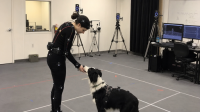
3d mapping is one of the most important building blocks because it helps devices interpret real spaces. Cameras, depth sensors, lidar, photogrammetry, and computer vision can capture the shape and position of walls, floors, objects, streets, rooms, and terrain. Once that information is processed, a system can place digital content in a way that appears stable and connected to the physical environment.
This is what allows a virtual chair to sit on a real floor, an industrial overlay to attach to a specific component, or a navigation arrow to appear aligned with a hallway. Without accurate 3d mapping, digital content can drift, clip through surfaces, or feel disconnected from reality. For many professional use cases, precision is not a nice extra; it determines whether the tool can be trusted.
Geospatial data connects experiences to location
Geospatial data describes information tied to place. It can include coordinates, maps, property boundaries, roads, terrain, utilities, environmental conditions, transportation routes, and points of interest. In spatial computing, this data helps digital experiences understand not only what is in front of a person but also where that person is in the broader world.
Location-aware systems can support field operations, logistics, tourism, emergency response, construction, and urban planning. A worker might view underground utility information before digging, or a visitor might receive historical context while walking through a neighborhood. The value comes from making data visible in the location where decisions happen.
Augmented reality and mixed reality shape the user interface
Augmented reality places digital information over the physical world, often through a phone, tablet, smart glasses, or headset. It can be simple, such as labels appearing over objects, or complex, such as guided workflows that respond to user movement. Augmented reality is powerful when the user still needs to see and act in the real environment.
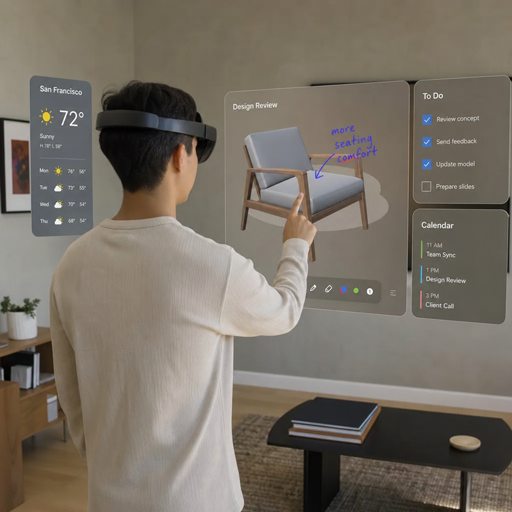
Mixed reality goes further by allowing digital and physical elements to interact more deeply. A mixed reality application might recognize a table as a surface, hide digital objects behind real obstacles, or let multiple people see and manipulate the same virtual model in a shared room. This creates immersive experiences that feel less like looking at a graphic and more like working with a digital object that belongs in the space.
Digital twins make environments easier to understand
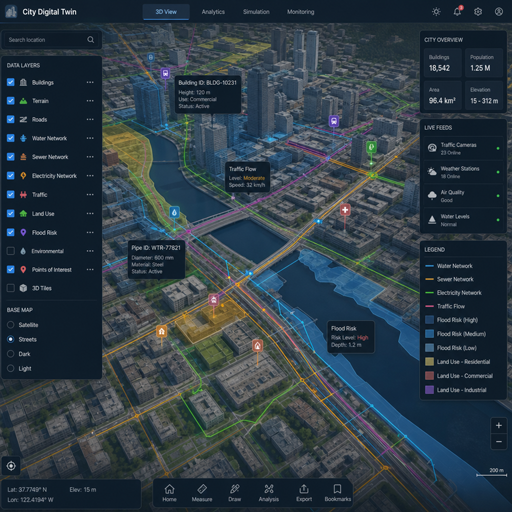
A digital twin is a digital representation of a physical object, system, process, or environment. In the context of spatial computing, digital twins can help people explore and manage buildings, factories, campuses, cities, products, and infrastructure. A basic model may show geometry and layout, while a more advanced twin may connect to live operational data.
The practical benefit is clarity. Instead of reading separate reports, maps, sensor logs, and maintenance records, a user can see information organized around the asset or place it describes. When paired with spatial interfaces, digital twins become easier to inspect, discuss, and act on.
Spatial computing as the next interface layer
Spatial computing is often described as the next major computing interface because it changes where digital content lives. Desktop computing organized work around files and windows. Mobile computing made digital tools portable and touch-based. Spatial computing moves information into the physical context around the user.
That shift can make digital experiences feel more natural. People already understand space, distance, movement, and scale. When data is presented spatially, users can often interpret it faster than they would on a flat chart or menu. A full-scale building model communicates proportion differently than a blueprint. A route projected into a warehouse can be easier to follow than a list of turns. A training simulation with realistic placement can be more memorable than a slide deck.
This does not mean screens disappear. Phones, monitors, and tablets will remain useful because they are efficient, familiar, and inexpensive. The future is more likely to be layered: some tasks stay on screens, some move into augmented reality, and some use fully immersive mixed reality environments. The best interface will depend on the job, the user, and the setting.
High-value use cases across industries
Spatial computing becomes most compelling when it solves a real problem that flat interfaces handle poorly. The strongest use cases usually involve complex environments, hands-on tasks, location-specific decisions, or three-dimensional information. The technology is not limited to one industry, but the value depends on thoughtful implementation.
Design, engineering, and architecture
Designers and engineers often need to understand scale, form, and fit before something is built. Spatial computing can make early decisions easier by allowing teams to inspect models in context. An architect can review how a proposed interior might feel at human scale, while an engineer can examine how components fit within a machine or structure.
This can improve communication between technical and nontechnical stakeholders. Many people struggle to interpret two-dimensional plans, but they can understand a spatial model placed in front of them. The more complex the design, the more valuable it becomes to see it from multiple angles and at a realistic size.
Manufacturing, maintenance, and field service
In industrial settings, spatial computing can support training, assembly, inspection, and repair. A worker might receive step-by-step guidance overlaid on equipment, reducing the need to look back and forth between a manual and the task. A remote expert could see what a field technician sees and annotate the environment in real time.
The practical advantage is hands-on context. Instructions are more useful when they appear near the relevant part. Safety warnings are more noticeable when attached to the hazard. Inspection records are more meaningful when connected to the exact asset being inspected.
Healthcare education and clinical planning
Spatial computing can help medical learners and professionals understand anatomy, procedures, equipment, and spatial relationships. Training environments can show organs, devices, or workflows in three dimensions. Planning tools may help teams discuss complex procedures using spatial models rather than relying only on flat images.
Healthcare applications require careful validation, privacy protection, and clinical oversight. Still, the educational value is clear: three-dimensional subjects are often easier to understand when they can be explored spatially. For students and teams, immersive experiences can create a stronger sense of context than traditional materials alone.
Retail, real estate, and customer experience
Retailers and real estate teams can use augmented reality to help people preview choices before committing. A shopper might see how furniture looks in a room, while a buyer might explore a property remotely or understand renovation possibilities. These applications work because they reduce uncertainty.
The experience should support decisions rather than distract from them. A useful spatial tool answers practical questions: Will this fit? How will it look from different angles? What options are available? How does the space feel? When the technology is focused on those questions, it can improve confidence and engagement.
Cities, infrastructure, and environmental planning
Urban and infrastructure projects involve many layers of location-based information. Spatial computing can bring those layers together through geospatial data, 3d mapping, and digital twins. Planners, engineers, and community stakeholders can explore how transportation routes, utilities, development proposals, and environmental factors interact.
This is especially useful when decisions affect a shared physical environment. A spatial view can reveal conflicts and opportunities that are harder to notice in separate documents. It can also make public communication clearer, because people can see proposed changes in relation to places they recognize.
How will spatial computing change everyday work?
Spatial computing will change everyday work by making digital information more contextual, visual, and action-oriented. Instead of searching for instructions, interpreting static diagrams, or switching between multiple systems, workers may increasingly see relevant data attached to the object, room, route, or process they are dealing with. The biggest impact will come where people need to make decisions in physical spaces.
That change will not happen all at once. Many teams will first adopt spatial tools for specific tasks such as training, visualization, guided repair, or remote assistance. Over time, those isolated tools may connect with asset management systems, design software, maps, sensors, and digital twins. As the ecosystem matures, spatial computing could become a regular part of how teams plan, operate, and collaborate.
A practical workflow might look like this:
- Capture the environment. The team scans a room, building, site, or object using cameras, sensors, or existing models.
- Connect relevant data. Drawings, records, geospatial data, sensor readings, or product information are linked to the spatial model.
- Create the experience. Users access overlays, simulations, instructions, or collaborative views through mobile devices, headsets, or web-based tools.
- Use it in context. The spatial interface supports a real task, such as inspection, planning, training, navigation, or customer engagement.
- Update and improve. Feedback, new scans, and operational data keep the experience accurate and useful.
This workflow shows why spatial computing is not just a visual layer. It is a connection layer between physical environments and digital systems. The quality of the result depends on the accuracy of the data, the clarity of the interface, and the usefulness of the task it supports.
Benefits that go beyond novelty
Spatial computing is sometimes discussed as if its main value is immersion. Immersion matters, but it is not the only benefit. The strongest applications help people understand complexity, reduce friction, and make better decisions in context.
Key benefits include:
- Clearer understanding of scale and space. Three-dimensional models help users interpret size, distance, and placement more naturally than flat images.
- Better task guidance. Instructions can appear where work is happening, which can reduce cognitive switching and make procedures easier to follow.
- Stronger collaboration. Teams can review the same model, environment, or digital twin even when they are not physically together.
- Improved planning. Spatial previews can reveal design conflicts, access issues, layout problems, or user experience concerns earlier.
- More engaging learning. Training that involves movement, context, and interaction can make abstract concepts easier to grasp.
- Richer customer experiences. Buyers and users can explore products or places in ways that feel more realistic and personalized.
The common thread is context. Spatial computing becomes valuable when it places information where it has meaning. A floating dashboard may look impressive, but an overlay that helps a person complete a task is much more useful.
Challenges that will shape adoption
The future of spatial computing is promising, but adoption depends on solving practical challenges. Organizations should look beyond the excitement and evaluate whether the technology is accurate, comfortable, secure, and maintainable enough for real use.
Data quality and interoperability
Spatial experiences depend on dependable data. If a 3d model is outdated, a location layer is inaccurate, or asset information is incomplete, the experience can mislead users. This is especially important in industrial, healthcare, construction, and infrastructure settings where errors have real consequences.
Interoperability is another major issue. Spatial computing often needs to connect design files, mapping systems, product data, operational platforms, and sensor feeds. If those systems do not work together, teams may spend more time managing data than using the experience. Standards, clean data practices, and flexible integration strategies will be essential.
Hardware comfort and accessibility
Headsets, glasses, phones, tablets, and room-scale systems all have different strengths. A headset may provide a rich mixed reality experience but may not be comfortable for every user or practical in every workplace. A phone is widely available but offers a smaller window into the spatial environment.
Good implementation means choosing the right device for the task. A short training simulation may justify a headset. A customer preview tool may work better on a smartphone. A planning session may need a large shared display plus an interactive model. Accessibility also matters, because spatial interfaces should serve users with different abilities, comfort levels, and working conditions.
Privacy, safety, and trust
Spatial computing often uses cameras, sensors, location data, and environmental scans. That creates legitimate privacy and security concerns. Organizations need clear policies for what is captured, where it is stored, who can access it, and how long it is retained.
Safety is equally important. Digital overlays must not distract users from physical hazards. In professional settings, teams need training, boundaries, and fallback processes. Users must trust that what they see is accurate, current, and appropriate for the task.
The relationship between AI and spatial computing
Artificial intelligence can make spatial computing more capable by helping systems recognize objects, interpret scenes, generate content, and respond to user intent. Computer vision can identify surfaces, equipment, gestures, or environmental features. Generative tools may help create 3d assets, summarize spatial data, or produce guided workflows from technical documentation.
The combination is powerful because spatial computing provides context and AI provides interpretation. A spatial system might know where a user is looking, what object is nearby, and what task is underway. An AI layer could then surface the most relevant instruction, warning, or explanation. Used well, this can reduce the burden on users and make complex systems easier to navigate.
However, AI also increases the need for governance. Automated recommendations should be transparent, especially in high-stakes environments. Generated spatial content should be reviewed before it is used operationally. The goal is not to replace expertise but to make expert knowledge more accessible at the point of need.
Building a practical spatial computing strategy
A strong spatial computing strategy starts with a problem, not a device. The most successful projects are usually tied to a measurable workflow need: helping people learn faster, inspect more clearly, sell more confidently, plan with less ambiguity, or collaborate across distance. When the objective is vague, the result can become a polished demo with little lasting value.
Use this checklist before investing in a spatial computing initiative:
- Define the use case clearly. Identify the task, user, environment, and decision the experience must support.
- Confirm that spatial context adds value. If a normal screen solves the problem well, spatial computing may not be necessary.
- Audit available data. Review 3d models, maps, asset records, geospatial data, and documentation for accuracy and completeness.
- Choose the right interaction model. Decide whether users need augmented reality, mixed reality, a digital twin, a mobile experience, or a combination.
- Start with a focused pilot. Limit the first project to a workflow that can be tested, improved, and explained clearly.
- Plan for maintenance. Spatial content can become outdated, so ownership and update processes matter from the beginning.
- Address privacy and safety early. Do not wait until launch to decide how scans, images, locations, and user data will be handled.
- Measure usefulness, not novelty. User adoption, task completion, clarity, and workflow fit are more important than visual impact alone.
This approach keeps the technology connected to business value. It also helps teams avoid overbuilding. A simple, reliable augmented reality guide may deliver more value than a complex immersive environment that is difficult to maintain.
How can organizations prepare for the spatial future?
Organizations can prepare for spatial computing by improving their data foundations, experimenting with focused use cases, and building internal understanding of where spatial interfaces are genuinely useful. Preparation does not require a massive transformation on day one. It requires practical steps that make future adoption easier and less risky.
The first step is to organize spatially relevant information. Many organizations already have maps, floor plans, product models, asset records, photos, videos, and operational data, but these materials may be scattered across teams and formats. Bringing them into a cleaner structure creates a stronger foundation for 3d mapping, digital twins, and immersive experiences.
The second step is to involve the people who will actually use the tools. Field workers, designers, trainers, sales teams, customers, and operations managers can reveal practical details that technology teams may overlook. They know where hands are busy, where visibility is poor, where mistakes happen, and where context would help.
Finally, organizations should build literacy around spatial design. Spatial interfaces are not just websites floating in the air. They require decisions about scale, movement, comfort, attention, anchoring, and environmental awareness. Teams that understand those principles will create experiences that feel useful rather than gimmicky.
Design principles for better immersive experiences
Good spatial computing design respects both the digital task and the physical setting. Users should not have to fight the interface, guess what matters, or feel overwhelmed by visual clutter. The best experiences often feel calm, precise, and purposeful.
Important design principles include:
- Anchor information to meaning. Place labels, instructions, and visual cues near the object or area they describe.
- Use depth carefully. Three-dimensional placement should clarify relationships, not create confusion.
- Minimize distraction. Do not cover the user’s field of view with unnecessary graphics, alerts, or animations.
- Support natural movement. Let users inspect, step back, zoom, rotate, or reposition content in ways that match the task.
- Design for the environment. Lighting, noise, safety gear, motion, and workspace constraints can affect usability.
- Provide exits and fallbacks. Users should always know how to pause, reset, switch views, or return to a traditional interface.
These principles are especially important because spatial computing is embodied. A poor website may be annoying, but a poor spatial interface can be tiring, disorienting, or unsafe. Comfort and clarity are central to adoption.
The future is contextual, connected, and spatial
Spatial computing is likely to evolve from isolated demos into a practical layer that connects people with digital information in the places where they work, learn, shop, travel, and make decisions. As devices improve and data ecosystems mature, the focus will shift from novelty to usefulness. The winning applications will be the ones that make complex environments easier to understand and real tasks easier to complete.
The future will also be hybrid. Augmented reality, mixed reality, 3d mapping, geospatial data, digital twins, and AI will not exist as separate trends for long. They will increasingly overlap inside platforms and workflows that treat the physical world as part of the computing environment.
For organizations, the opportunity is to start thoughtfully. Build clean data, choose meaningful use cases, involve real users, and design for practical outcomes. Spatial computing is not simply about making digital content more immersive; it is about making information more present, more relevant, and more useful in the world around us.