Personal knowledge management is the practice of capturing, organizing, connecting, and applying what you learn so it remains useful after the moment has passed. A strong PKM system helps you reduce information overload, improve recall, make better decisions, and turn scattered notes into usable insight. This guide explains how to build a practical system using information management habits, learning techniques, mind mapping, productivity tools, and knowledge sharing.
What is Personal knowledge management PKM?
Personal knowledge management PKM is a personal system for handling the ideas, facts, experiences, references, and resources you collect in daily work and life. Instead of saving information randomly across notebooks, apps, email threads, browser tabs, and screenshots, PKM gives you a repeatable way to decide what matters, where it belongs, and how you will use it later.
At its best, PKM is not just digital filing. It is a thinking process. You capture information, clarify its meaning, connect it to what you already know, and convert it into action, writing, strategy, study material, or better judgment. That makes it useful for students, professionals, creators, researchers, managers, founders, and anyone whose work depends on learning and decision-making.
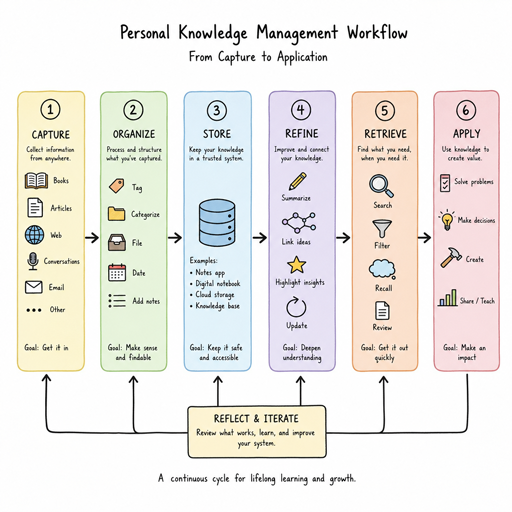
A complete PKM system usually includes five functions:
- Capture: Save ideas, references, meeting notes, quotes, tasks, and questions before they disappear.
- Organize: Place information where it can be found without creating a maze of folders.
- Connect: Link related concepts so your notes become a network rather than a storage box.
- Review: Revisit material often enough to strengthen memory and uncover patterns.
- Apply: Use knowledge in projects, conversations, writing, planning, teaching, or problem-solving.
Why does personal knowledge management matter?
Personal knowledge management matters because modern work creates more information than memory can reliably hold. Without a system, useful ideas get buried, learning becomes fragmented, and people repeatedly search for things they have already found. A good PKM approach turns information management into a calm, repeatable habit instead of a constant rescue mission.
The benefit is not only saving time. PKM improves the quality of your thinking. When you can see relationships between ideas, compare sources, and revisit past decisions, you build deeper understanding. You stop treating every article, meeting, podcast, or lesson as an isolated event and start using each one as part of a growing body of knowledge.
This is especially important when work involves complex projects. A marketer may need to connect customer research, campaign results, brand positioning, and content ideas. A software professional may need to connect documentation, bug patterns, architecture notes, and lessons from past builds. A student may need to connect lectures, readings, assignments, and exam preparation. The tools differ, but the goal is the same: make knowledge easier to retrieve, combine, and use.
The core principles of an effective PKM system
A successful PKM system does not need to be complicated. In fact, the best systems are usually simple enough to maintain on busy days. The aim is to create a structure that supports thinking without becoming another project to manage.
Start with purpose, not tools
Many people begin by searching for the perfect productivity tools. Tools matter, but they should come after purpose. Ask what kind of knowledge you handle most often and what you need it to do for you. Do you need to write more clearly, study more effectively, manage research, prepare presentations, remember decisions, or support team knowledge sharing?
Once the purpose is clear, tool choices become easier. A lightweight notes app may be enough for everyday capture. A database-style app may suit research-heavy work. A visual whiteboard may support mind mapping and planning. The right tool is the one that lowers friction and helps you return to your knowledge when it counts.
Capture quickly, process later
Your capture method should be fast. If saving an idea takes too long, you will avoid doing it. Use an inbox note, voice memo, bookmark tool, physical notebook, or mobile widget to collect raw material without deciding immediately where everything belongs.
Processing can happen later during a short daily or weekly review. At that point, delete what no longer matters, rewrite vague notes, tag or link useful items, and move action-related information into your task system. This separation protects your attention: capture keeps ideas from being lost, while processing keeps your system from becoming cluttered.
Organize for retrieval, not perfection
A PKM system should help you find and use knowledge, not impress you with its architecture. Overly detailed folders can feel productive at first but become difficult to maintain. A practical structure often combines broad categories, search, tags, and links.
For example, you might organize notes around active projects, long-term areas of responsibility, resources, and archives. Inside that structure, tags can identify themes such as leadership, customer research, writing ideas, learning techniques, or product strategy. Links can connect related notes across categories, which is where deeper knowledge management begins.
A practical workflow for building your PKM system
The easiest way to build a PKM habit is to follow a repeatable workflow. You can adapt the steps to any tool, from a paper notebook to a full digital workspace.
- Collect inputs in one trusted inbox. Send articles, ideas, meeting notes, book highlights, and questions to a single place whenever possible.
- Clarify what each item means. Decide whether it is a task, reference, insight, question, project material, or something to discard.
- Rewrite important notes in your own words. This turns passive saving into active learning and improves long-term recall.
- Connect the note to related ideas. Add links, tags, or references to projects, topics, people, or decisions.
- Create useful outputs. Turn notes into briefs, checklists, decisions, study cards, mind maps, drafts, or action plans.
- Review on a schedule. Use weekly or monthly reviews to clean up loose notes, update project knowledge, and rediscover useful ideas.
This workflow keeps your system alive. The point is not to collect everything. The point is to create a reliable path from information to understanding and from understanding to action.
Learning techniques that strengthen knowledge retention
PKM works best when it includes proven learning behaviors, not just storage. If you only save information, your system becomes a digital attic. If you engage with information, your notes become a learning engine.
One useful technique is active recall. Instead of rereading a note repeatedly, ask yourself what you remember before looking. This forces the brain to retrieve information, which is more powerful than passive review. You can add short questions at the top of important notes, create flashcards for technical material, or summarize a concept from memory after reading.
Another technique is spaced review. Important knowledge should be revisited after time has passed. You do not need to review everything, only the material that supports your current goals or long-term expertise. A weekly review can focus on active projects, while a monthly review can revisit evergreen notes, frameworks, lessons learned, and strategic ideas.
Elaboration is equally valuable. When you capture an idea, add why it matters, where it applies, and how it connects to your experience. A note that says “clear briefs improve execution” is useful, but a note that explains what makes a brief clear, when ambiguity causes problems, and how you will use that insight is far more actionable.
Using mind mapping to connect ideas
Mind mapping is a visual technique for exploring relationships between ideas. It helps when linear notes feel too rigid or when you need to understand a broad topic quickly. A mind map usually starts with a central concept, then branches into themes, subtopics, examples, questions, and actions.
This approach is especially useful in the early stages of learning or planning. If you are researching a new market, you could place the market at the center and branch into customer needs, competitors, risks, messaging, distribution, and open questions. If you are studying a complex subject, you can map theories, definitions, examples, and contradictions.
Mind mapping also supports knowledge sharing. A visual overview can help others understand how ideas fit together without reading every note in your system. It is not a replacement for detailed notes, but it is a strong bridge between exploration and explanation.
How do you choose the right productivity tools?
Choose productivity tools by matching them to your workflow, not by chasing every new feature. The best tool for personal knowledge management is one you can use consistently for capture, organization, retrieval, and review. If a tool feels powerful but adds friction, it may weaken your system instead of improving it.
Use this checklist when evaluating tools:
- Low-friction capture: Can you save ideas quickly from desktop and mobile?
- Reliable search: Can you find notes by keyword, title, tag, date, or related concept?
- Flexible structure: Can the tool support folders, tags, links, databases, or visual boards as needed?
- Portability: Can you export or back up your information if your needs change?
- Integration: Does it work with your calendar, task manager, browser, email, or reading tools?
- Focus: Does the interface help you think, or does it constantly invite tinkering?
Some people prefer an all-in-one workspace. Others use separate tools for notes, tasks, bookmarks, and mind mapping. Either approach can work if the boundaries are clear. For example, notes hold knowledge, tasks hold commitments, calendars hold time-specific events, and bookmarks hold sources you may revisit.
Turning personal knowledge into shared knowledge
PKM begins with the individual, but it often becomes more valuable through knowledge sharing. When you summarize lessons, document decisions, or explain a concept to someone else, you clarify your own thinking while helping others move faster.
Shared knowledge does not have to mean publishing everything. It can be as simple as a project recap, a meeting summary, a decision log, a reusable checklist, or a short internal guide. The key is to convert private insight into a format another person can understand without needing the full history behind it.
Good knowledge sharing also requires judgment. Not every raw note is ready for others. Before sharing, remove irrelevant details, add context, define terms, and explain the practical takeaway. A useful shared note answers three questions: what happened, why it matters, and what should happen next.
Common PKM mistakes to avoid
Even a well-designed system can fail if it becomes too heavy or too vague. The most common mistakes are easy to prevent when you notice them early.
- Collecting without processing: Saving everything feels productive, but unprocessed information becomes noise.
- Overbuilding the system: Complex dashboards, excessive tags, and nested folders can slow you down.
- Confusing notes with tasks: Knowledge belongs in your PKM system; commitments need a task or calendar workflow.
- Never reviewing: Notes lose value when they are never revisited, refined, or connected.
- Using too many tools: Scattered systems create duplicate work and make retrieval harder.
- Writing notes only for your current self: Add enough context so future you understands why the note mattered.
The solution is to simplify. Keep fewer categories, write clearer notes, review regularly, and focus on outputs. A system that produces better decisions, stronger writing, faster learning, or clearer communication is working.
A sustainable weekly PKM routine
Consistency matters more than intensity. A short weekly routine can keep your personal knowledge management system useful without turning it into an obligation.
Set aside a regular review window and move through four steps. First, clear your capture inbox by deleting, filing, or rewriting loose notes. Second, update active project notes with decisions, next steps, and useful references. Third, connect new ideas to older notes through links or tags. Fourth, choose one or two insights to apply during the coming week.
This routine creates momentum. Instead of waiting for a major cleanup, you maintain the system in small passes. Over time, your notes become clearer, your thinking becomes more connected, and your knowledge becomes easier to use.
Final takeaways for better knowledge management
Effective knowledge management is less about building a perfect archive and more about creating a dependable thinking environment. Capture what matters, organize it simply, connect ideas deliberately, and review often enough to keep knowledge active. Use productivity tools to support the workflow, not to replace the discipline behind it.
If you are just getting started, begin small. Choose one capture inbox, one note structure, and one weekly review habit. Add mind mapping, advanced tags, templates, or shared documentation only when they solve a real problem. The best PKM system is the one that helps you learn continuously, think clearly, and turn information into meaningful action.