
A paperless office is not simply an office with fewer printers. It is a more intentional way to capture, organize, route, approve, store, and share information so work moves faster with fewer manual handoffs. With the right mix of document management, cloud collaboration, digital workflow design, and task automation, teams can reduce clutter while making everyday work easier to track, search, and secure.
What does paperless productivity really mean?
Paperless productivity means using digital tools to remove unnecessary paper from business processes while improving how people get work done. The goal is not to digitize chaos; it is to create a clearer system where documents, approvals, tasks, and records move through consistent digital paths instead of sitting in inboxes, filing cabinets, or desk piles.
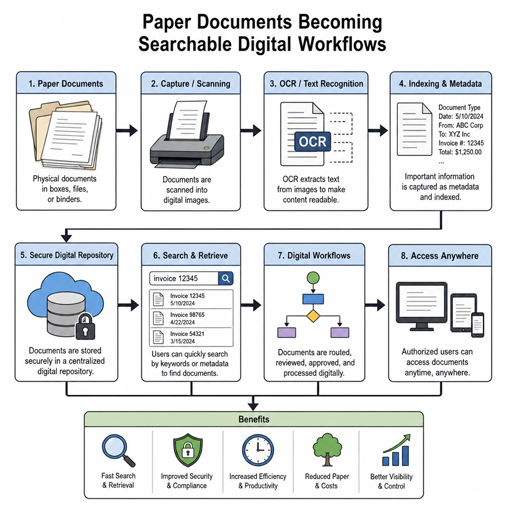
In practice, that might mean scanning incoming forms with OCR, storing contracts in a searchable document management platform, routing invoices for digital approval, sending secure digital faxes through a tool such as RightFax, and collaborating on files in the cloud instead of emailing multiple versions back and forth. It also means employees can find what they need without knowing which folder, cabinet, or coworker last touched a document.
The biggest shift is cultural as much as technical. Paper-based habits often survive because they feel familiar, not because they are efficient. A strong paperless strategy gives people a better alternative: fewer repetitive steps, clearer ownership, faster retrieval, and better visibility into where work stands.
The core tools behind a paperless office
A successful paperless office usually depends on several connected productivity tools, not one standalone app. Each tool solves a different part of the workflow, from capturing information to storing it, sharing it, automating it, and protecting it.
Document management systems create a reliable source of truth
Document management is the backbone of most paperless productivity strategies. A good system gives teams a central place to store files, apply naming conventions, manage versions, control access, and search across records. Instead of saving documents across desktops, shared drives, email attachments, and physical folders, the organization can build a single, governed structure.
The practical benefit is speed and confidence. Employees spend less time asking where a file is and more time acting on it. Leaders also gain better oversight because records can be organized by department, client, project, status, or retention requirement.
OCR turns static documents into usable data
Optical character recognition, often called OCR, helps convert scanned pages, PDFs, and image-based documents into searchable and editable text. This is especially useful for invoices, intake forms, applications, shipping documents, medical records, and signed agreements that still arrive in paper or image formats.
OCR does more than make documents searchable. When paired with workflow automation, it can help extract key fields and reduce manual data entry. Teams still need quality checks, especially for sensitive or complex documents, but OCR can remove a significant amount of repetitive typing from daily work.
Cloud collaboration keeps work moving from anywhere
Cloud collaboration tools allow employees to access, edit, comment on, and share documents without relying on local hardware or office-only systems. For hybrid and remote teams, this is often what makes a digital workflow practical. A file can be reviewed by finance, legal, operations, or customer support without physically moving through the building.
Cloud tools also reduce common version-control problems. Instead of multiple attachments named “final,” “final revised,” and “final approved,” teams can work from a shared document with version history, comments, and permissions. The result is less confusion and fewer delays.
Digital fax and secure transmission still matter
Some industries still rely on fax because of established workflows, partner requirements, or sensitive document exchange. A paperless strategy does not have to ignore that reality. Digital fax tools, including platforms such as RightFax, can help organizations send and receive faxed documents without printing, scanning, or manually filing each page.
This can be particularly useful in healthcare, finance, legal, and government-adjacent environments where secure transmission, audit trails, and integration with existing systems matter. The fax becomes part of the digital workflow instead of a paper bottleneck.
Task automation reduces repetitive follow-up
Task automation connects actions that people would otherwise handle manually. For example, when a contract is uploaded, the system can notify the reviewer, assign a due date, request approval, store the final version, and alert the next department. Automation helps prevent work from stalling because someone forgot to send an email or move a document to the right folder.
The best automations are simple and specific. They remove predictable friction without making the process so rigid that employees create workarounds. Start with high-volume, rules-based tasks before trying to automate complex exceptions.
How do these tools improve daily business efficiency?
Paperless productivity improves efficiency by making documents easier to find, workflows easier to track, and repetitive tasks easier to automate. It reduces the hidden drag created by printing, filing, searching, rekeying data, waiting for signatures, and chasing approvals through email threads.
The benefits show up in ordinary moments. A customer service employee can retrieve a signed agreement while still on a call. A finance team can see which invoices are awaiting approval. A clinic can route records securely without passing paper between desks. A manager can review the status of a request without asking three people for an update.
Key efficiency gains often include:
- Faster document retrieval: Searchable files reduce time spent digging through folders, cabinets, email, or shared drives.
- Cleaner workspaces: Less paper means fewer piles, fewer misplaced forms, and less need for physical storage.
- Reduced supply dependence: Teams can use fewer printers, ink cartridges, folders, envelopes, labels, and other consumables.
- Fewer manual handoffs: Digital routing helps work move from one person to the next without physical transfer.
- Improved visibility: Managers can see where requests, approvals, or documents are in the process.
- Better continuity: Cloud access and digital records make it easier to keep work moving during travel, remote work, or office disruptions.
Efficiency also comes from standardization. When everyone follows a different filing process, digital clutter can become just as frustrating as paper clutter. Paperless systems work best when teams agree on file names, folder structures, permissions, and workflow rules before the volume grows.
A practical roadmap for going paperless
Moving toward a paperless office is easier when the process is phased. Trying to digitize every document and automate every workflow at once can overwhelm employees and produce inconsistent adoption. A staged approach helps teams learn, adjust, and build trust in the new system.
1. Map the paper trail first
Start by identifying where paper enters, moves through, and exits the organization. Look at forms, invoices, contracts, HR records, client files, internal approvals, compliance documents, and recurring reports. Pay close attention to steps where employees print something only to scan it again later.
This mapping exercise reveals which paper processes are actually necessary and which exist only because “that is how we have always done it.” It also helps prioritize the workflows with the most friction.
2. Choose one high-impact workflow
Pick a process that is frequent, visible, and manageable. Invoice approvals, employee onboarding, contract review, patient intake, purchase requests, and customer documentation are common starting points. The first workflow should be important enough to matter but not so complex that it becomes a never-ending pilot.
Define what success looks like in practical terms. For example, success might mean fewer printed forms, faster approvals, easier document retrieval, or clearer status tracking. Avoid vague goals like “be more digital” and focus on observable improvements.
3. Set rules for naming, storage, and access
A paperless system can quickly become messy without governance. Create simple rules for file naming, folder structure, metadata, version control, and retention. Decide who can view, edit, approve, delete, or archive different document types.
These rules do not need to be complicated. In fact, the simpler they are, the more likely employees are to follow them. The goal is to make the correct behavior easy and consistent.
4. Train people on the workflow, not just the software
Software training often focuses on buttons and features, but employees also need to understand the process. Show what happens when a document is uploaded, who receives it next, how approvals are recorded, where the final version lives, and what to do when something goes wrong.
People adopt new productivity tools faster when they can see how the change reduces frustration in their own work. Explain the “why” behind the process, not just the steps.
5. Review, refine, and expand
After the first workflow is running, gather feedback. Are documents easy to find? Are notifications useful or excessive? Are employees creating side folders because the official structure is confusing? Are exceptions handled clearly?
Use those lessons before expanding to another department or process. Paperless productivity grows stronger when each rollout improves the next one.
Comparing common paperless productivity tools
Different tools support different parts of the digital workplace. The right mix depends on the organization’s industry, compliance needs, existing software, and employee workflows.
|
Tool category |
Best use |
Practical advantage |
Watch for |
|---|---|---|---|
|
Document management system |
Storing, organizing, searching, and controlling files |
Creates a central source of truth for records |
Requires clear naming, permissions, and retention rules |
|
OCR and data capture |
Converting scans and forms into searchable text or usable fields |
Reduces manual data entry and improves search |
Needs review for accuracy on poor-quality scans |
|
Cloud collaboration platform |
Shared editing, commenting, and remote file access |
Supports hybrid work and version control |
Permissions must be managed carefully |
|
Digital fax solution |
Secure faxing without paper-based machines |
Keeps fax-dependent workflows digital |
Should integrate with document systems where possible |
|
Workflow automation platform |
Routing approvals, tasks, alerts, and status updates |
Reduces manual follow-up and bottlenecks |
Poorly designed automation can create confusion |
|
E-signature tool |
Signing contracts, forms, and approvals |
Speeds up agreements and reduces printing |
Must fit the organization’s legal and compliance needs |
This comparison also shows why paperless transformation is rarely a single purchase. A document repository without automation may still leave employees chasing approvals. Automation without good document management can move files quickly but store them inconsistently. The best results come from connecting the tools around the actual way work moves.
Security and compliance need to be designed in
Paperless systems can improve control over sensitive information, but only when security is built into the process from the beginning. A digital workflow should define who has access, how documents are transmitted, how activity is logged, how records are retained, and how data is protected.
For organizations in regulated fields, such as healthcare, finance, legal services, education, or public-sector work, these decisions are especially important. A healthcare organization, for instance, may need to connect fax, EMR, and document workflows while supporting encryption, audit trails, and privacy requirements such as HIPAA. The specific requirements vary by industry, so teams should involve compliance, legal, IT, and department leaders early.
Useful security and compliance practices include:
- Role-based access: Give employees access only to the documents and workflows they need.
- Audit trails: Track who viewed, changed, approved, sent, or archived sensitive records.
- Encryption: Protect documents during storage and transmission.
- Retention policies: Define how long records are kept and when they should be archived or deleted.
- Secure sharing: Replace uncontrolled email attachments with permission-based links or approved transmission methods.
- Vendor review: Evaluate cloud providers and software partners for security practices, compliance alignment, and integration support.
Cloud collaboration can be secure, but it should not be casual. Organizations that handle sensitive records should look for security controls, administrative visibility, and relevant frameworks or standards, such as FedRAMP where appropriate for government-related cloud needs. The point is not to choose the most complicated system; it is to choose one that fits the risk level of the documents being handled.
Integrations turn tools into a real digital workflow
A paperless office becomes more powerful when document tools connect with the systems employees already use. Integration with CRM, ERP, EMR, HR, accounting, or case management platforms reduces duplicate entry and helps information flow with the work.
For example, a sales team might store signed agreements directly in a CRM record. A finance team might connect invoices to an ERP approval process. A healthcare team might route received documents into an EMR-related workflow. These connections reduce the need to download, rename, upload, email, and manually update records in multiple places.
Integration also supports better decision-making. When documents and tasks are linked to customer records, projects, cases, or transactions, employees have more context. That context can improve customer engagement, reduce internal confusion, and make operational reporting more useful.
The key is to integrate around business outcomes, not novelty. Before connecting systems, ask what manual step the integration removes, what error it prevents, or what visibility it creates. If the answer is unclear, the integration may add complexity without improving productivity.
Common adoption challenges and how to solve them
Even strong paperless systems can fail if employees do not trust or understand them. Resistance is normal, especially when people have relied on paper for years. The goal is to make the new process feel safer, faster, and more reliable than the old one.
Common challenges include:
- “I still like paper.” Offer digital alternatives that preserve useful habits, such as annotations, bookmarks, and easy search.
- Fear of losing files. Use clear storage rules, version history, backups, and visible confirmation when documents are saved.
- Too many tools. Consolidate where possible and explain which platform is used for which purpose.
- Notification overload. Automate alerts carefully so employees receive timely signals, not constant noise.
- Inconsistent scanning quality. Set standards for scan resolution, file types, naming, and quality checks.
- Unclear ownership. Assign process owners who maintain workflows, answer questions, and review exceptions.
Change management works best when leadership models the behavior. If managers still ask employees to print documents for review, the paperless initiative will feel optional. If leaders use the digital workflow consistently, employees are more likely to follow.
A simple checklist for choosing the right tools
Before investing in new productivity tools, evaluate them against the way your organization actually works. A feature-rich platform is not helpful if it creates confusion, duplicates existing systems, or fails to support compliance needs.
Use this checklist during evaluation:
- Does the tool solve a specific paper-based bottleneck?
- Can employees search, retrieve, and share documents easily?
- Does it support permissions, audit trails, retention, and secure transmission?
- Can it integrate with existing systems such as CRM, ERP, EMR, accounting, or HR software?
- Is the interface practical for the people who will use it every day?
- Can workflows be adjusted as departments change?
- Does the vendor provide adequate support, documentation, and administrative controls?
- Will the tool reduce duplicate work rather than create another place to manage files?
The best choice is usually the one that balances usability with control. If a system is secure but too difficult to use, employees may work around it. If it is easy but poorly governed, the organization may create new risks. Effective paperless productivity needs both.
The takeaway
Paperless productivity is about building a smarter way to work, not just removing paper from the office. When document management, cloud collaboration, OCR, digital fax, integrations, and task automation work together, teams can find information faster, reduce manual steps, and keep business-critical documents under better control.
Start with one workflow, make it clear, secure it properly, and train people on how the process helps them. From there, each improvement becomes easier to repeat. A paperless office is most successful when it feels less like a technology project and more like a practical upgrade to everyday work.