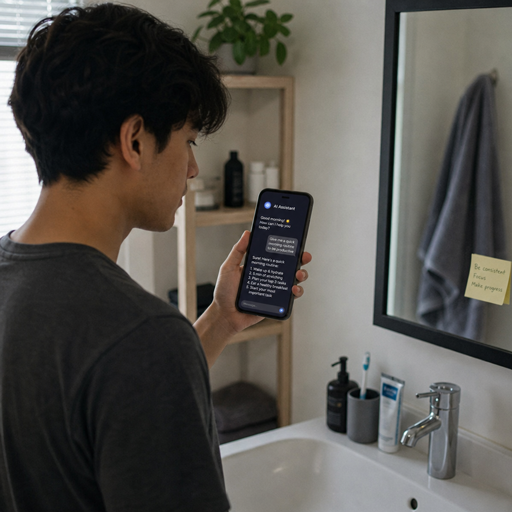
Artificial intelligence is no longer something reserved for research labs, tech companies, or futuristic movies. It already supports many ordinary tasks, from planning your day to improving how you shop, learn, communicate, and manage your home. This guide explains practical, approachable ways to make artificial intelligence in daily life feel useful instead of overwhelming.
How to use artificial intelligence in daily life?
The simplest way to use artificial intelligence in daily life is to start with one routine you already repeat and look for a tool that can make it faster, easier, or more personalized. You do not need to overhaul your entire schedule or become a technical expert. Everyday AI works best when it quietly supports decisions, removes friction, or helps you focus on work that needs your attention.
A good starting point is to notice where you lose time. Maybe you rewrite similar emails, forget items on your grocery list, struggle to plan meals, or spend too long searching for information. AI tools can help with each of those moments, but the goal is not to automate your whole life. The goal is to create small improvements that compound.
Think of AI as an assistant, not a replacement for judgment. It can suggest, summarize, organize, and predict, but you still decide what is accurate, appropriate, and worth doing. That balance is what makes AI for everyone practical: the technology becomes useful when it fits real human routines.
Everyday AI starts with small habits
The most successful way to integrate AI is to connect it to habits you already have. If you check the weather every morning, use an assistant that also reminds you about traffic, calendar events, or errands nearby. If you write notes after meetings, try a tool that summarizes key points and turns them into action items.
Small use cases are easier to trust because you can quickly see whether the output helps. If an AI calendar suggestion saves you from double-booking, the benefit is clear. If a shopping recommendation does not match your needs, you can ignore it and adjust your preferences.
Start with low-risk tasks before moving into more important decisions. Let AI organize a to-do list, draft a casual message, or recommend a recipe. Once you understand its strengths and limits, you can use it more confidently for planning, research, budgeting, or learning.
10 uses of artificial intelligence in daily life
There are many uses of artificial intelligence in daily life, but the most valuable ones usually solve ordinary problems. These examples show how AI can support routines without making them feel complicated.
- Smart reminders and scheduling AI-powered calendars can suggest meeting times, detect conflicts, and remind you when to leave based on location or traffic. This helps reduce mental clutter and keeps your day moving.
- Email and message support Writing assistants can help draft, shorten, rephrase, or proofread messages. They are especially useful when you need a clearer tone, a faster reply, or a more organized explanation.
- Search and research assistance AI can summarize long articles, compare options, and help you understand unfamiliar topics. Instead of opening dozens of tabs, you can ask for a starting point and then verify details from reliable sources.
- Personalized entertainment Streaming platforms use AI to recommend music, movies, podcasts, and shows based on your activity. The experience feels simple, but the technology is learning patterns from your preferences.
- Navigation and travel planning Maps and travel apps use AI to estimate routes, predict delays, and suggest efficient alternatives. This is one of the most familiar artificial intelligence examples in daily life.
- Smart home automation Thermostats, lights, security cameras, and voice assistants can adapt to patterns over time. Used well, they can improve comfort, convenience, and energy awareness.
- Shopping recommendations Retail apps often use AI to suggest products, compare similar items, or remind you about repeat purchases. This can be useful, but it is still wise to pause before buying something just because it appears personalized.
- Health and wellness tracking Fitness apps, sleep trackers, and wearable devices can identify trends in movement, rest, and habits. They can support healthier routines, though they should not replace professional medical advice.
- Financial organization Budgeting apps can group spending, flag unusual activity, or help forecast upcoming expenses. AI can make patterns easier to see, which supports better decision-making.
- Learning and skill building AI tutors, language apps, and writing tools can adapt practice to your level. They help you review, revise, and keep learning in short sessions that fit your schedule.
These 10 uses of artificial intelligence in daily life are not about chasing trends. They are about noticing where intelligent tools can remove repetitive work and make daily choices easier.
AI helps with communication and creativity
One of the most accessible forms of everyday ai is writing and communication support. Many people use AI to brainstorm ideas, outline documents, refine emails, create social captions, or translate rough thoughts into clearer language. This can be especially helpful when you know what you want to say but struggle to organize it.
The best results come from giving specific direction. Instead of asking for “a better email,” explain the audience, tone, purpose, and length. For example, you might ask for a polite follow-up, a friendly reminder, or a shorter version of a detailed message.
AI can also support creative routines. It can suggest meal themes, birthday gift ideas, workout playlists, study plans, or journaling prompts. You remain the editor and decision-maker, while the tool helps you move past a blank page.
Can AI make home and personal routines easier?
Yes, AI can make home and personal routines easier when it is used to reduce repeated decisions and keep useful information close at hand. It can help plan meals from ingredients you already have, create cleaning checklists, remind you about household tasks, or adjust smart devices based on your patterns. The benefit is not that your home becomes “high-tech,” but that small tasks require less attention.
For example, a smart speaker can add items to a grocery list while you cook. A home assistant can remind you to switch laundry, turn off lights, or start a morning playlist. A meal-planning app can suggest recipes that match your schedule and preferences.
To avoid frustration, keep automation simple. If a routine becomes harder because you are constantly fixing settings, it is not saving time. Choose tools that fit your lifestyle rather than forcing your lifestyle to fit the tool.
Simple home routine ideas
- Use voice notes to capture reminders when your hands are busy.
- Ask an AI assistant to turn a messy list into organized errands.
- Create recurring reminders for chores, bills, and appointments.
- Use smart lighting schedules for mornings, evenings, or travel days.
- Let a recipe app suggest meals based on leftovers or pantry staples.
- Review weekly spending categories to spot habits you want to change.
These small integrations are often more useful than complex setups. The more natural the habit feels, the more likely you are to keep using it.
Better decisions through personalization
A major reason artificial intelligence in daily life feels powerful is personalization. AI systems can adapt suggestions based on behavior, preferences, timing, and context. That is why your navigation app may learn your commute, your music app may understand your taste, and your shopping app may highlight items similar to past purchases.
Personalization can save time, but it should not remove awareness. Recommendations are shaped by data, and they are not always neutral. A platform may suggest what keeps you watching, scrolling, or buying rather than what is best for your goals.
A healthy approach is to treat AI suggestions as options, not instructions. Use them to discover possibilities, then apply your own priorities. If your goal is to spend less, focus better, or eat healthier, make sure your tools are configured to support those outcomes.
Building an AI-friendly daily workflow
An AI-friendly workflow does not require dozens of apps. In fact, too many tools can create more noise. Start by choosing a few areas where support would make a clear difference: time, communication, planning, learning, or organization.
A practical workflow might look like this:
- Capture information quickly. Use voice notes, reminders, or AI-assisted notes so ideas do not disappear.
- Organize tasks once a day. Ask an assistant to group errands, deadlines, and priorities into a cleaner list.
- Use AI for first drafts. Let it outline emails, plans, or documents, then revise with your own judgment.
- Summarize before acting. For long articles, meeting notes, or research, ask for key points before reading deeper.
- Review recommendations weekly. Adjust settings, delete tools you do not use, and keep only what helps.
This kind of routine keeps AI in a supporting role. It gives you more structure without turning every task into a technology project.
What should you watch out for when using AI?
You should watch out for accuracy, privacy, bias, overreliance, and unnecessary automation. AI tools can be helpful, but they can also make confident mistakes, reflect incomplete data, or encourage you to share more information than needed. Using them well means combining convenience with common sense.
Accuracy matters most when decisions affect money, health, legal issues, safety, or other important outcomes. For those situations, use AI as a starting point, not the final authority. Check reliable sources, consult qualified professionals when needed, and avoid acting on information you cannot verify.
Privacy is another important concern. Before adding personal documents, financial details, health information, or workplace data to any tool, understand how that information may be stored or used. If you would not want the information exposed, think carefully before sharing it.
A quick checklist for responsible everyday AI
- Confirm important facts before relying on an AI answer.
- Avoid sharing sensitive personal, financial, or medical information unless you trust the tool and understand its policies.
- Review AI-generated messages before sending them.
- Keep human judgment involved in emotional, ethical, or high-stakes situations.
- Turn off notifications or recommendations that encourage distraction.
- Revisit app permissions and connected accounts regularly.
- Use AI to support your goals, not just to consume more content.
Responsible use does not mean avoiding AI. It means staying aware of where it helps and where it needs supervision.
AI for everyone means practical access, not perfection
The phrase ai for everyone can sound ambitious, but in daily life it simply means useful tools should be approachable. You should not need technical training to ask for a summary, organize a list, improve a message, or automate a reminder. The best AI features often feel invisible because they fit into apps and routines people already understand.
At the same time, access is not the same as mastery. People will use AI differently depending on their needs, comfort level, devices, language, and goals. A student may use it to study. A parent may use it to plan meals. A small business owner may use it to draft customer updates. A retiree may use it to learn new topics or simplify travel planning.
That flexibility is what makes artificial intelligence examples in daily life so varied. AI is not one single habit. It is a set of tools that can support many kinds of people in many kinds of routines.
Making AI feel natural over time
The easiest way to keep using AI is to connect it with moments that already happen. If you plan your week on Sunday, add AI-assisted scheduling then. If you review spending at the end of the month, use a budgeting tool at that moment. If you often forget follow-ups, let an assistant draft reminders after meetings.
Try not to adopt AI just because a tool is popular. Ask a better question: does this save time, reduce stress, improve quality, or help me make a better decision? If the answer is no, you do not need it.
You can also create boundaries. Choose when AI is welcome and when you want a fully human process. Some people love using AI for work drafts but prefer handwritten journals. Others use it for home automation but not creative projects. The right balance is personal.
The takeaway
Integrating artificial intelligence in daily life works best when it begins with ordinary routines, not big promises. Use AI to handle repetitive tasks, organize information, personalize suggestions, and support better planning. Keep your judgment involved, protect sensitive information, and choose tools that genuinely make life easier.
Everyday AI does not need to feel futuristic. When used thoughtfully, it becomes a quiet layer of support that helps you spend less energy on routine friction and more attention on the parts of life that matter most.