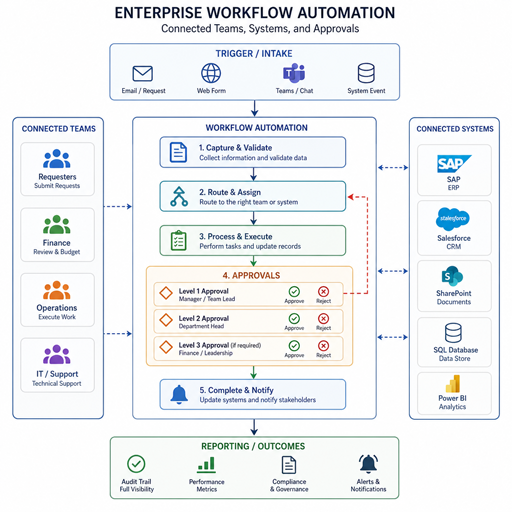
Hyper-automation brings together AI automation, workflow automation, robotic process automation, analytics, and connected systems to redesign how enterprise work gets done. Instead of automating one task at a time, it looks across departments, data flows, approvals, exceptions, and decisions to create faster, more resilient operating models. This guide explains what it means, where it fits, and how organizations can approach Hyper-Automation & Enterprise Workflows without turning automation into another layer of complexity.
What does hyper-automation mean for enterprise workflows?
Hyper-automation means using multiple automation technologies together to identify, automate, monitor, and continuously improve business processes at scale. In an enterprise workflow, that may include bots that move data between systems, AI models that classify documents, workflow tools that route approvals, integrations that sync records, and dashboards that show whether the process is working as intended.
The important shift is scope. Traditional process automation often focuses on a single repetitive action, such as copying invoice details into an accounting system. Hyper-automation asks a broader question: how should the entire invoice process work from intake to validation, approval, exception handling, payment, reporting, and audit readiness?
That broader view matters because enterprise work rarely happens in one application or one team. A customer onboarding process may touch sales, finance, legal, compliance, operations, support, and customer success. If each group automates in isolation, the company may gain pockets of speed but still struggle with handoff delays, duplicate data, inconsistent approvals, and unclear ownership.
Hyper-automation is designed to solve that cross-functional problem. It combines technology with process design, governance, and measurement so automation supports the business outcome, not just the task.
The core building blocks of intelligent automation
Intelligent automation is the practical foundation of hyper-automation. It connects rule-based execution with AI-supported decisions, human review, system integrations, and continuous improvement. Each building block has a role, and the value comes from how they work together.
Robotic process automation handles repetitive digital tasks
Robotic process automation, often called RPA, uses software bots to perform structured tasks in digital systems. A bot might open an application, extract data, populate fields, generate a file, or trigger a status update. RPA is especially useful when an enterprise relies on legacy systems, manual data entry, or applications that do not easily connect through modern APIs.
RPA works best when the task is consistent, rules are clear, and input data is reasonably predictable. It can reduce manual effort and improve speed, but it should not be treated as a cure for broken processes. If a workflow has unclear rules, poor data quality, or frequent exceptions, automating it without redesign may simply make the mess move faster.
AI automation adds classification, prediction, and decision support
AI automation expands what can be automated by helping systems interpret unstructured or variable information. It can classify emails, extract fields from documents, summarize requests, detect anomalies, recommend next steps, or prioritize work based on risk and urgency.
In enterprise workflows, AI is valuable because much business work is not perfectly structured. Contracts, claims, support tickets, purchase requests, and compliance documents often contain free text, attachments, exceptions, and judgment calls. AI can help prepare the work, but many organizations still keep people in the loop for approvals, sensitive decisions, and edge cases.
Workflow automation coordinates people, systems, and approvals
Workflow automation provides the orchestration layer. It defines who receives a task, what information they need, what happens after a decision, when reminders are sent, and how the process moves from one state to another. It can connect forms, notifications, approvals, service tickets, document repositories, and enterprise platforms.
This is where many hyper-automation efforts become visible to employees. Instead of searching inboxes, waiting for status updates, or asking who owns the next step, teams can follow a defined process with transparent routing and accountability.
Integration connects the enterprise technology stack
Automation breaks down when systems cannot share information. Integrations connect the tools used across finance, HR, operations, sales, procurement, IT, and customer service. They help reduce duplicate data entry and make sure one workflow step can trigger the next across applications.
Strong integration strategy also reduces dependence on fragile workarounds. When possible, modern APIs, event-driven connections, and secure data pipelines provide a more stable base than screen-level automation alone.
Analytics shows whether automation is improving the business
Dashboards and process analytics help leaders see cycle times, bottlenecks, exception rates, rework, backlog, and completion trends. Without measurement, automation programs can drift toward activity instead of impact.
Analytics also supports continuous improvement. If a new workflow reduces manual entry but increases exception queues, the organization can investigate the root cause and adjust the design. Hyper-automation is not only about deploying automations; it is about learning from the way work actually moves.
Why enterprise workflows need more than task automation
Many organizations begin with simple task automation because it is familiar and easy to justify. A team finds a repetitive step, builds a bot or script, and saves time. That can be useful, but enterprise transformation requires a wider lens.
A workflow is a chain of decisions, data movements, approvals, dependencies, and outcomes. When one task is automated but the surrounding process stays manual, bottlenecks often reappear somewhere else. For example, a company may automate data extraction from vendor invoices, yet still rely on email threads for approval, spreadsheet tracking for exceptions, and manual checks for payment status.
Hyper-automation looks at the complete path of work. It asks where demand enters, how information is validated, which decisions are predictable, where human judgment is required, what systems need updates, and how the final outcome is measured.
This end-to-end view supports digital transformation because it changes operating behavior, not just technology usage. Teams gain clearer processes. Leaders gain better visibility. Customers and employees encounter fewer delays. Systems become part of a coordinated operating model rather than isolated tools.
High-value enterprise use cases
The strongest candidates for Hyper-Automation & Enterprise Workflows usually share a few traits: high volume, repeated steps, multiple systems, measurable outcomes, and clear pain from delays or errors. Not every workflow should be automated first. The goal is to choose processes where automation can create meaningful operational leverage.
Common enterprise use cases include:
- Finance operations: invoice intake, three-way matching support, expense review, payment status updates, reconciliation support, and reporting preparation.
- Human resources: employee onboarding, access requests, document collection, benefits workflows, internal mobility processes, and offboarding tasks.
- Procurement: purchase request routing, vendor setup, contract intake, approval tracking, purchase order updates, and supplier communications.
- Customer service: ticket triage, knowledge suggestions, escalation routing, refund approvals, customer notifications, and case summarization.
- IT operations: service request fulfillment, identity and access workflows, incident routing, software provisioning, asset updates, and compliance checks.
- Legal and compliance: document review preparation, policy attestations, evidence collection, contract routing, audit support, and risk exception workflows.
- Sales operations: lead routing, quote approvals, account updates, handoffs to implementation teams, and renewal workflow support.
The best use case is not always the most obvious one. A flashy AI automation project may be less valuable than a practical workflow automation initiative that removes a persistent bottleneck. Enterprises should evaluate impact, complexity, risk, and readiness before choosing where to start.
Where does AI fit without replacing human judgment?
AI fits best when it helps employees process information faster, make better-informed decisions, and focus attention where judgment matters most. It should not be positioned as a blanket replacement for expertise, accountability, or governance. In many enterprise workflows, the strongest design combines AI assistance with human oversight.
For example, AI can summarize a customer complaint, identify the product involved, detect sentiment, and suggest a routing category. A service manager may still decide whether the issue requires an exception, refund, escalation, or policy review. The automation accelerates preparation, while the person remains responsible for the judgment-sensitive decision.
This balance is especially important in workflows involving compliance, finance, employment, security, customer commitments, or legal obligations. AI can support consistency and speed, but enterprises need clear rules for when people review outputs, how exceptions are handled, and how decisions are documented.
A practical AI automation design should define:
- The decision boundary: what the system can do automatically and what requires human approval.
- The confidence threshold: when AI output is reliable enough to proceed and when it should be reviewed.
- The escalation path: who handles uncertain, sensitive, or high-risk cases.
- The audit trail: how inputs, outputs, actions, and approvals are recorded.
- The feedback loop: how human corrections improve the process over time.
The goal is not to remove people from the workflow entirely. The goal is to remove unnecessary friction so people spend more time on work that benefits from context, empathy, negotiation, investigation, and strategic thinking.
A practical roadmap for hyper-automation
A strong hyper-automation program starts with business clarity before technology selection. Tools matter, but the sequence of decisions matters more. Enterprises that skip process discovery often end up automating symptoms instead of causes.
1. Identify workflow pain points
Start by finding where work slows down, fails, repeats, or becomes invisible. Look for manual re-entry, long approval cycles, inconsistent handoffs, duplicate records, high exception volumes, and status updates that depend on individual follow-up.
Useful inputs include employee interviews, system logs, service tickets, process documentation, audit findings, and customer feedback. The goal is to understand the workflow as it actually operates, not only how it appears in a procedure document.
2. Map the current process
Document each step from request intake to final outcome. Include systems used, roles involved, data required, approval rules, common exceptions, and downstream dependencies. A workflow map often reveals that the real problem is not the task employees complain about most, but an earlier data quality issue or unclear approval rule.
This stage should also identify variations. If different teams perform the same process in different ways, the organization may need standardization before automation.
3. Prioritize based on value and feasibility
Not every workflow deserves immediate investment. A prioritization model helps compare opportunities without relying on enthusiasm alone.
Consider these factors:
- Process volume and frequency
- Time spent by employees
- Impact on customers, vendors, or internal teams
- Error rate, rework, or compliance exposure
- System complexity and integration needs
- Data quality and rule clarity
- Change management effort
- Potential to reuse components in other workflows
Start with workflows that are meaningful enough to matter but contained enough to deliver. Early wins build confidence, reveal governance needs, and create reusable patterns.
4. Redesign before automating
Automation should simplify work, not preserve unnecessary complexity. Before building, remove redundant approvals, clarify ownership, standardize inputs, reduce handoffs, and decide which exceptions truly need special handling.
This is where process automation becomes strategic. A streamlined workflow is easier to automate, easier to support, and easier for employees to trust. If a process has ten approval steps because no one knows who is accountable, automation will not fix the accountability problem.
5. Build in layers
Most enterprise workflows benefit from a layered design. Start with the orchestration layer, then add integrations, bots, AI models, rules, dashboards, and monitoring where needed. This approach makes the workflow easier to manage and improves visibility into how each component contributes.
For example, an onboarding workflow might begin with a structured intake form and approval path. Later phases could add automated identity provisioning, document classification, equipment request routing, and real-time status updates.
6. Test with real-world exceptions
Testing should include more than happy-path scenarios. Use real examples that include missing data, conflicting approvals, duplicate submissions, unusual requests, system outages, and cases requiring escalation. Exceptions are where many automation projects either earn trust or lose it.
Employees should be involved in testing because they understand process nuance. Their feedback can reveal confusing screens, unrealistic rules, unclear notifications, or missing context that would otherwise create friction after launch.
7. Monitor, improve, and scale
Once the workflow is live, track adoption, cycle time, exception volume, user feedback, and outcome quality. Automation is not finished at launch. It should improve as teams learn what works, where users struggle, and which exceptions can be reduced through better design.
Scaling does not mean copying the same automation everywhere. It means reusing principles, components, integrations, governance models, and lessons learned across new processes.
Governance keeps automation scalable and safe
As automation expands, governance becomes essential. Without it, enterprises may accumulate disconnected bots, unclear ownership, inconsistent security practices, and automations that no one fully understands. Good governance protects speed by creating standards that teams can follow confidently.
Governance should define who can propose automations, who approves them, how they are documented, how risk is assessed, and how changes are managed. It should also address access rights, data handling, retention, monitoring, and continuity planning.
A practical governance checklist includes:
- A named owner for each automated workflow
- Clear documentation of process logic, systems, inputs, outputs, and exceptions
- Security review for data access and system permissions
- Human review rules for sensitive decisions
- Change control for process or system updates
- Monitoring for failures, delays, and unusual activity
- Retirement criteria for outdated automations
- Training materials for users and support teams
Governance should not become a barrier that slows every improvement. The right model is proportionate. A low-risk internal notification workflow does not need the same review as an automation that affects payments, regulated data, or customer commitments.
Data quality determines automation quality
Automation depends on the data that flows through it. If data is incomplete, duplicated, outdated, or inconsistent, the workflow will produce poor results faster. This is why data readiness should be part of every hyper-automation initiative.
Enterprises should examine the source of critical data, how it is validated, who owns it, and where it changes during the workflow. A process that relies on customer records, vendor details, employee information, or product data needs clear rules for which system is the source of truth.
Data quality work may feel less exciting than AI automation, but it is often what makes intelligent automation reliable. Clean inputs improve classification, routing, reporting, and decision support. They also reduce the number of exceptions that require manual review.
Strong data practices include standardized forms, required fields only where necessary, validation at intake, duplicate detection, master data ownership, and regular review of exception patterns. The cleaner the data foundation, the more confidently an enterprise can automate.
Change management turns automation into adoption
Enterprise automation succeeds when people understand the change, trust the workflow, and know how to work with it. A technically sound automation can still fail if employees see it as confusing, imposed, or disconnected from their real responsibilities.
Change management starts early. Teams affected by the workflow should help describe the current pain, validate the future state, test prototypes, and prepare for rollout. Their involvement improves the design and reduces resistance because the automation reflects practical work, not only executive intent.
Communication should explain what is changing, why it matters, how the new workflow works, and what employees should do when something does not fit. Training should be role-specific. An approver, requester, exception handler, and process owner each need different information.
It also helps to be honest about what automation will and will not do. If a new process reduces manual tracking but still requires human review for complex cases, say so. Clear expectations build trust.
How do you measure success in hyper-automation?
Success should be measured by business outcomes, operational health, and user experience, not only by the number of automations deployed. A large portfolio of bots or workflows does not automatically mean the enterprise is more efficient. The real question is whether work moves faster, with better quality, clearer accountability, and less avoidable effort.
Useful measures include cycle time, backlog, first-pass completion, rework, exception rates, cost to serve, employee effort, customer response time, compliance readiness, and process visibility. The right metrics depend on the workflow. A finance process may focus on accuracy and approval time, while a customer service workflow may focus on routing speed, escalation quality, and resolution support.
Measurement should also include qualitative feedback. Employees can often explain why a metric improved or deteriorated. A dashboard may show rising exceptions, but users can reveal that a form field is unclear or a policy rule is being interpreted inconsistently.
A balanced scorecard for process automation might include:
- Speed: how long work takes from start to finish
- Quality: how often work is completed correctly the first time
- Reliability: how often the automation completes without failure
- Adoption: how consistently teams use the designed workflow
- Experience: whether employees and stakeholders find the process easier
- Control: whether approvals, records, and exceptions are visible and auditable
- Scalability: whether the design can support higher volume or new use cases
The strongest programs review these measures regularly. They use results to refine rules, improve interfaces, update training, and decide which workflows to automate next.
Common mistakes to avoid
Hyper-automation can create major value, but it can also amplify weak processes if approached carelessly. Many problems are avoidable with better discovery, governance, and stakeholder involvement.
Watch for these common mistakes:
- Automating before understanding the process. If the current workflow is poorly defined, automation may preserve confusion instead of solving it.
- Choosing tools before use cases. Technology should match the workflow problem, risk level, system environment, and business goal.
- Ignoring exceptions. Enterprise workflows often fail at the edge cases, not the standard path.
- Underestimating integration work. Connected workflows require reliable data movement between systems.
- Treating AI as fully autonomous. Many use cases still need human review, confidence thresholds, and audit trails.
- Skipping ownership. Every automated workflow needs someone accountable for performance, changes, and support.
- Measuring activity instead of value. Counting automations is less useful than tracking outcomes.
- Forgetting the employee experience. If the workflow is hard to use, teams will create workarounds.
Avoiding these mistakes does not require slowing innovation. It requires disciplined design so automation improves how the enterprise operates.
The future of enterprise workflow automation is adaptive
Enterprise workflows are becoming more adaptive, data-driven, and connected. As AI automation becomes more capable, organizations will be able to automate more preparation work, improve routing accuracy, and support decisions with richer context. At the same time, responsible design will become more important because automated decisions and actions must remain explainable, secure, and aligned with business rules.
The future is not simply more bots. It is a shift toward workflows that can sense demand, interpret information, coordinate tasks, learn from outcomes, and surface the right work to the right person at the right time. This is where intelligent automation supports digital transformation in a practical way.
Enterprises that build strong foundations now will be better prepared to scale. That means clear process ownership, clean data, thoughtful AI boundaries, flexible integrations, and governance that supports innovation without losing control.
Key takeaways for enterprise leaders
Hyper-automation is most effective when it is treated as an operating strategy, not a software project. It combines workflow automation, robotic process automation, AI automation, integration, analytics, and governance to improve how work moves across the enterprise.
For leaders planning the next phase of process automation, the priorities are clear:
- Start with business outcomes and workflow pain points.
- Map the full process before selecting automation methods.
- Use RPA for structured repetitive work and AI for information-heavy tasks.
- Keep humans involved where judgment, risk, or accountability matters.
- Invest in integration and data quality early.
- Build governance that protects security, reliability, and scale.
- Measure success by outcomes, not automation volume.
- Improve continuously after launch.
Done well, Hyper-Automation & Enterprise Workflows create more than faster tasks. They create clearer operations, better decisions, stronger visibility, and a more adaptable foundation for digital transformation.