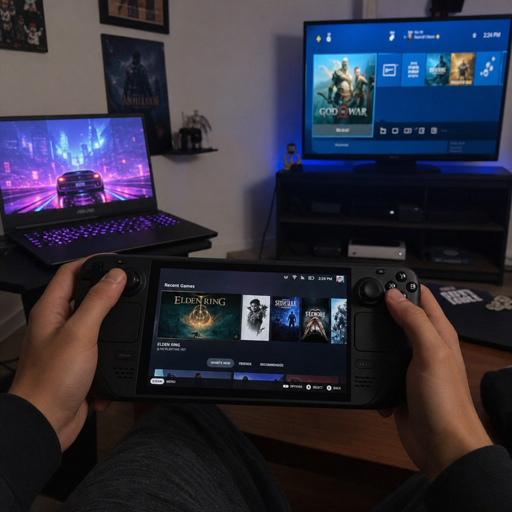
Handheld gaming PCs have changed portable play from a separate console habit into an extension of the same PC library many players already own. Instead of choosing only between handheld consoles, gaming laptops, and phones, buyers can now look at handheld gaming devices that run PC storefronts, cloud services, remote play apps, and controller-friendly launchers. The real value is not just “playing anywhere”; it is keeping more of your games, saves, settings, and subscriptions connected across screens.
What makes handheld gaming PCs different from traditional handheld consoles?
Handheld gaming PCs are portable computers built around integrated controls, a compact screen, and PC-style software access, while traditional handheld consoles usually rely on a more closed platform and a curated game library. That difference matters because gaming handheld PCs can often reach Steam, Xbox on PC, Epic Games Store, cloud gaming services, browser apps, emulators where legally used, productivity tools, and desktop settings from one device. The tradeoff is that flexibility can bring more setup, more updates, and more decisions than a plug-and-play console.
If you want a simple way to think about it, handheld consoles prioritize consistency, mobile gaming devices prioritize convenience, gaming laptops prioritize power and screen size, and handheld gaming PCs try to sit between all three. They are for players who want console-like comfort without giving up the open-ended nature of PC gaming. That makes cross-platform flexibility the feature that separates a good purchase from a frustrating one.
1. Your game library becomes the center of the device
The biggest advantage of modern gaming handhelds is that the device is usually not the ecosystem. Your account library is. A Steam-focused device, for example, can immediately feel familiar if you already own a large Steam collection, while a Windows-based handheld can appeal to players who split time across Xbox on PC, Epic, Steam, Battle.net, GOG, EA, Ubisoft Connect, and other launchers.
This library-first mindset changes the buying question. You are not only asking which handheld has the best screen or controls; you are asking where your purchased games live, how many of them support controllers, and whether your saves can move cleanly between a desktop, gaming laptop, TV setup, and handheld. Valve’s Steam Deck compatibility system is designed to show compatibility details in the Steam store and library, including whether reviewed games meet factors such as default resolution support, readable text, and usable default settings. (steamdeck.com)
For many players, the best handheld gaming PCs are the ones that reduce duplicate purchases. If a game you already own works well on the device, your handheld becomes a second form factor rather than a second platform. That can make the purchase feel more like expanding your existing setup than starting over.
2. Storefront choice is a practical form of freedom
On a traditional console, the store is usually part of the deal. On many gaming handheld PCs, especially Windows models, storefront choice is one of the core benefits. You can buy from different PC stores, claim subscription games, install launchers, and choose where a title makes the most sense based on saves, friends, pricing, mod support, achievements, or controller compatibility.
That freedom is especially useful when a game exists in multiple ecosystems. A player who owns an Xbox console may prefer Xbox Play Anywhere titles when available because Microsoft describes the program as letting players buy a digital game once and play it across Xbox consoles, Xbox PC, and supported gaming handheld devices at no extra cost. (developer.microsoft.com) A player who spends most of their time on Steam may prefer Steam for community layouts, verified status, and Steam Cloud. A player who collects free or discounted PC titles may value Epic Games Store support, especially for games with cloud saves.
The practical lesson is simple: choose stores intentionally. Do not buy a game on a handheld just because it is playable there. Buy it where your future self will want to continue it.
3. Cloud saves are the backbone of cross-platform play
Cross-platform flexibility falls apart if your progress gets trapped on one machine. Cloud saves are what let a handheld session become part of a larger gaming routine. When they work well, you can play a mission on the couch, continue on a gaming laptop during travel, and finish on a desktop without manually moving save files.
Steam Cloud supports save syncing across devices, and Valve’s documentation specifically discusses Steam Deck behavior, including syncing necessary files from Steam Cloud when launching on another device. (partner.steamgames.com) Epic also notes that many Epic Games Store titles support cloud saves, allowing the same save files to be used between different devices, and its launcher can filter a library to show games that support the feature. (epicgames.com) Xbox Play Anywhere similarly emphasizes cloud game saves and cross-progression across Xbox and PC experiences. (developer.microsoft.com)
Before you rely on cloud saves, check each game rather than assuming every version behaves the same. Some titles support cloud saves on one storefront but not another. Others separate console and PC saves, or support cross-progression only after account linking. A little checking before purchase can prevent the worst handheld problem: realizing your “portable” playthrough is actually isolated.
4. Operating system choice shapes the whole experience
The operating system is where handheld gaming devices start to feel very different from each other. SteamOS-style experiences emphasize a console-like interface built around Steam, quick access to games, and a controller-first feel. Windows handhelds offer broader launcher compatibility but may ask you to manage desktop dialogs, background apps, drivers, and game-specific settings more often.
Neither approach is automatically better. The right one depends on how you play. If your library is mostly Steam and you want a smoother handheld-first interface, a Steam Deck-style experience can be appealing. Valve’s Steam Deck OLED models, for instance, are listed with HDR OLED displays, gamepad controls, and NVMe storage options, reinforcing the idea of a dedicated handheld PC built around the Steam ecosystem. (steamdeck.com)
Windows handhelds are stronger when your game library is scattered across services. ASUS lists the ROG Ally as a Windows 11 handheld using AMD Ryzen Z1-series hardware, and Lenovo’s Legion Go is also positioned as a Windows 11 handheld gaming PC. (rog.asus.com) For players who want Game Pass, non-Steam launchers, anti-cheat compatibility, and general PC utility, Windows can be worth the added complexity.
5. Controller support decides whether a PC game feels portable
A game can technically run on a handheld and still feel wrong on a handheld. Tiny text, keyboard-heavy menus, awkward mouse input, and unoptimized UI scaling can turn a powerful device into a chore. That is why controller support and interface readability matter as much as frame rate.
Steam Deck Verified criteria highlight several of these comfort issues, including controller support, default resolution behavior, readable text, and appropriate default settings. (steamdeck.com) Those details are not just badges for enthusiasts. They help everyday players avoid games that demand too much tinkering on a small screen.
When comparing handheld consoles and handheld gaming PCs, this is one of the hidden differences. Console games are usually designed around fixed inputs. PC games vary widely. Before buying a game for handheld use, scan for controller support, text legibility comments, launcher requirements, and whether the game needs frequent typing. The smoother the input experience, the more likely you are to use the device daily rather than only as a novelty.
6. Windows handhelds can bridge PC, Xbox, and cloud ecosystems
Windows handhelds matter because they can act like compact PCs rather than single-purpose consoles. That means they can install PC launchers, run supported subscription titles, access browser services, pair with external controllers, and dock to larger displays. The flexibility is especially valuable if you move between Xbox, PC, and portable sessions.
Microsoft’s handheld work shows where this category is going. The Xbox handheld compatibility program is meant to help players understand when a game will work on a compatible handheld, and the Xbox app includes a curated channel for handheld-optimized games. (xbox.com) Microsoft also describes a Windows gaming full-screen experience where Windows can start a gaming home app as the launcher and run games full screen on gaming handheld devices. (support.microsoft.com)
ASUS’s ROG Xbox Ally messaging leans into the same idea: a Windows 11 handheld with access to supported PC games from Xbox and other game stores, plus an Xbox full-screen experience optimized for joystick and button controls. (rog.asus.com) This does not make Windows invisible, but it does show a push toward more console-like navigation on gaming handheld PCs.
7. Steam Deck-style devices simplify the Steam-first lifestyle
For players who mainly buy and play through Steam, a Steam Deck-style device can make handheld PC gaming feel less fragmented. The advantage is not only hardware. It is the tight relationship between the store, library, compatibility labels, controls, cloud saves, updates, and a controller-oriented interface.
That focus can be a strength. If your gaming life is mostly Steam, you may not need every launcher to feel equally native. You may care more about knowing which games are Verified or Playable, resuming quickly, downloading from your existing library, and using community controller layouts when a game needs help.
The limitation is that not every PC game fits neatly into that model. Some Windows-only launchers, anti-cheat systems, or non-Steam titles may require extra steps or may not work as expected. That is why Steam-first handheld gaming devices are often best for players who value a smoother core experience over maximum storefront reach.
8. Docking turns a handheld into a living-room or desk device
Cross-platform flexibility is not only about accounts. It is also about where the same machine can be used. Many handheld gaming PCs can connect to external displays, controllers, keyboards, mice, docks, storage, and chargers, making them useful beyond handheld mode.
This matters if you want one device to cover several scenarios. At home, you might dock it to a TV and use a wireless controller. At a desk, you might connect a monitor and keyboard for launcher management, downloads, mods, or light productivity. On the road, you return to handheld mode and continue the same installed games.
Docking does not turn every handheld into a high-end desktop replacement. Performance, thermals, resolution, and power settings still matter. But docking can make mobile gaming devices feel less temporary. Instead of being only a travel accessory, a handheld PC can become a flexible node in your gaming setup.
9. Game streaming fills the performance gap
Even the best handheld gaming PCs have limits. Newer AAA games can be demanding, storage can fill quickly, and battery life can drop under heavy loads. Cloud gaming and local streaming help by moving some of the workload to another machine or remote server.
NVIDIA lists GeForce NOW support through apps or supported browsers and includes gaming handheld devices in its download and setup materials. (nvidia.com) For the right player, that means a handheld can run lighter games locally and stream more demanding titles when the network is strong enough. Remote play from a home gaming PC or console can serve a similar purpose, especially inside the house.
Streaming is not a perfect replacement for local play. It depends on network quality, service availability, latency tolerance, account linking, and whether a specific game is supported. Still, it adds another layer of flexibility. A handheld with strong streaming options can feel more powerful than its local chip alone suggests.
10. Gaming laptops still win on power, but handhelds win on immediacy
Gaming laptops remain the better fit for players who want a larger screen, stronger cooling, higher power limits, keyboard-and-mouse play, and a more traditional PC workspace. They are also easier for competitive shooters, strategy games, creation tools, and long sessions where posture and visibility matter. If your main priority is maximum performance in a portable PC, a laptop is still hard to replace.
Handheld gaming PCs win in a different way. They reduce friction. You can play from a couch, bed, train seat, hotel room, or lunch break without setting up a laptop, mouse, charger, and flat surface. That immediacy is why many players use gaming handhelds even when they own stronger machines.
The best setup may involve both. A gaming laptop can handle demanding games, work tasks, and long sessions, while the handheld covers shorter sessions and lighter titles. With cloud saves, remote play, and shared storefronts, the two devices can complement each other instead of competing.
11. Storage planning protects the portable experience
Storage is one of the most practical parts of owning handheld gaming devices. PC games can be large, updates can be frequent, and multiple launchers may create separate folders, shader caches, and temporary files. A handheld with limited internal storage can feel spacious on day one and cramped after a few modern installs.
When comparing handheld gaming PCs, look beyond the headline storage number. Ask whether storage is upgradeable, whether the device supports microSD expansion, how easy it is to manage installed games, and whether your favorite launchers allow flexible install locations. Also think about your play style. If you rotate between a few indie games, older titles, and cloud streaming, modest storage may be fine. If you want several large AAA games installed at once, storage planning becomes central.
A useful approach is to separate games by use case:
- Keep daily games and performance-sensitive titles on the fastest internal storage.
- Put smaller, slower-paced, or less demanding games on expandable storage if the device supports it.
- Uninstall completed games quickly instead of treating the handheld like an archive.
- Use cloud saves before removing a game, and confirm the sync completed.
- Leave free space for patches, shader updates, screenshots, and system updates.
Good storage habits make a handheld feel lighter. Bad storage habits make it feel like a tiny desktop that is always asking for maintenance.
12. Battery life depends on the game, not just the device
Battery expectations are often where handheld buyers get surprised. A handheld may last a comfortable amount of time in a lightweight 2D game and drain quickly in a demanding 3D title. Screen brightness, refresh rate, wireless connections, power mode, frame-rate caps, and background apps can all change the result.
That is why battery capacity alone does not tell the whole story. Lenovo’s Legion Go listing, for example, references a 49.2Wh battery capacity, but real-world endurance still depends on game load and settings. (lenovo.com) Instead of chasing one universal battery number, think in profiles: low-power indie mode, balanced travel mode, plugged-in performance mode, and streaming mode.
For portable play, frame-rate caps are especially useful. Many games feel good at stable, moderate frame rates on a small screen, and chasing maximum frames can waste power. Lowering resolution, reducing shadows, limiting background launchers, and using sleep or suspend carefully can also make handheld gaming PCs feel more reliable away from outlets.
13. Cross-play and cross-progression are not the same thing
Many players use “cross-platform” as one idea, but it includes several different features. Cross-play means players on different platforms can play together. Cross-progression means your unlocks, saves, or account progress move between platforms. Cross-buy means one purchase gives you access on more than one platform. Cloud saves may support progression within one store ecosystem without supporting every console or launcher version.
This distinction matters when buying games for gaming handhelds. A multiplayer game may support cross-play with friends on console but keep progression separate. Another game may share progress through a publisher account but require separate purchases. Xbox Play Anywhere is one clearer example of cross-buy inside the Xbox ecosystem, where eligible digital games can be played across Xbox and Windows PC at no additional cost. (developer.microsoft.com)
Before you buy, check what kind of “cross” feature the game actually offers. The best handheld experience comes from matching the feature to your need. Playing with friends, continuing a save, and avoiding a second purchase are related goals, but they are not identical.
14. Handheld PCs reward players who like light customization
Handheld gaming PCs are flexible because they are adjustable. That can mean changing power profiles, mapping back buttons, tweaking graphics settings, choosing launchers, installing updates, setting frame caps, managing cloud saves, or using community controller layouts. For some players, that customization is part of the fun. For others, it is friction.
The key is to customize only where it improves the experience. You do not need to optimize every game perfectly. Start with stable defaults, then change one thing at a time: resolution, frame cap, graphics preset, control layout, or power mode. If the game already feels good, stop tuning and play.
This is where handheld consoles still have an advantage. They hide complexity. Handheld gaming PCs expose more of it, but they also let you shape the device around your library. If you enjoy that balance, the category can feel liberating.
15. The best device is the one that matches your ecosystem
Choosing between handheld consoles, gaming handheld PCs, mobile gaming devices, and gaming laptops becomes much easier when you start with your ecosystem. Hardware reviews matter, but your accounts, friends, saves, subscriptions, and favorite genres matter more. A powerful handheld is not the best choice if it makes your library awkward.
Use this buying checklist before narrowing your options:
- Primary library: Are most of your games on Steam, Xbox on PC, Epic, GOG, or another launcher?
- Must-play titles: Do your top games support controller input, readable text, and handheld-friendly settings?
- Save continuity: Do the versions you own support cloud saves or cross-progression?
- Multiplayer needs: Do your friends play on PC, Xbox, PlayStation, Nintendo Switch, or mobile?
- Setup tolerance: Do you want console-like simplicity, or are you comfortable with Windows maintenance?
- Travel pattern: Will you play near outlets, on short breaks, during flights, or mostly at home?
- Screen preference: Do you care more about size, refresh rate, OLED contrast, or battery efficiency?
- Docking plans: Will the handheld also connect to a TV, monitor, keyboard, or external controller?
- Budget beyond device: Will you need a case, dock, charger, storage card, screen protector, or subscription?
Answering these questions will usually point you toward the right class of device before you compare spec sheets. A Steam-heavy player, a Game Pass subscriber, a cloud gaming fan, and a competitive PC player may all need different solutions.
How should you start building a flexible handheld setup?
Start with the games you already play, not the device you are most excited about. List your top ten titles, note where you own them, check handheld compatibility, confirm cloud saves, and decide whether you need Windows, Steam-focused simplicity, cloud streaming, or a gaming laptop companion. That process keeps the purchase grounded in your real habits instead of marketing promises.
Once you have the device, build slowly. Install a small group of games that represent different use cases: one quick indie game, one longer single-player game, one multiplayer title, one cloud or remote-play option, and one demanding benchmark-style game. Tune those first, learn the device’s limits, and then expand your library.
The promise of handheld gaming PCs is not that one gadget replaces every other screen. It is that your gaming life can become less tied to one room, one store, or one form factor. When your library, saves, controls, and services work together, handheld gaming devices become more than portable hardware; they become the most flexible doorway into the games you already care about.