Google’s new Google AI Edge Foresight puts a fresh spotlight on the fast-growing world of AI meeting notes. It is a local-first Mac app positioned as a competitor to Granola, the popular AI note-taking tool, and it leans into a bigger shift: people want productivity software that is useful, private, and available even when the internet is not. If you arrived here after searching for a “google granola competitor” and expected healthy snacks, the naming overlap is real—but this story is about work notes, not organic granola.
What did Google release, and why does it matter?
Google released Google AI Edge Foresight, a Mac meeting note-taking app that can work completely offline and is designed to capture notes across apps, including in-person meetings. TechCrunch reported the launch on October 8, 2026, describing it as a competitor to Granola and other AI note-takers, with on-device AI at the center of the experience.
That matters because AI note-taking has moved beyond simple transcription. The best tools now try to help people stay present during conversations, capture decisions, surface action items, and answer questions from meeting context. In that sense, the “granola market” people are talking about here is not the grocery aisle filled with granola brands; it is the crowded software market for tools that turn messy conversations into usable knowledge.
A local-first approach changes the pitch
The most notable part of Google AI Edge Foresight is not simply that Google made another AI app. It is that the app is built around local-first behavior, meaning core work can happen on the user’s device rather than depending entirely on cloud processing. TechCrunch reports that the app can work completely offline using Google’s on-device EmbeddingGemma 2 model, and that Google’s FAQ says it is optimized for Apple Silicon.
For users, this has a practical benefit: meeting notes can remain accessible when traveling, working from a weak connection, or sitting in a room where Wi-Fi is unreliable. For companies, it also raises a bigger question about control. Teams are increasingly aware that meeting transcripts may include customer details, hiring discussions, strategy, financial planning, and other sensitive material. A local-first architecture does not automatically solve every privacy or compliance issue, but it does make “where does the data go?” a central product question instead of an afterthought.
Google has also been building a broader AI Edge ecosystem for running AI on devices, including tools for on-device machine learning and local generative AI use cases. Foresight fits neatly into that direction: instead of treating local AI as a technical demo, it applies the idea to a daily work habit.
How Foresight compares with Granola
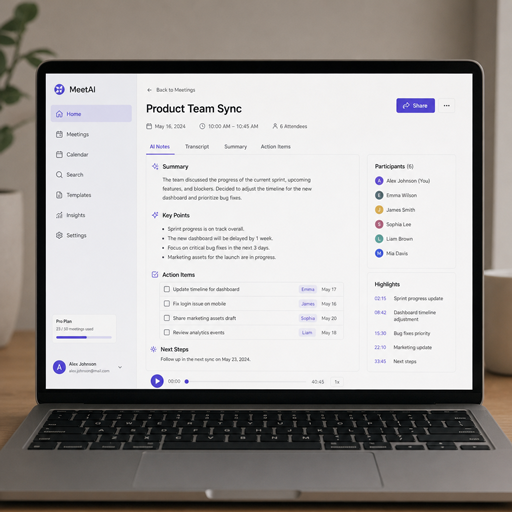
Foresight appears to borrow from the workflow that helped make Granola popular: it supports manual note-taking alongside AI-generated notes. TechCrunch says Google’s app has a split-screen view with shorthand notes on one side and AI-generated notes on the other, plus the ability to view a transcript and chat with a Gemma-powered assistant.
Granola’s own Google Play listing describes it as an AI meeting notes app that transcribes conversations, creates shareable summaries, highlights decisions and action items, and lets users chat with notes. In other words, both tools are aimed at people who want to participate in a conversation instead of typing every word.
A simple comparison helps show where the new Google app is trying to stand out:
|
Area |
Google AI Edge Foresight |
Granola |
|---|---|---|
|
Core use |
Meeting capture, AI notes, transcripts, note chat |
Meeting transcription, summaries, decisions, action items |
|
Main positioning |
Local-first and offline-capable on Mac |
Polished AI notepad for busy meetings |
|
Manual notes |
Yes, with split-screen note workflow |
Yes, designed around staying present while notes are captured |
|
Knowledge base |
Can use uploaded documents such as PDFs, Google Docs, Office files, Markdown, text, and bookmarks |
Focused on searchable and shareable meeting notes |
|
Best fit |
Users curious about on-device AI and offline access |
Users who want a familiar, dedicated AI notetaker workflow |
The key difference is not that one product “takes notes” and the other does something entirely different. The key difference is where each product wants the user to place trust: in a dedicated startup experience, or in Google’s local-first AI stack.
Why are AI meeting note-takers getting so competitive?
AI meeting note-takers are competitive because meetings are where valuable work information is created—and where a lot of it is lost. Decisions get buried in long calls, action items are missed, and people often choose between listening carefully or documenting everything. Tools like Granola, Foresight, Otter, Fireflies, and built-in meeting assistants are all chasing the same promise: make conversations more useful after they end.
TechCrunch noted that the meeting note-taker space is crowded, with companies such as Wispr and Calendly releasing their own note-taking tools and Superhuman acquiring Fathom. That wave makes sense. Meeting notes are not a niche feature anymore; they are becoming part of the productivity layer that sits across calendars, video calls, documents, customer records, and project management systems.
The real opportunity is not just transcription. Raw transcripts are often too long to use. The value comes when software can identify what changed, what needs to happen next, who owns the follow-up, and what background documents are relevant.
The knowledge base feature may be the bigger story
Foresight’s support for uploaded documents could make it more than a meeting recorder. According to TechCrunch, users can upload PDFs, Google Docs, Microsoft Office files, plain text, Markdown, and web bookmarks to build a knowledge base, then use meeting notes and documents so the app can answer questions when related topics come up.
That changes the product from “remember what was said” to “connect what was said to what we already know.” Imagine a product manager in a roadmap meeting asking the assistant to pull details from a requirements document. Or a consultant checking whether a client’s comment matches the scope in a proposal. Or a founder reviewing investor feedback against an internal planning memo.
This is where AI note-taking starts to feel less like a recording tool and more like an active work companion. The more context a tool can safely use, the more helpful it becomes. The challenge is making that context available without making users feel they have lost control of their information.
What users should look for before switching tools
A new release from Google will naturally attract attention, but it does not mean every Granola user should immediately switch. The right choice depends on your workflow, devices, privacy needs, and how deeply a tool fits into your day.
Use this checklist before choosing a meeting note app:
- Offline access: Can the app still capture, search, or summarize notes when you have no connection?
- Data handling: Does the product clearly explain what is stored locally, what is uploaded, and what can be deleted?
- Platform fit: Does it support the computer, phone, calendar, and meeting tools you actually use?
- Manual note workflow: Can you add shorthand, emphasis, or context while the AI captures the conversation?
- Summary quality: Does it separate decisions, follow-ups, open questions, and background context?
- Knowledge retrieval: Can you ask questions across past notes or connected documents?
- Sharing controls: Can you decide what teammates, clients, or attendees can see?
- Reliability: Does the tool recover gracefully from crashes, poor audio, or interrupted connectivity?
Think of it the way you would compare breakfast options. The best healthy breakfast is not just the trendiest bowl or the prettiest packaging; it is the one that fits your routine and keeps you going. Likewise, the best AI notetaker is the one you will actually trust in the meetings that matter.
The “Granola” name creates a funny SEO overlap
There is an amusing side effect to all of this: “Granola” is both a food term and the name of a productivity app. That means searches around a “google granola competitor” can sound like Google has entered the healthy snacks business. It has not.
Still, the overlap is a useful reminder of how language shapes discovery. In food, people compare organic granola, healthy breakfast ideas, healthy snacks, and familiar granola brands. In software, people compare note quality, privacy, integrations, local AI, and collaboration. The words may collide, but the buying criteria are completely different.
For publishers and marketers, that distinction matters. If you are writing about the software, make the context clear early. If you are writing about the grocery category, do not borrow tech-news phrasing just to chase traffic. Readers should know within a sentence whether they are reading about breakfast options or AI meeting notes.
What this signals for the future of productivity apps
Google AI Edge Foresight suggests that the next phase of productivity software may be less cloud-only and more hybrid. Cloud AI is powerful, but on-device AI offers speed, availability, and a different trust model. The likely future is not one approach replacing the other; it is apps choosing the right mix for the task.
For everyday users, that could mean meeting assistants that summarize locally, search personal notes privately, and only use cloud services when deeper reasoning or collaboration is needed. For teams, it could mean more nuanced policies: some meetings may be fine for cloud processing, while others require stricter controls.
Google’s move also pressures smaller AI note-taking companies to keep differentiating. A startup can still win with better design, faster workflows, stronger integrations, or a clearer audience focus. But when a platform company enters the space with a local-first product, the baseline expectations rise.
The takeaway
Google AI Edge Foresight is important because it brings local-first AI into a practical, high-frequency use case: meeting notes. It does not make Granola irrelevant, but it does make the category more interesting by emphasizing offline use, on-device processing, and document-aware assistance.
If you are evaluating AI meeting tools, do not choose based on hype alone. Look at how the app handles your data, how well it supports your actual meetings, and whether its summaries help you act faster afterward. And if you came for organic granola, healthy snacks, or healthy breakfast inspiration, this particular Google Granola competitor is not edible—but it may still make your workday a little easier to digest.