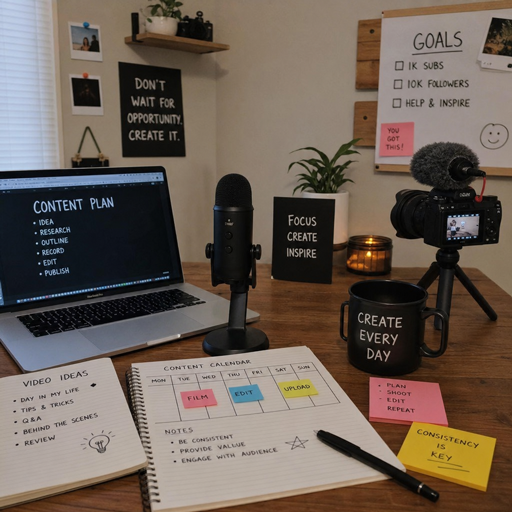
The creator economy rewards people who can make, publish, measure, and monetize consistently. The right stack of creator tools helps a digital creator spend less time juggling files and more time producing useful content, serving an audience, and building revenue streams. Goldman Sachs has estimated the creator economy could grow from about $250 billion to $480 billion by 2027, which makes a focused toolset more than a convenience; it is business infrastructure.
Which creator tools should you prioritize first?
Start with the tools that protect your workflow: planning, creation, publishing, audience ownership, analytics, and monetization. A polished tech stack is not about collecting every new app; it is about removing friction from the repeatable work of content creation. If a tool saves time, improves quality, clarifies decisions, or helps you earn more reliably, it deserves consideration.
For most creators, the best approach is to build in layers. Choose a simple system first, then upgrade as your audience, workload, and income streams grow.
1. Content planning tools keep ideas from disappearing
Every creator needs a place to capture ideas before they vanish into a notes app, voice memo, or forgotten text thread. A planning tool can be as simple as a spreadsheet or as advanced as a full editorial calendar, but it should help you track topics, formats, deadlines, hooks, keywords, and publishing status.
This matters because creative output depends on momentum. When you sit down to make a video, newsletter, podcast, or carousel, you should not have to start from zero. A good planning system gives you a bank of tested ideas, audience questions, seasonal themes, brand obligations, and repurposing opportunities.
Look for creator tools that let you:
- Sort ideas by platform, content pillar, or campaign
- Assign due dates and production stages
- Store notes, scripts, links, and reference material
- Mark content as drafted, edited, scheduled, published, or repurposed
- Review which ideas are tied to business goals
Planning software is the quiet backbone of a creator business. It turns scattered inspiration into a repeatable production pipeline.
2. Research and keyword tools sharpen your content strategy
Creators often rely on instinct, but research tools help you understand what people are already searching, asking, watching, and sharing. For SEO-driven blogs, video titles, podcast topics, or social captions, research tools reveal the language your audience actually uses.
These tools are especially useful when you want content to work beyond the first day it is published. Search-informed topics can attract viewers, readers, or buyers over time, while audience research helps you avoid content that sounds clever but answers no real need.
Useful research inputs include:
- Search keywords and related questions
- Competitor topics and content gaps
- Trending conversations in your niche
- Comments, reviews, and community discussions
- Frequently repeated customer objections
The goal is not to let data erase creativity. The goal is to aim your creative software, scripts, visuals, and ideas toward problems your audience already cares about.
3. Writing and scripting tools turn ideas into publishable assets
Even visual creators need words. Scripts, captions, newsletters, blog posts, product descriptions, community prompts, and brand pitch emails all rely on clear writing. A strong writing tool helps you draft faster, organize sections, polish tone, and adapt one idea across multiple channels.
For video creators, scripting tools can prevent rambling and make editing easier. For newsletter writers, they can help shape a stronger opening and cleaner call to action. For influencers, they can keep sponsored content aligned with both brand requirements and audience trust.
The best writing tools support your voice rather than flatten it. Use them to outline, rewrite, summarize research, or create caption variations, but keep final judgment human. Audiences follow creators for perspective, not just information.
4. Design tools make your brand recognizable
Visual consistency helps people recognize your content before they read your name. Design tools let you create thumbnails, social graphics, media kits, lead magnets, slide decks, digital products, and promotional assets without rebuilding everything from scratch.
For a digital creator, templates are not a shortcut to generic work when used well. They are a way to protect creative energy. A strong template system keeps fonts, colors, spacing, image treatments, and layout choices consistent while still leaving room for experimentation.
Prioritize design tools that include:
- Reusable brand templates
- Easy resizing for different creator platforms
- Collaboration or approval features
- Simple export options
- Organized folders for assets and campaigns
Good design does more than look polished. It reduces confusion, improves perceived professionalism, and makes every post feel connected to a bigger brand.
5. Photo and video editing tools raise production quality
Video and image editing software sits at the center of modern content creation. Whether you make short-form videos, tutorials, interviews, product demos, vlogs, or educational explainers, editing tools shape pacing, clarity, and emotional impact.
You do not need the most complex creative software on day one. You need tools that match your current format and skill level. A creator making daily short videos may need fast trimming, captions, templates, and mobile editing. A course creator may need screen recording, audio cleanup, chapter markers, and polished exports.
The most useful editing features often include:
- Quick cuts and timeline editing
- Auto-captioning or caption styling
- Color correction and audio cleanup
- B-roll, overlays, and transitions
- Format presets for multiple platforms
Production quality should support the message, not bury it. Clear sound, clean framing, and tight editing usually matter more than expensive effects.
6. Audio tools help creators sound trustworthy
Audio quality can make or break podcasts, webinars, voiceovers, online courses, and talking-head videos. Viewers may tolerate imperfect lighting, but distracting background noise or uneven volume quickly erodes attention.
Audio tools help record, clean, edit, transcribe, and repurpose spoken content. They are valuable for podcasters, educators, coaches, livestreamers, and creators who rely on interviews or commentary. Even if you publish mostly video, better audio can make your content feel more professional immediately.
A practical audio stack may include a recording app, noise reduction, transcript generation, and a simple editing workflow. Transcripts also make it easier to create blog posts, captions, quote graphics, newsletter snippets, and searchable show notes from one recording.
7. Scheduling and publishing tools protect consistency
Consistency is easier when publishing does not depend on being online at the perfect moment. Scheduling tools let you batch content, preview feeds, coordinate campaigns, and post across multiple creator platforms from one place.
These tools are especially helpful for creators balancing client work, brand deals, family responsibilities, or a full-time job. Instead of switching context every day, you can reserve focused time for production and let the system handle distribution.
When comparing scheduling tools, consider whether they support your main channels, caption variations, approval workflows, link tracking, and calendar views. Also check whether the tool encourages thoughtful publishing rather than simply pushing the same post everywhere. The best schedule respects each platform’s format and audience behavior.
8. Link-in-bio and landing page tools connect attention to action
Social attention is valuable, but it needs somewhere to go. Link-in-bio pages and simple landing page builders help creators direct followers to newsletters, products, services, affiliate links, booking pages, communities, and featured content.
This category matters because most creators have multiple goals at once. A single audience member may want to watch your latest video, download a free resource, buy a template, join a community, or contact you for a collaboration. A clear landing page reduces friction and gives people obvious next steps.
Linktree’s Creator Commerce Report 2024, based on insights from 1,562 users in its creator community, reflects how central monetization and content pathways have become for creators using link hubs and commerce features.
Keep the page simple. Too many links can dilute attention, while a small set of prioritized actions can turn profile visits into subscribers, customers, or qualified leads.
9. Email and newsletter tools build owned audience value
Social platforms are powerful, but creators do not fully control algorithms, reach, or account access. Email tools give you a more direct line to people who actively want to hear from you. That makes newsletters one of the most important creator economy tools for long-term resilience.
A newsletter can support education, storytelling, product launches, affiliate recommendations, event promotion, sponsorship inventory, and community building. It also gives you a place to develop ideas in more depth than a short caption allows.
Choose email tools that make it easy to segment subscribers, create signup forms, automate welcome sequences, and track engagement. Even a simple monthly newsletter can become a valuable asset if it consistently delivers useful ideas and clear next steps.
10. Community tools deepen the relationship beyond content
Content attracts attention; community creates participation. Community platforms give followers a place to ask questions, meet each other, attend events, share wins, and stay connected between posts.
This does not mean every creator needs a private community immediately. Communities require moderation, structure, and ongoing energy. But for educators, niche experts, membership creators, coaches, and fan-driven brands, community tools can increase loyalty and create a stronger sense of belonging.
Useful community features include member profiles, discussion channels, event hosting, direct messages, content libraries, and moderation controls. The key is to define the purpose clearly. A community built around accountability, learning, access, or shared identity is more likely to thrive than one built only because the creator wants another channel.
11. Monetization tools turn influence into income
Influencer tools should support revenue without compromising trust. Monetization tools can include digital product platforms, course builders, affiliate dashboards, membership systems, storefronts, tipping features, sponsorship management, and booking tools.
The right model depends on your audience and expertise. A designer may sell templates. A fitness creator may sell programs. A business educator may sell workshops, consulting, or a paid newsletter. A lifestyle creator may combine affiliate income, brand partnerships, and merchandise.
Before choosing monetization software, clarify three things:
- What problem your audience will pay to solve Revenue works best when the offer is tied to a clear need, desire, or transformation.
- How much support the buyer expects A downloadable guide, live cohort, private membership, and consulting package all require different systems.
- How the tool handles payments and delivery Make sure the buying experience is simple, secure, and easy for you to manage.
Monetization tools should make purchasing feel natural, not pushy. The stronger the audience relationship, the more important it is to sell with clarity and restraint.
12. Analytics tools show what is actually working
Without analytics, creators often overvalue loud feedback and undervalue quiet performance. A post with fewer comments may drive more email signups. A video with modest views may attract better leads. A newsletter with a smaller list may produce stronger sales than a larger but passive audience.
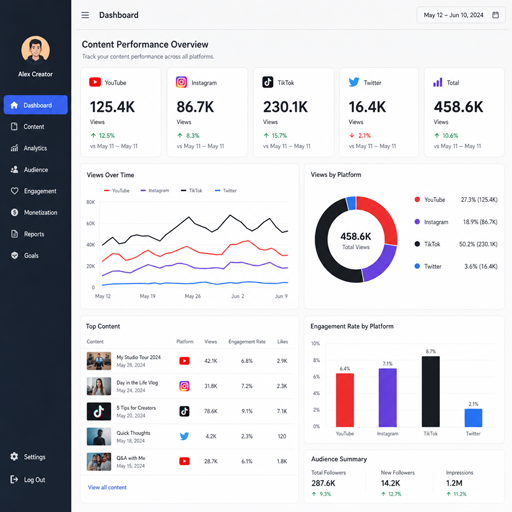
Analytics tools help you evaluate performance across reach, retention, clicks, saves, shares, watch time, conversions, and revenue. They also help you spot patterns: which hooks work, which formats retain attention, which topics attract buyers, and which platforms deserve more effort.
Track a small set of metrics that match your goals:
- Awareness: reach, impressions, views, follower growth
- Engagement: comments, replies, saves, shares, watch time
- Audience ownership: email signups, community joins, downloads
- Revenue: sales, affiliate clicks, bookings, paid memberships
- Efficiency: time spent, cost per asset, content reused
The purpose of analytics is not to chase every spike. It is to make better creative decisions with less guesswork.
A simple starter stack for new creators
If you are early in your creator journey, keep the stack lean. Too many tools can create busywork before you have a clear content rhythm. Start with essentials, then add more advanced creator platforms and influencer tools when a real bottleneck appears.
A practical starter stack might include:
- One planning tool for ideas and deadlines
- One writing or scripting tool for drafts
- One design tool for thumbnails and graphics
- One editing tool for your main format
- One scheduling tool for consistent publishing
- One link hub or landing page
- One email tool for audience ownership
- One analytics dashboard or tracking spreadsheet
As your business grows, add specialized tools for sponsorships, digital products, community, automation, accounting, and customer support. Each addition should solve a specific problem, not simply make your workflow look more advanced.
Choose tools that fit your creative business
The best creator economy tools are the ones you will actually use. A solo creator, agency-backed influencer, podcaster, educator, streamer, and newsletter writer may all need different systems, even if they share the same broad goals.
Before paying for another platform, ask whether it improves quality, saves time, increases consistency, strengthens audience ownership, or supports revenue. If it does none of those things, it may be a distraction. If it does one of them very well, it may become a core part of your creator business.
Creator tools should make the creative process lighter, not more complicated. Build a stack that helps you plan clearly, publish consistently, learn from the data, and give your audience a reason to come back.