Remote work runs smoothly when people can communicate clearly, manage tasks visibly, share files securely, and stay focused without constant status chasing. The right mix of remote work tools creates a practical system for planning, collaboration, documentation, meetings, and day-to-day execution. This list breaks down the essential categories of work from home tools and explains what each one helps your team accomplish.
Which remote work tools does a productive team actually need?
A productive remote team does not need every app on the market. It needs a reliable digital workspace where people know what to do, where to find information, how to communicate, and how progress is tracked. The best setup usually combines remote project management, messaging, video meetings, cloud storage, shared documentation, scheduling, security, and focus-supporting tools.
Use the list below as a practical remote work productivity tools comparison. Instead of choosing tools by popularity alone, compare each category by the problem it solves, how often your team will use it, and whether it reduces or adds complexity.
1. Project management platforms keep work visible
Remote project management tools are the backbone of distributed work because they turn scattered conversations into visible workflows. When everyone can see tasks, owners, deadlines, dependencies, and status updates, fewer things get lost in private messages or endless meetings.
A strong project management platform helps teams plan campaigns, assign client work, track product launches, manage recurring operations, and keep cross-functional projects moving. It also gives managers a clearer view of capacity without requiring constant check-ins.
Look for features such as:
- Task ownership: Every task should have a clear person responsible for moving it forward.
- Due dates and priorities: Teams need to know what matters now and what can wait.
- Multiple views: Boards, lists, calendars, and timelines help different work styles.
- Comments and attachments: Context should live with the work, not in a separate thread.
- Templates: Repeatable workflows save time for onboarding, reporting, approvals, and launches.
Remote project management works best when the team agrees on simple rules. For example, define what each status means, when a task should be updated, and where final decisions are recorded. Without those agreements, even excellent software can become a messy digital bulletin board.
2. Team messaging tools reduce inbox overload
Messaging apps are essential remote collaboration tools because they replace many slow email exchanges with faster, more focused communication. They are especially useful for quick updates, team announcements, lightweight questions, and informal culture-building.
However, messaging can also become distracting if every discussion happens in real time. The best teams create channels for specific functions, projects, clients, or departments so conversations stay organized. They also set expectations around response times, especially across time zones.
Good team messaging habits include:
- Use public channels when the information may help others.
- Use direct messages for sensitive or truly one-to-one topics.
- Move complex decisions into a task, document, or meeting when needed.
- Pin important resources so they do not disappear in the stream.
- Avoid treating every message as urgent.
Team management software often includes built-in messaging, but dedicated chat tools can be more flexible for fast-moving teams. The key is to prevent chat from becoming the default home for final decisions. Important outcomes should be summarized somewhere more permanent.
3. Video meeting software supports human connection
Video calls remain one of the most important work from home tools because remote teams still need face-to-face interaction. A short meeting can resolve ambiguity, build trust, and help people read tone more easily than text alone.
The goal is not to schedule more meetings. The goal is to use video intentionally for work that benefits from conversation, such as kickoff calls, strategy reviews, creative discussions, one-on-ones, hiring interviews, training, and conflict resolution.
A reliable video meeting tool should offer:
- Stable audio and video quality
- Screen sharing for reviews and walkthroughs
- Recording options when appropriate
- Calendar integrations
- Waiting rooms or access controls
- Chat, reactions, and hand-raising features
To keep meetings productive, pair the tool with clear meeting norms. Share an agenda in advance, identify the decision needed, invite only the necessary people, and end with owners and next steps. Video software becomes a productivity tool only when meetings are designed well.
4. Cloud storage keeps files accessible and organized
Remote teams need a shared place for documents, images, presentations, contracts, spreadsheets, and creative files. Cloud storage makes those assets accessible from different locations while reducing the risk of files living only on one person’s device.
Strong digital workspace solutions usually include cloud storage with permissions, folder structures, search, version history, and sharing controls. These features help teams collaborate without creating endless duplicate files named with confusing labels like “final,” “final2,” and “final-approved.”
A useful folder structure might include:
- Company operations
- Department folders
- Client or project folders
- Templates and brand assets
- Meeting notes and reports
- Archived work
The practical benefit is simple: people spend less time asking where something is and more time using it. For best results, document naming conventions and access rules early. A messy drive can slow a remote team just as much as a messy office.
5. Shared documents create a single source of truth
Documentation tools help remote teams capture decisions, processes, plans, policies, and institutional knowledge. This matters because distributed teams cannot rely on hallway conversations or someone being available in the next room.
Shared documents are useful for standard operating procedures, onboarding guides, meeting notes, project briefs, editorial calendars, product requirements, sales playbooks, and internal wikis. They give people a place to learn, contribute, and reference information asynchronously.
The strongest documentation systems are easy to search and simple to update. If the tool is too complicated, people may avoid using it. If no one owns maintenance, information becomes outdated quickly.
Use documentation tools for:
- Explaining repeatable processes
- Recording decisions after meetings
- Creating onboarding paths for new hires
- Centralizing company policies
- Building knowledge bases for departments
- Reducing repeat questions
Remote work productivity improves when people can answer common questions without interrupting a teammate. Good documentation is not just storage; it is an operating system for how the team works.
6. Digital whiteboards make brainstorming more visual
Remote collaboration tools should support more than messages and documents. Digital whiteboards give teams a visual space for brainstorming, planning, mapping customer journeys, organizing ideas, and facilitating workshops.
These tools are especially helpful for design teams, product teams, marketers, consultants, educators, and leaders running strategy sessions. They allow people to contribute sticky notes, diagrams, comments, votes, and sketches in a shared canvas.
A digital whiteboard can help with:
- Sprint planning
- Mind mapping
- Process mapping
- Retrospectives
- Workshop exercises
- Customer journey mapping
- Content planning
The main advantage is participation. In a traditional meeting, the loudest voices may dominate. In a digital whiteboard session, everyone can add ideas at the same time, giving quieter team members more room to contribute.
To make whiteboarding sessions effective, prepare the board before the meeting. Add sections, prompts, time boxes, and instructions so people know exactly where to participate. Afterward, move decisions and action items into your project management platform.
7. Calendar and scheduling tools protect time
Remote work can blur the boundaries between focus time, meetings, and personal responsibilities. Calendar and scheduling tools help teams coordinate availability while reducing back-and-forth messages about meeting times.
For distributed teams, scheduling software is especially valuable when people work across time zones. A good tool makes availability visible, converts time zones clearly, and gives invitees a simple way to book approved time slots.
Use scheduling tools to manage:
- Client calls
- Candidate interviews
- Internal one-on-ones
- Office hours
- Sales consultations
- Project check-ins
- Training sessions
The productivity benefit is not just easier booking. It is better time protection. Teams can block deep work, set meeting windows, create buffer time, and avoid overloading calendars with fragmented obligations.
A healthy remote calendar system should include meeting-free blocks, clear working hours, and shared expectations around urgency. Without these norms, remote work tools can accidentally create a culture of constant availability.
8. Password managers improve security without slowing teams down
Password managers are essential work from home tools because remote employees often access many cloud-based systems. Reusing passwords, sharing credentials through chat, or storing logins in personal notes can create unnecessary risk.
A password manager lets individuals and teams store, generate, and share strong credentials more safely. It also makes onboarding and offboarding easier because access can be granted or removed in a more controlled way.
Key capabilities to consider include:
- Secure password sharing
- Strong password generation
- Multi-factor authentication support
- Role-based access
- Admin controls
- Shared vaults for team accounts
Security tools should feel practical, not punitive. When secure behavior is easy, people are more likely to follow it. For remote teams, a password manager is a simple way to support better habits without creating extra administrative friction.
9. Time tracking tools clarify effort and capacity
Time tracking is useful for teams that bill clients, manage retainers, estimate project costs, or need better visibility into workload. It can show how long tasks actually take compared with expectations, which helps improve planning over time.
This type of tool should be used carefully. The goal is not to micromanage every minute. The goal is to understand where time goes, price work more accurately, balance capacity, and identify bottlenecks.
Time tracking can support:
- Client billing
- Project estimates
- Resource planning
- Profitability reviews
- Workload balancing
- Personal productivity awareness
For trust-based remote teams, transparency matters. Explain why time is being tracked, how the information will be used, and what level of detail is expected. When positioned well, time tracking can help protect employees from overload rather than create pressure.
10. Focus and distraction-blocking apps support deep work
Remote workers face different distractions than office workers: household noise, personal errands, social media, notification overload, and the temptation to multitask. Focus tools help people create boundaries and protect attention during high-value work.
These tools may include website blockers, focus timers, ambient sound apps, notification managers, and personal productivity dashboards. They are most useful when paired with intentional routines rather than treated as a complete solution.
Simple focus practices include:
- Block distracting websites during deep work sessions.
- Silence nonessential notifications.
- Use timers for focused work intervals.
- Batch email and chat checks.
- Reserve the first part of the day for priority work.
- Create a shutdown routine at the end of the workday.
For remote teams, focus is a shared responsibility. If the culture rewards instant responses all day, individual focus apps will not solve the problem. Leaders should model reasonable response expectations and protect uninterrupted work time.
11. Automation tools remove repetitive busywork
Automation tools connect apps and trigger routine actions without manual effort. For remote teams, this can reduce repetitive administrative work and keep information moving between systems.
Examples include automatically creating tasks from form submissions, sending notifications when a document is approved, moving leads into a customer relationship management system, or updating a spreadsheet when a project status changes.
Automation is most helpful for processes that are:
- Repetitive
- Rule-based
- High volume
- Easy to define
- Prone to manual errors
- Shared across multiple tools
Start small. Automating a broken process often creates faster confusion, not better results. First, clarify the workflow. Then automate the parts that are predictable and low-risk.
A good automation setup saves time without hiding accountability. Someone should still own the workflow, review outputs, and update automations when tools or processes change.
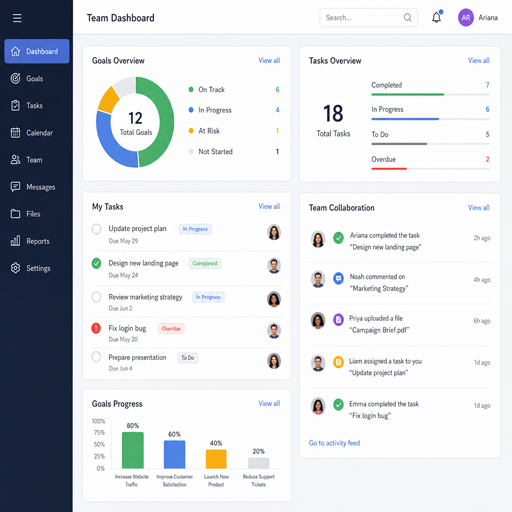
12. Team management software aligns people, goals, and performance
Team management software helps leaders coordinate people, priorities, goals, feedback, and performance conversations. While project management focuses on work, team management focuses more on the people doing the work.
This category can include tools for one-on-ones, goal tracking, employee engagement, performance reviews, recognition, capacity planning, and internal communications. For remote teams, these systems can create structure around conversations that might otherwise happen inconsistently.
Useful team management features include:
- Goal visibility
- One-on-one meeting notes
- Feedback tracking
- Recognition features
- Employee surveys
- Role and responsibility clarity
- Workload insights
The most important benefit is consistency. Remote employees should not have to guess how they are doing, what their priorities are, or when they will receive feedback. A clear team management system helps managers support people intentionally instead of reactively.
13. Virtual private network and device tools support safer access
Remote work often happens across home networks, coworking spaces, hotels, and public Wi-Fi. Security-focused remote work tools help protect company systems and sensitive information when people are not in a central office.
Depending on the organization, this may include a virtual private network, mobile device management, endpoint protection, single sign-on, multi-factor authentication, and access monitoring. The right setup depends on the size of the team, the sensitivity of the work, and the systems employees need to access.
Practical security habits include:
- Require multi-factor authentication for important accounts.
- Keep devices updated.
- Avoid sharing work devices with others.
- Use approved networks and access methods.
- Remove access promptly when roles change.
- Train employees on phishing and suspicious links.
Security should not be treated as a separate concern from productivity. When access is safe, simple, and well managed, remote employees can work confidently without creating avoidable risk.
14. Communication and documentation guidelines make every tool work better
Tools alone do not create productivity. Remote teams also need operating agreements that explain where communication happens, how decisions are made, and what each tool is for.
A common mistake is using too many platforms for the same purpose. If project updates appear in chat, email, documents, and meetings with no clear source of truth, people waste time searching and confirming. Clear guidelines prevent that confusion.
A simple remote communication framework might define:
|
Need |
Best channel |
Practical rule |
|---|---|---|
|
Urgent issue |
Chat or call |
Use only when quick action is truly needed |
|
Project update |
Project management tool |
Keep status tied to the task or milestone |
|
Final decision |
Shared document or project record |
Summarize the outcome where others can find it |
|
Complex discussion |
Video meeting |
Bring an agenda and document next steps |
|
Long-term knowledge |
Internal wiki or documentation tool |
Keep evergreen information searchable |
This framework turns remote collaboration tools into a real workflow. People know where to look, what to update, and how to avoid duplicating effort.
15. Analytics and reporting tools reveal what is working
Remote teams benefit from clear reporting because leaders cannot rely on physical visibility to understand progress. Analytics tools help teams track performance, project health, marketing results, sales activity, support volume, productivity patterns, or operational trends.
The right reporting tool depends on the work being measured. Some teams need dashboards for revenue and pipeline. Others need project status reports, campaign results, customer satisfaction trends, or engineering metrics.
Useful reports should be:
- Easy to understand
- Connected to business goals
- Updated consistently
- Focused on decisions, not vanity numbers
- Visible to the right stakeholders
- Paired with context and next steps
Reporting becomes more powerful when it reduces status meetings. A clear dashboard can answer common questions before they become another calendar invite. The best reports help teams decide what to continue, change, pause, or investigate.
How should you choose the right remote work stack?
Choose remote work tools by starting with your team’s workflow, not with software features. Identify where work currently slows down, where communication breaks, where information gets lost, and where employees need more support. Then select tools that solve those specific problems with the least possible complexity.
Use this checklist before adopting a new platform:
- Problem fit: What exact issue will this tool solve?
- Daily usefulness: Will the team use it often enough to justify the change?
- Ease of adoption: Can people learn it without heavy training?
- Integration: Does it connect with your existing digital workspace solutions?
- Ownership: Who will manage settings, permissions, templates, and updates?
- Governance: What rules will prevent clutter or misuse?
- Scalability: Can the tool still work as your team or workload grows?
A lean, well-managed stack usually beats a large collection of disconnected apps. Start with the essentials: project management, communication, meetings, file storage, documentation, scheduling, and security. Add specialized tools only when the need is clear.
A practical remote work productivity tools comparison
The table below summarizes the core categories and how they support productivity.
|
Tool category |
Best for |
Productivity benefit |
|---|---|---|
|
Project management |
Tasks, deadlines, ownership |
Keeps work visible and accountable |
|
Messaging |
Quick communication |
Reduces slow email chains |
|
Video meetings |
Discussion and alignment |
Builds clarity and connection |
|
Cloud storage |
File access and sharing |
Makes assets easy to find |
|
Documentation |
Knowledge and processes |
Reduces repeat questions |
|
Digital whiteboards |
Brainstorming and planning |
Makes collaboration more visual |
|
Scheduling |
Booking and availability |
Protects time and reduces coordination work |
|
Password management |
Secure access |
Supports safer credential sharing |
|
Time tracking |
Billing and capacity |
Clarifies effort and workload |
|
Focus tools |
Deep work |
Reduces distractions |
|
Automation |
Repetitive workflows |
Saves manual effort |
|
Team management |
Goals and feedback |
Supports people and performance |
|
Security tools |
Safe remote access |
Protects systems and data |
|
Reporting |
Progress and results |
Improves decision-making |
No single tool can fix unclear priorities, poor communication habits, or overloaded schedules. But the right combination can make those problems easier to see and solve.
Build a remote toolkit that supports real work
The best remote work setup is simple, intentional, and easy for the team to follow. It gives people a clear place to communicate, manage projects, find information, collaborate, and protect focused time.
Start by choosing the essential remote work tools your team needs most, then create lightweight rules for how each one should be used. When your digital workspace supports clarity instead of clutter, remote work becomes more organized, more flexible, and more productive.