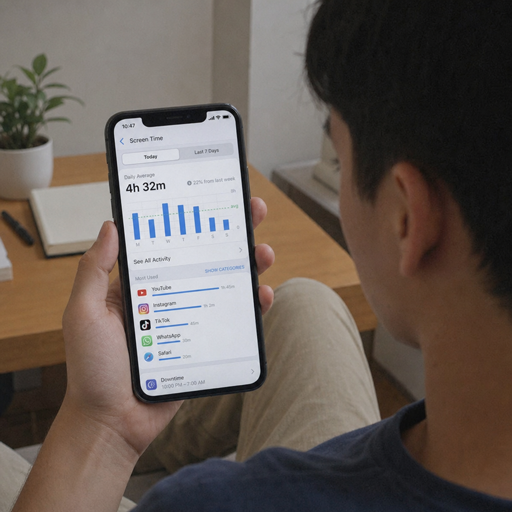
Screen time management is the practice of setting intentional boundaries around device usage so your phone, tablet, computer, and apps support your life instead of constantly interrupting it. This guide walks you through practical steps for understanding your current habits, setting realistic screen time limits, using screen time management tools, and building digital wellness routines that are easier to maintain than a one-time digital detox.
What is the best way to start managing screen time?
The best way to start is to measure your current device usage before you try to change it. Many people jump straight to strict limits, delete apps, or attempt a dramatic digital detox, then return to old habits within a few days because the plan does not match their real routine. A better approach is to review when, where, and why you use screens, then make small changes that reduce low-value scrolling while protecting the digital tools you genuinely need for work, school, communication, and daily life.
A strong screen time management plan should answer four questions:
- What am I using most? Identify the apps, websites, games, or streaming platforms taking the largest share of your attention.
- When am I most vulnerable? Notice whether screen time spikes before bed, first thing in the morning, during work breaks, or when you feel bored or stressed.
- What do I want back? Choose a positive goal, such as better sleep, more focused work, deeper family time, or more time outdoors.
- Which limits are realistic? Set boundaries you can actually follow instead of rules that sound impressive but collapse quickly.
Step 1: Audit your current device usage
Start by reviewing your screen time data for the past week. Most smartphones, tablets, and computers include built-in reports that show daily usage, pickups, notifications, and app categories. If your device does not provide enough detail, screen time management tools can help you see patterns across devices and accounts.
Look beyond the total number of hours. Total screen time can be misleading because not all screen activity has the same value. A video call with family, a work project, a guided workout, and two hours of aimless scrolling all count as screen time, but they affect your life differently.
Create a simple audit using three categories:
- Necessary screen time: work, school, banking, navigation, health appointments, or essential communication.
- Useful screen time: learning, creative work, planning, meaningful connection, or intentional entertainment.
- Draining screen time: compulsive scrolling, late-night videos, repeated app checking, or content that leaves you distracted or dissatisfied.
For three to seven days, write down your top three apps, your longest screen session, and the moment you most regretted picking up your device. This short audit gives you a baseline. It also keeps the process honest, because the goal is not to shame yourself; it is to understand the habit loop you are trying to change.
Step 2: Define your screen time goals
Once you know your patterns, choose goals that are specific enough to guide daily decisions. “Use my phone less” is too vague. “Keep social media under 30 minutes on weekdays” or “stop using screens 45 minutes before bed” gives you a clear target.
Tie every goal to a benefit you can feel. Screen time management works better when it is connected to something meaningful, such as sleeping better, feeling calmer, finishing work faster, being more present with children, or making room for hobbies. The stronger the reason, the easier it is to accept short-term discomfort.
Use this goal-setting checklist:
- Choose one primary habit to change first.
- Set a daily or weekly limit rather than a vague intention.
- Decide where the rule applies, such as the bedroom, dinner table, commute, or work desk.
- Pick a replacement activity before removing the screen habit.
- Review your goal after one week, then adjust if it is too strict or too loose.
For example, if short videos are your biggest challenge, your goal might be: “I will use TikTok only after dinner, for a maximum of 20 minutes, and not in bed.” That is more actionable than simply searching for screen time management TikTok advice and hoping willpower will take over.
Step 3: Set screen time limits that match real life
Screen time limits are most effective when they reduce friction around the habits you want to change without blocking essential tasks. Start with limits that are slightly below your current average rather than cutting everything in half overnight. If you currently spend two hours a day on a social app, a first limit of 90 minutes may be more sustainable than 20 minutes.
Set limits by app, category, or time of day. App limits help when one platform is the problem. Category limits help when you bounce between multiple entertainment apps. Time-based limits help when you want to protect specific parts of the day, such as mornings, deep work blocks, meals, or bedtime.
Try this practical structure:
- Morning limit: Do not open social media, news, or entertainment apps until after your first important task.
- Work or study limit: Keep distracting apps blocked during focus blocks, with short planned breaks.
- Evening limit: Set a wind-down period when notifications are reduced and stimulating apps are unavailable.
- Bedroom limit: Charge devices outside the bedroom or across the room to prevent late-night use.
The point is not to create a perfect rule. The point is to make the better choice easier at the exact moment you are most likely to slip.

Step 4: Use screen time management tools wisely
Screen time management tools can help you follow through when motivation fades. Built-in phone settings, browser extensions, parental controls, focus modes, website blockers, app timers, and notification controls all create small barriers between impulse and action. Those barriers matter because many screen habits happen automatically.
Choose tools based on the problem you are solving. If notifications pull you away from work, adjust alerts before setting app limits. If you lose time in the evening, use scheduled downtime. If you keep overriding limits, use a stronger blocker, accountability setting, or passcode held by someone you trust.
Useful tool categories include:
- Usage dashboards: show how much time you spend on devices and which apps dominate your day.
- App timers: warn or block you after a chosen amount of use.
- Focus modes: allow only selected people or apps during work, rest, or family time.
- Website blockers: prevent access to distracting sites during scheduled periods.
- Parental controls: help families create age-appropriate boundaries and shared expectations.
- Notification settings: reduce unnecessary prompts that trigger repeated checking.
Do not treat tools as the whole strategy. A blocker can stop an app, but it cannot decide what you value. Pair each tool with a clear rule and a replacement behavior, such as reading, walking, stretching, cooking, journaling, or talking with someone nearby.
Step 5: Redesign your environment for digital wellness
Digital wellness depends on your surroundings as much as your self-control. If your phone is always within reach, face up, buzzing, and loaded with attention-grabbing apps, you will need constant discipline. A better environment reduces temptation before the habit starts.
Begin with your physical space. Keep devices out of the bedroom when possible. Place your phone in another room during focused work. Use a regular alarm clock if your phone is the reason you bring it to bed. Create screen-free zones at the table, in bathrooms, or during family routines.
Then redesign your digital space. Move distracting apps off your home screen, remove unnecessary widgets, unsubscribe from low-value notifications, and log out of apps that you open automatically. If an app is useful but easy to overuse, keep it installed but make it less accessible.
A simple digital wellness reset can include:
- Delete apps you no longer need.
- Turn off nonessential notifications.
- Remove social apps from your home screen.
- Set your phone to grayscale during focus hours or bedtime.
- Keep only practical apps in your main dock.
- Create folders that separate work, learning, entertainment, and errands.
This step is powerful because it changes the default. When your device is calmer, you do not have to fight it all day.
How can you reduce screen time without feeling deprived?
You reduce screen time without feeling deprived by replacing low-value device usage with activities that meet the same need in a healthier way. Most people do not reach for screens randomly; they reach for stimulation, rest, escape, connection, or relief from boredom. If you remove the screen without replacing the reward, the habit will feel like punishment.
Match the replacement to the reason behind the behavior. If you scroll because you are tired, choose a real rest activity, such as lying down, taking a short walk, or listening to calm music. If you scroll because you want connection, send a voice note, call a friend, or make plans. If you scroll because you are avoiding a task, use a five-minute start instead of escaping into another app.
Try these substitutions:
- For boredom: keep a book, puzzle, sketchpad, or hobby item nearby.
- For stress: practice breathing, stretch, step outside, or write a quick brain dump.
- For loneliness: message one person directly instead of browsing feeds.
- For procrastination: set a timer for five minutes and begin the task badly but honestly.
- For evening entertainment: choose one planned show, game, or article instead of endless browsing.
The goal is not to remove enjoyment from your day. It is to shift from passive, unplanned consumption to intentional use that leaves you satisfied.
Step 6: Build phone-free routines into your day
Strong screen time management becomes easier when it is attached to routines you already have. Instead of relying on memory, connect screen boundaries to daily anchors such as waking up, meals, work sessions, exercise, commuting, and bedtime. Anchored routines reduce decision fatigue because the rule is already chosen.
Start with one or two phone-free windows. A morning window helps you begin the day with intention instead of reacting to messages and feeds. A bedtime window protects sleep and makes late-night scrolling less likely. A meal window supports presence and conversation.
Here is a simple routine to test for one week:
- First 20 minutes after waking: no social apps, news, or email.
- During meals: keep phones away from the table.
- During one work block: use focus mode and keep the phone out of reach.
- Last 30 to 60 minutes before bed: switch to offline activities and charge devices away from the bed.
If this feels too strict, shorten the windows. Consistency matters more than intensity. A 15-minute screen-free bedtime routine practiced every night will usually help more than an ambitious two-hour rule that happens once.
Step 7: Manage social media and short-form video intentionally
Social media and short-form video platforms are designed for continuous use, so they deserve their own plan. If TikTok, Reels, Shorts, or similar feeds are your main challenge, treat them as scheduled entertainment rather than background noise. Decide when you will use them, how long you will stay, and what signal tells you to stop.
For screen time management TikTok habits specifically, avoid opening the app during transition moments such as getting into bed, waiting for a meeting, or taking a quick break. These moments feel small, but they can turn into long sessions because there is no natural stopping point. Use app limits, but also create a personal exit rule, such as stopping after one saved video, one creator check-in, or one 15-minute timer.
You can also clean up the content environment. Unfollow accounts that trigger comparison, irritation, or compulsive watching. Save useful content intentionally instead of watching endlessly “just in case.” If you use social platforms for learning or work, separate creation time from consumption time so the tool does not become a trap.
Step 8: Create a family or household screen plan
If you share a home with children, partners, roommates, or relatives, screen habits become easier when expectations are visible. A household plan prevents constant negotiation and helps everyone understand the purpose of the limits. The best plan is clear, realistic, and modeled by adults whenever possible.
Avoid making the plan only about restriction. Include when screens are allowed, what types of content are appropriate, where devices can be used, and what happens when limits are ignored. For children, explain the reason in simple language: sleep, schoolwork, safety, mood, and family time.
A household screen plan may include:
- Device-free meals.
- Shared charging station outside bedrooms.
- Homework or chore completion before entertainment screens.
- Co-viewing for younger children when possible.
- Clear rules for gaming, streaming, and social apps.
- A weekly review instead of daily arguments.
Adults should follow some of the same rules. Children notice when rules apply only to them. Even small shared practices, such as no phones at dinner, can make digital wellness feel like a family value instead of a punishment.
Step 9: Plan a realistic digital detox
A digital detox does not have to mean disappearing from every device for a week. For most people, a realistic detox is a planned break from the specific apps, platforms, or habits that feel most disruptive. The purpose is to reset your attention and prove that you can tolerate space without constant input.
Choose a detox length that fits your responsibilities. You might take one screen-free evening, a social media-free weekend, or a 24-hour break from entertainment apps. Before you start, tell anyone who may need to reach you, handle essential tasks, and decide what you will do instead.
A simple digital detox plan looks like this:
- Pick the apps or devices you are pausing.
- Choose a start and end time.
- Remove shortcuts or log out before the detox begins.
- Prepare offline activities, meals, errands, or social plans.
- Notice cravings without treating them as emergencies.
- Review what felt better and what felt difficult.
After the detox, do not rush back into the same patterns. Keep one boundary that helped, such as no social media before noon or no phone in bed.
Step 10: Review your progress and adjust your limits
Screen time management is not a one-time setup. Your work schedule, family needs, stress level, and interests will change, so your boundaries should evolve too. A weekly review keeps your plan flexible without letting old habits quietly return.
Review three things: your data, your mood, and your follow-through. If your screen time dropped but you feel isolated, you may need more intentional connection. If your limits look good but you keep overriding them, the rules may be too strict or the replacement activity too weak. If your total screen time stayed the same but your sleep improved, your plan may still be working.
Use these review questions:
- Which limit helped the most this week?
- Which app or time of day still caused problems?
- Did I replace screen time with something worthwhile?
- Do I need a stricter tool, a softer goal, or a clearer routine?
- What is one change I will test next week?
Progress should feel practical, not perfect. The best plan is one you can keep refining.
Keep your devices useful, not dominant
Effective screen time management is about intention. You do not need to reject technology, delete every app, or treat all device usage as harmful. You need a system that protects your attention, supports digital wellness, and gives you enough structure to make better choices when your energy is low.
Start with your audit, set one realistic limit, adjust your environment, and choose a replacement habit before attempting a bigger digital detox. Over time, those small decisions change your relationship with screens from automatic to intentional—and that is the real goal.