Bring clearer, more inclusive conversations to workplaces, schools, service desks, healthcare settings, events, and everyday digital experiences. Sign language translation software helps teams support deaf communication with practical communication tools that can assist with signed, spoken, and written interaction. Whether you need a sign language app for quick exchanges, an ASL translator for common phrases, or accessibility software that supports a human sign interpreter workflow, the right solution helps more people take part with less friction.
How does sign language translation software support your team?
Sign language translation software supports your team by making communication more accessible when signed language, speech, captions, text, and visual prompts need to work together. It can help users understand routine information, prepare for conversations, provide on-screen language support, and reduce delays in common interactions. For complex, legal, medical, educational, or emotionally sensitive conversations, software should be treated as an accessibility aid rather than a full replacement for a qualified sign interpreter.
That balance matters. A good accessibility setup helps people communicate faster in everyday moments while still making room for professional interpretation when accuracy, nuance, consent, or context is critical. Instead of forcing one channel of communication, it gives your team multiple ways to meet people where they are.
Accessible communication that fits real situations
Deaf communication needs are not all the same. Some people use American Sign Language, some prefer written text, some use speechreading, some rely on captions, and many use a mix depending on the situation. A flexible sign language app or translation software should support that reality rather than assuming one workflow fits everyone.
Use it to improve access in moments such as:
- Front-desk and reception conversations, where visitors need directions, appointment details, check-in instructions, or basic service information.
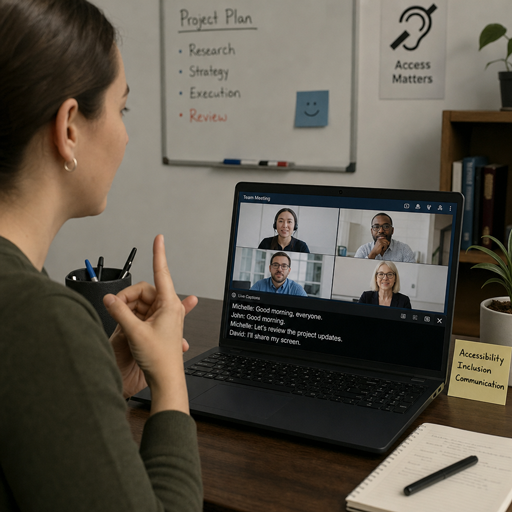
- Workplace meetings and training, where captions, visual notes, and sign language support can help more people follow the discussion.
- Customer support interactions, where quick, respectful communication can prevent confusion and reduce repeat explanations.
- Classroom and learning environments, where students may need visual communication tools alongside written resources and interpreter support.
- Events and public services, where accessibility planning helps deaf and hard-of-hearing attendees participate more confidently.
- Remote conversations, where video, text, and visual translation features can help bridge communication gaps when people are not in the same room.
The goal is not just to add another tool. The goal is to make communication easier to start, easier to understand, and easier to continue without making deaf users carry the burden of explaining every access need from the beginning.
Built for smoother access, not complicated setup
Accessibility software works best when people can actually use it in the flow of their day. A useful sign language translation software experience should be easy to open, simple to navigate, and clear enough for staff, clients, students, or guests to use with minimal instruction. The fewer steps it takes to begin a conversation, the more likely the tool is to support real inclusion.
Look for communication tools that help with practical tasks:
- Converting common spoken or typed phrases into accessible visual communication support.
- Helping users prepare messages before a meeting, appointment, or service interaction.
- Supporting ASL translator use cases for everyday phrases and common exchanges.
- Allowing teams to combine text, captions, visual prompts, and interpreter coordination.
- Giving staff a consistent way to respond when someone requests accessible communication.
- Supporting privacy-conscious workflows appropriate to the setting and conversation.
A strong solution should also make expectations clear. Translation technology can support access, but signed languages have grammar, culture, regional variation, facial expression, body movement, and context that software may not fully capture. Being transparent about those limits protects users and helps organizations choose the right level of support for each situation.
A better experience for deaf users and hearing teams
When communication breaks down, the problem is often not a lack of goodwill. It is a lack of prepared tools, clear processes, and accessible options. A person may arrive for an appointment and find no one knows how to communicate. A staff member may want to help but have no simple way to begin. A remote meeting may include captions but no visual support for someone who primarily uses sign language.
The right sign language translation software helps close those gaps. It gives hearing teams a practical starting point and gives deaf users more ways to participate without waiting for a workaround. In a reception area, that might mean quickly sharing check-in instructions. In a training session, it might mean pairing captions with visual sign support and written summaries. In customer service, it might mean reducing back-and-forth by offering clearer options from the first interaction.
This is where accessibility becomes more than compliance language. It becomes a better experience: fewer awkward pauses, fewer missed details, and more respectful communication for everyone involved.
What the software can help you improve
An accessible communication platform can support daily operations while giving your organization a more consistent response to communication needs. Instead of relying on improvisation, your team can follow a repeatable process that combines technology, human support, and clear next steps.
Key benefits include:
- Faster first contact: Give staff a way to begin accessible conversations without scrambling for a solution.
- More inclusive service delivery: Support people who use sign language, text, captions, or a mix of communication methods.
- Better preparation for appointments and meetings: Create visual and written communication support before the conversation begins.
- Clearer escalation paths: Know when to move from software support to a qualified sign interpreter.
- Improved confidence for teams: Help employees respond respectfully and consistently when accessibility needs arise.
- A stronger accessibility culture: Show users that communication access is planned, not treated as an exception.
These benefits are most powerful when paired with training and thoughtful policies. Software can open the door, but people still shape the experience. Teams should know how to ask about communication preferences, how to respect user choice, and how to bring in interpreter services when needed.
Designed for organizations that take inclusion seriously
Sign language translation software is useful for any organization that communicates with the public, supports employees, delivers education, hosts events, or provides digital services. It can help small teams take a practical first step and help larger organizations standardize accessibility across locations, departments, or programs.
It is especially relevant for:
- Employers improving workplace accessibility and meeting participation.
- Schools and training providers supporting diverse learners.
- Healthcare and wellness teams preparing for patient communication needs.
- Retail, hospitality, and service teams improving front-line interactions.
- Government offices and public-facing organizations serving broad communities.
- Event teams planning accessible registration, check-in, and attendee support.
For many organizations, the immediate need is simple: make sure a deaf person can ask a question, understand an instruction, complete a task, or participate in a conversation with dignity. From there, the accessibility strategy can grow into stronger policies, better staff readiness, and deeper support for sign language users.
Start with a communication workflow that works
Getting started does not have to mean rebuilding every process at once. Begin with the conversations that happen most often and the places where communication barriers are most visible. Then match those moments with the right combination of translation software, sign language app access, written support, captions, and sign interpreter availability.
A practical rollout can look like this:
- Identify common communication points, such as reception, intake, meetings, customer support, or training.
- Choose the access options needed for each setting, including software support, captions, written text, or interpreter escalation.
- Train staff on respectful use, including how to ask for communication preferences and when not to rely on software alone.
- Test the workflow with real scenarios, so your team knows what to do before a high-pressure moment.
- Review and improve, using feedback from deaf users, staff, and accessibility stakeholders.
Ready to make communication more accessible? Explore a sign language translation software approach that supports everyday conversations, strengthens deaf communication, and gives your team practical tools for more inclusive service. Request a demo or start a conversation today to build an accessibility workflow that fits your organization.